
Arctic Wolf Aurora Endpoint Defense
Arctic Wolf Aurora Endpoint Defense is an endpoint protection and detection platform that offers threat prevention, agent management, and device security monitoring. This adapter enables organizations to discover and monitor devices protected by Arctic Wolf Aurora, consolidate endpoint security data with other assets, and maintain comprehensive visibility of their security infrastructure.
Use Cases the Adapter Solves
- Endpoint Coverage Verification: Identify all devices protected by Arctic Wolf Aurora and verify complete endpoint coverage across your environment. Quickly detect unprotected or non-compliant devices that may pose security risks.
- Device Security Posture Assessment: Monitor device health, agent status, threat detection results, and security policy compliance across your managed endpoints using comprehensive device and agent metadata.
Asset Types Fetched
- Devices
Data Retrieved through the Adapter
Devices - Fields such as Device ID, Name, Hostname, Operating System, IP Addresses, MAC Addresses,
Before You Begin
Required Ports
- TCP port 443 (HTTPS)
Authentication Methods
JWT-based OAuth 2.0 (2-step flow).
APIs
Axonius uses the Arctic Wolf Aurora Endpoint Defense API v2. The following endpoints are called:
POST /auth/v2/tokenGET /devices/v2/extended
Required Permissions
The following permissions are required:
The API application must be granted the Devices - Read privilege to access device data.
- Devices - Read (scope:
device:list)
Supported From Version
Supported from Axonius version 8.0.23
Setting Up Arctic Wolf Aurora Endpoint Defense to Work with Axonius
Obtain the Application ID and , Application Secret from Arctic Wolf Aurora Management Console → Settings → Integrations → Add Application. Obtain the Tenant ID (tid) from the Integrations page. For official Arctic Wolf API documentation, visit: https://docs.arcticwolf.com/bundle/Aurora-User-API-guide/page/API_Tools.html
Connecting the Adapter in Axonius
Navigate to the Adapters page, search for Arctic Wolf Aurora Endpoint Defense, and click on the adapter tile.
Click Add Connection.
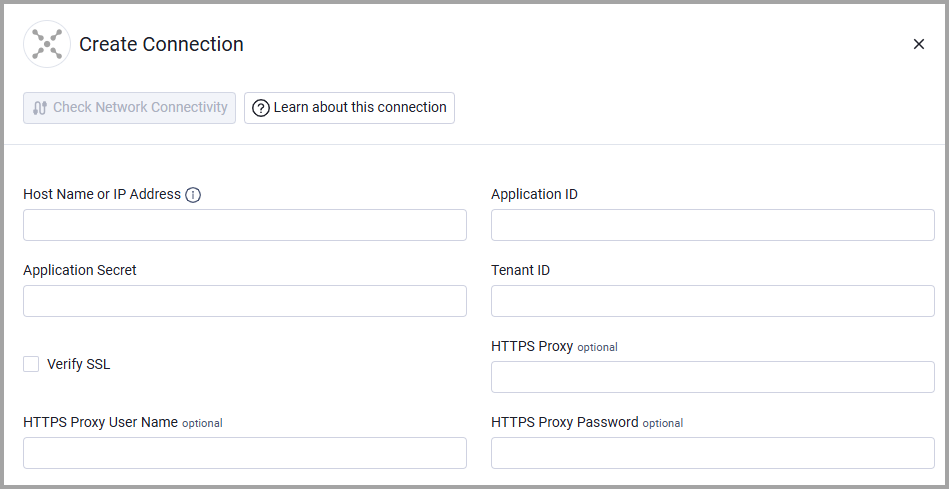
To connect the adapter in Axonius, provide the following parameters:
Required Parameters
- Host Name or IP Address - The region-specific base URL for your Arctic Wolf Aurora environment (e.g.,
https://protectapi.cylance.com). Include the protocol prefix but do not add specific endpoints.- North America:
https://protectapi.cylance.com - EU:
https://protectapi-euc1.cylance.com - APAC-N:
https://protectapi-apne1.cylance.com - APAC-SE:
https://protectapi-au.cylance.com - South America:
https://protectapi-sae1.cylance.com - US Gov:
https://protectapi.us.cylance.com
- North America:
- Application ID - Your unique application identifier obtained from Arctic Wolf Management Console Settings → Integrations.
- Application Secret - Your application's secret key used for JWT token signing.
- Tenant ID - Your unique tenant identifier from Arctic Wolf Management Console Settings → Integrations.
Optional Parameters
- Verify SSL - Select whether to verify the SSL certificate of the server against the CA database inside of Axonius. For more details, see SSL Trust & CA Settings.
- HTTPS Proxy - Connect the adapter to a proxy instead of directly connecting it to the domain.
- HTTPS Proxy User Name - The user name to use when connecting via the HTTPS proxy.
- HTTPS Proxy Password - The password to use when connecting to the server using the HTTPS proxy.
To learn more about common adapter connection parameters and buttons, see Adding a New Adapter Connection.
Advanced Settings
Note:
Advanced settings can either apply to all connections for this adapter, or to a specific connection. Refer to Advanced Configuration for Adapters.
The Arctic Wolf Aurora Endpoint Defense adapter does not have additional advanced configuration settings beyond the standard connection parameters.
Related Enforcement Actions
The Arctic Wolf Aurora Endpoint Defense adapter does not currently support enforcement actions. It is a read-only integration for asset discovery and data collection.
Updated 5 months ago