
Cisco Webex
Cisco Webex is an enterprise solution for video conferencing, online meetings, screen share, and webinars.
Types of Assets Fetched
This adapter fetches the following types of assets:
- Devices
- Users
- Application Settings
- Activities
Parameters
-
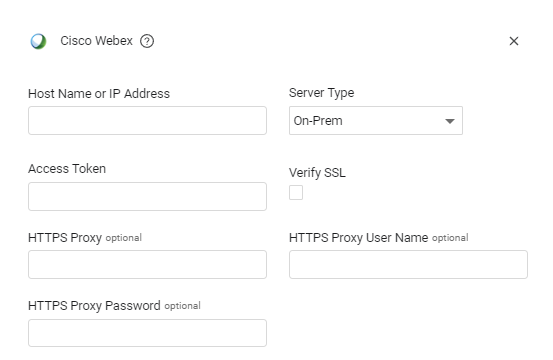
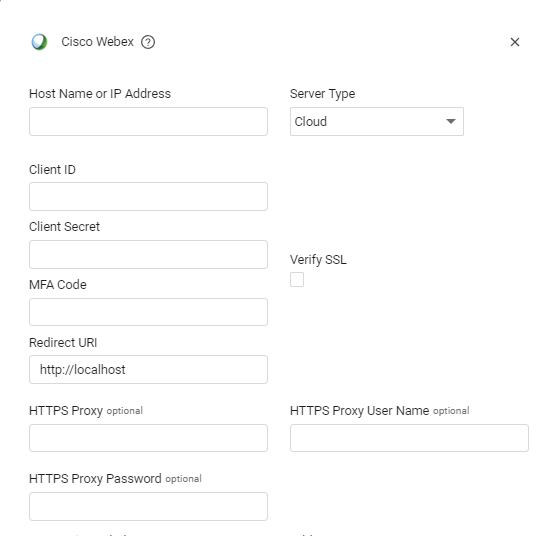
Host Name or IP Address (required, default: empty) - The hostname or IP address of the Cisco Webex server that Axonius can communicate with via the Required Ports. For the cloud version the default domain is
https://webexapis.com. For Cloud server, -
Server Type - From the dropdown, select one of the following:
- On-Prem (default) - This type of server has the following connection parameter:
- Access Token (required, default: empty) - An API Key associated with a user account that has the Required Permissions to fetch assets.
- Cloud - - This type of server has the following connection parameters:
- Client ID - The client ID that was provided after creating the integration.
- Client Secret - The client secret that was provided after creating the integration.
- MFA Code - The code provided in the query params of the OAuth2 redirection. As it appears here:
http://your-server.com/auth?code=YjAzYzgyNDYtZTE3YS00OWZkLTg2YTgtNDc3Zjg4YzFiZDlkNTRlN2FhMjMtYzUz. For more information, see Authenticating and Receiving the MFA Code. - Redirect URL (required, default:
http://localhost) - The redirection URI provided during the integration’s creation. Important: Make sure that the redirect URI you registered to the integration is the same one entered for the adapter connection and the same one you authenticate to.
- On-Prem (default) - This type of server has the following connection parameter:
-
Verify SSL - Select whether to verify the SSL certificate of the server against the CA database inside of Axonius. For more details, see SSL Trust & CA Settings.
-
HTTPS Proxy (optional) - Connect the adapter to a proxy instead of directly connecting it to the domain.
-
HTTPS Proxy User Name (optional) - The user name to use when connecting to the value supplied in Host Name or IP Address via the value supplied in HTTPS Proxy.
-
HTTPS Proxy Password (optional) - The password to use when connecting to the server using the HTTPS Proxy.
To learn more about common adapter connection parameters and buttons, see Adding a New Adapter Connection.
Advanced Settings
Note
- Advanced settings can apply to either all connections of this adapter, or to a specific connection. For more detailed information, see Advanced Configuration for Adapters.
- For more general information about advanced settings, see Adapter Advanced Settings.
- Fetch Application Settings - Select this option to fetch Webex application settings from all organizations the API token can access.
- Fetch Roles for Users - Select this option to fetch role names from
/v1/rolesand resolve role IDs on each user. - Fetch Authorizations for Users - Select this option to fetch OAuth authorizations for each user from
/v1/authorizations. - Fetch Events (Activities) - Select this option to fetch Webex events from
/v1/eventsand map them to Activities. - Fetch Admin Audit Events (Activities) - Select this option to fetch admin audit events from
/v1/adminAudit/eventsand map them to Activities.
APIs
Axonius uses the Cisco Webex Devices API.
Axonius uses the Cisco Webex People API.
For Application Settings:
Axonius uses the Webex Settings API to retrieve organization-level settings.
API Endpoints Used:
GET /v1/organizations- Retrieves the list of organizations accessible by the API tokenGET /v1/settings/organizations/{orgId}/settings- Retrieves all settings for a specific organizationGET /v1/events- Retrieves Webex EventsGET /v1/adminAudit/events- Retrieves Admin Audit EventsGET /v1/roles- Retrieves RolesGET /v1/authorizations- Retrieves Authorizations
Required Ports
Axonius must be able to communicate with the value supplied in Host Name or IP Address via the following ports:
- TCP port 443
Required Permissions
The value supplied in Access Token must be associated with the following permissions in order to fetch assets:
-
Devices
- spark:devices_read - See details for the devices in the integration's organization (associated with the creator's organization).
- spark-admin:devices_read - See details for the devices in your entire organization.
-
Users
- spark-admin:people_read - Viewing the list of all people in your organization requires admin privileges.
spark-admin:people_read- Fetch OAuth authorizations for users Note: While the authorizations endpoint exists, user-level access requires people_read scope.
-
Application Settings - The Webex API token must have access to organization settings
-
Roles
spark-admin:roles_read- Fetch role names and IDs to enrich user data.spark-admin:organizations_read- Fetch organization display names to enrich user data
-
Activities
spark-compliance:events_read- Fetch general Webex events for Activities asset type Special requirement: Must be a Compliance Officer with this scope.audit:events_read- Fetch admin audit events for Activities asset type. Must be a Compliance Officer with this scope.
Setting Up the Integration
To create an integration, follow the instructions in Build - Integrations | Webex for Developers, making sure to do the following:
- In the Requesting Permission section of the integration, the permissions listed above according to your requirements. Note that to fetch users, the signed-in user must have Admin privileges.
Authenticating and Receiving the MFA Code
-
Navigate to
https://webexapis.com/v1/authorize?client_id=\{client_id}&response_type=code&redirect_uri=\{redirect_uri}&scope=spark-admin:people_read&spark-admin:devices_read&state=AXONIUS_STATE- Replace CLIENT_ID and REDIRECT_URI with the actual values. You are redirected to a Webex login page.
-
Log in to Webex. You are redirected to the REDIRECT_URI that you provided. It should look like this:
http://localhost?code=YjAzYzgyNDYtZTE3YS00OWZkLTg2YTgtNDc3Zjg4YzFiZDlkNTRlN2FhMjMtYzUz&state=AXONIUS_STATE -
Copy the code query parameter and use it as the MFA Code in your Webex adapter.
Note
Your code ends right before the “&”. In the example above, your code is:
YjAzYzgyNDYtZTE3YS00OWZkLTg2YTgtNDc3Zjg4YzFiZDlkNTRlN2FhMjMtYzUz
Related Enforcement Actions
Updated 3 months ago