
Oracle Cloud
Oracle Cloud is a computing service providing servers, storage, network, applications and services.
Asset Types Fetched
- Devices, Users, Groups, Compute Services, Load Balancers, Databases, Compute Images, Network/Firewall Rules, Application Resources, Network Routes, Accounts/Tenants, Object Storage, Disks
Note
If resources are spread across multiple OCI regions, you need to create additional connections per region, all pointing to the same Tenancy OCID and credentials, but each specifying a different Region Identifier.
Required Permissions
To fetch information from Oracle Cloud API, you first need to create a user for Axonius, and put that user in at least one IAM group with any desired read-only permissions. For more details, see Oracle Cloud Infrastructure Documentation - Adding Users.
To add the appropriate permissions for the type of data you want to fetch, follow these steps on your Oracle console:
- From the left hand navigation menu, select Identity & Security
>Policies. - Use the compartment selector at the top of the Policies page to select which compartment you want to apply the policy to. For tenancy-wide policies, you usually need to select the root compartment.
- After adding the appropriate compartment, you need to add permissions to the policy. Either select an existing policy to edit or click Create Policy to create a new one.
- In the Policy Editor, add a Policy Statement - for example,
Allow group Admins to read users in tenancy. Then, click Create or Save Changes.
All the permissions and policy statements you can add are listed below.
Expand Permissions
| Category | Permission | Policy Statement |
|---|---|---|
| Compute Service | list_instances | Allow group <group_name> to read instances in compartment <compartment_name> |
| Compute Service | list_vnic_attachments | Allow group <group_name> to read vnic-attachments in compartment <compartment_name> |
| Compute Service | list_image/get_image | Allow group <group_name> to read images in compartment <compartment_name> |
| Networking Service | list_network_security_group_security_rules | Allow group <group_name> to read network-security-groups in compartment <compartment_name> |
| Networking Firewall | list_network_firewalls | Allow group <group_name> to read network-firewalls in tenancy |
| Networking Service | list_public_ips | Allow group <group_name> to read virtual-network-family in compartment <compartment_name> |
| Networking Service | list_security_lists | Allow group <group_name> to read security-lists in compartment <compartment_name> |
| Networking Service | get_subnet | Allow group <group_name> to inspect subnets in compartment <compartment_name> |
| Networking Service | get_private_ip | Allow group <group_name> to read virtual-network-family in compartment <compartment_name> |
| Networking Service | get_vnic | Allow group <group_name> to read vnic in compartment <compartment_name> |
| Networking Service | list_vcns | Allow group <group_name> to read vcns in compartment <compartment_name> |
| Networking Service | get_security_list | Allow group <group_name> to read security-lists in compartment <compartment_name> |
| Database Service | list_db_systems | Allow group <group_name> to read db-systems in compartment <compartment_name> |
| Database Service | list_db_homes | Allow group <group_name> to read db-homes in compartment <compartment_name> |
| Database Service | list_databases | Allow group <group_name> to read databases in compartment <compartment_name> |
| Database Service | list_autonomous_databases | Allow group <group_name> to read autonomous-databases in compartment <compartment_name> |
| Database Service | list_pluggable_databases | Allow group <group_name> to read pluggable-databases in compartment <compartment_name> |
| Database Service | get_db_system/list_db_systems | Allow group <group_name> to read db-systems in compartment <compartment_name> |
| NoSQL Database Service | list_tables | Allow group <group_name> to read tables in compartment <compartment_name> |
| Container Engine for Kubernetes (OKE) | list_clusters | Allow group <group_name> to read clusters in compartment <compartment_name> |
| Identity and Access Management (IAM) | get_compartment | Allow group <group_name> to read compartments in tenancy |
| Identity and Access Management (IAM) | list_compartments | Allow group <group_name> to read compartments in tenancy |
| Identity and Access Management (IAM) | list_users | Allow group <group_name> to read users in tenancy |
| Identity and Access Management (IAM) | list_groups | Allow group <group_name> to read groups in tenancy |
| Identity and Access Management (IAM) | list_api_keys | Allow group <group_name> to read api-keys in compartment <compartment_name> |
| Identity and Access Management (IAM) | list_user_group_memberships | Allow group <group_name> to read group-memberships in compartment <compartment_name> |
| OCI Auto Scaling | list_auto_scaling_configurations | Allow group <group_name> to read auto-scaling-configurations in compartment <compartment_name> |
| Load Balancers | list_auto_scaling_configurations | Allow group <group_name> to read load-balancers in tenancy |
| Identity and Access Management (IAM) | get_tenancy | Allow group <group_name> to inspect tenancies in tenancy |
| Vault, Key Management, and Secret Management Service | vault_inspect | Allow group <group_name> to inspect vaults in tenancy |
| Vault, Key Management, and Secret Management Service | key_inspect | Allow group <group_name> to inspect keys in tenancy |
| Vault, Key Management, and Secret Management Service | secret_inspect | Allow group <group_name> to inspect secrets in tenancy |
| Block Volume Service | backup_policies_inspect | Allow group <group_name> to inspect backup-policies in tenancy |
| Object Storage | buckets_inspect | Allow group <group_name> to inspect buckets in tenancy |
| Networking | drgs_inspect | Allow group <group_name> to inspect drgs in tenancy |
| Networking | drg_route_tables_inspect | Allow group <group_name> to inspect drg-route-tables in tenancy |
| Container Registry | repos_inspect | Allow group <group_name> to inspect repos in tenancy |
| Container Registry | container_images_inspect | Allow group <group_name> to inspect container-images in tenancy |
| Volumes, Boot Volumes | list_volumes, list_boot_volumes | Allow group <group_name> to inspect volume-family in tenancy |
| Volumes Backups | list_volume_backups | Allow group <group_name> to inspect volume-backups in tenancy |
| Boot Volume Backups | list_boot_volume_backups | Allow group <group_name> to inspect boot_volume_backups in tenancy |
| Volume Group Backups | list_volume_group_backups | Allow group <group_name> to inspect volume-group-backups in tenancy |
Connecting the Adapter in Axonius
Required Parameters
-
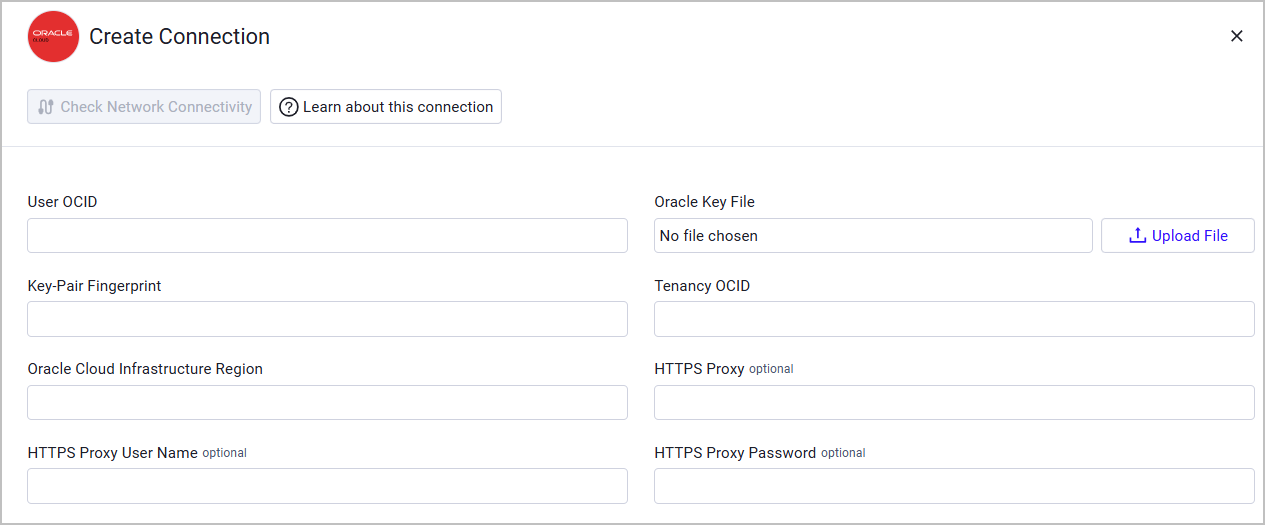
User OCID - Specify the Oracle Cloud Identifier (OCID) for the Axonius user. For more details on User OCID, see Oracle Cloud Infrastructure Documentation - Where to Get the Tenancy's OCID and User's OCID.
-
Oracle Key File - Upload an RSA key pair in PEM format (minimum 2048 bits). For more details on generating such key, see Oracle Cloud Infrastructure Documentation - How to Generate an API Signing Key.
-
Key-Pair Fingerprint - Specify the key fingerprint. To get the key fingerprint, you need to upload the PEM public key in the Oracle Cloud console. For more details, see Oracle Cloud Infrastructure Documentation - How to Upload the Public Key.
-
Tenancy OCID - Specify your tenancy Oracle Cloud Identifier (OCID). For more details on User OCID, see Oracle Cloud Infrastructure Documentation - Where to Get the Tenancy's OCID and User's OCID.
-
Oracle Cloud Infrastructure Region - Specify your Region Identifier. For the complete region list, see Oracle Cloud Infrastructure Documentation - Regions and Availability Domains.
Optional Parameters
-
HTTPS Proxy - Connect the adapter to a proxy instead of directly connecting it to the domain.
-
HTTPS Proxy User Name - The user name to use when connecting to the value supplied in Host Name or IP Address via the value supplied in HTTPS Proxy.
-
HTTPS Proxy Password - The password to use when connecting to the server using the HTTPS Proxy.
To learn more about common adapter connection parameters and buttons, see Adding a New Adapter Connection.
Advanced Settings
Note
Advanced settings can either apply to all connections for this adapter, or to a specific connection. Refer to Advanced Configuration for Adapters.
Endpoints Config
-
Fetch ComputeServices from Vaults - Select to fetch Oracle Cloud Vaults as Compute Services.
-
Fetch Secret of sub type key from Keys - Select to fetch Oracle Cloud KMS Keys as Secrets.
-
Fetch Secret of sub type secret from Secrets - Select to fetch Oracle Cloud Vault Secrets as Secrets.
-
Fetch Configuration from Volume Backup Policies - Select to fetch Oracle Cloud Volume Backup Policies as Configurations assets.
-
Fetch ObjectStorage from Object Storage Buckets - Select to fetch OCI Object Storage Buckets as Object Storage assets.
-
Fetch NetworkRoute from DRG Route Tables - Select to fetch Dynamic Routing Gateway (DRG) route tables as Network Routes.
-
Fetch ComputeImage of sub-type container_image from Container Images - Select to fetch container images from OCI Artifact Registry as Compute Images.
-
Fetch ComputeImage of sub-type volume_backup from Volume Backups - Select to fetch Oracle Volume Backups as Compute Images.
-
Fetch ComputeImage of sub-type boot_volume_backup from Boot Volume Backups - Select to fetch Oracle Boot Volume Backups as Compute Images.
-
Fetch ComputeImage of sub-type volume_group_backup from Volume Group Backups - Select to fetch Oracle Volume Group Backups as Compute Images.
-
Fetch Disk of sub-type boot_volume from Boot Volumes - Select to fetch Boot Volumes as Disks.
-
Fetch Disk of sub-type volume from Volumes - Select to fetch Volumes as Disks.
-
Fetch Kubernetes Clusters - Select to fetch Kubernetes clusters as Compute Services.
-
Fetch Database Service - Select to fetch database services as Databases.
-
Fetch VM Clusters - Select to fetch VM clusters as Compute Services.
-
Fetch Auto Scaling Group - Select to fetch Auto Scaling groups as Groups.
-
Fetch Network Firewall - Select to fetch network firewall as Network/Firewall Rules.
-
Fetch Load Balancers - Select to fetch Load Balancers as assets.
-
Fetch OCI Tenancy - Select this to fetch OCI tenancies as Accounts/Tenants.
Parser Config
- List of tags to parse as fields - Enter a comma-separated list of tag keys to be saved as fields.
- Parse all tags from assets as fields - Select to parse all tags from Oracle Cloud assets as Axonius fields, regardless of the tags specified under List of tags to parse as fields. You can use both settings together.
Note
To learn more about Adapter Configuration tab advanced settings, see Adapter Advanced Settings.
Related Enforcement Actions
Updated 2 months ago