
Archer IRM
Archer IRM delivers innovative solutions that help businesses protect their assets, meet compliance requirements, and proactively manage risks.
Use Cases the Adapter Solves
- Centralized Risk and Compliance Visibility: Bring Archer IRM device and user records into Axonius to give security teams a unified view of assets alongside their associated risk and compliance posture.
- Asset Inventory Enrichment: Correlate Archer-managed devices and applications with data from other adapters to fill coverage gaps and identify assets that lack risk or compliance tracking.
Asset Types Fetched
- Devices, Users, Applications, Application Settings
Before You Begin
Required Ports
Axonius must be able to communicate with the value supplied in Host Name or IP Address via the following ports:
- Port 443
Authentication Methods
Archer IRM uses session-based authentication. Axonius authenticates by submitting a username, password, and instance name to the Archer login endpoint, which returns a session token. That token is then sent in the Authorization header of every subsequent API request.
NoteIf Single Sign-On (SSO) is enabled on your Archer instance, you must enable Allow manual bypass in the Archer Control Panel to allow the REST API to generate a session token using local credentials.
APIs
Axonius uses the Archer REST API with the following endpoints:
POST platformapi/core/security/loginGET platformapi/core/system/userGET contentapi/{devices_endpoint}GET contentapi/ApplicationsGET platformapi/core/system/securityparameter
Required Permissions
The value supplied in User Name must be assigned to an Access Role with the following permissions:
Read Permissions Required
- Read permissions for User Management APIs
- Read permissions for Content APIs (to access devices, applications, and other content records)
- Read permissions for Security Parameters APIs
Application-Level Access
The user's Access Role must grant Read access to:
- Applications containing device and user data (specifically the configured devices endpoint)
- All levels/applications that contain assets to be fetched
Note: The API returns only the data that the user account can view in the Archer User Interface. Ensure the user has appropriate Read permissions for all applications and levels containing asset data.
Recommended Access Role
For optimal data collection, assign the user to an Access Role that includes:
- Read privileges on all target applications
- Access to system-level user management resources
- No Create, Update, or Delete permissions are required
Important: Archer API privileges and Archer platform privileges are shared. If a user has Read privileges to an application in Archer, they can use API calls that require Read permissions for that application.
Connecting the Adapter in Axonius
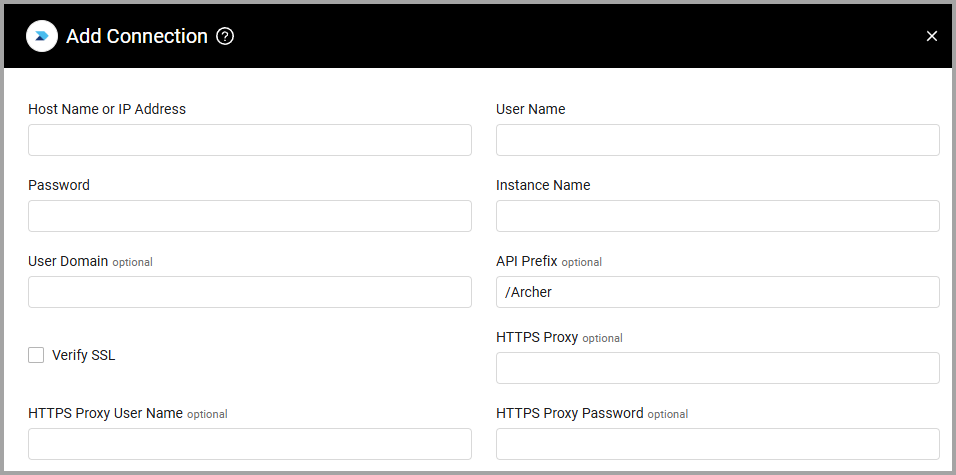
To connect the adapter in Axonius, provide the following parameters:
Required Parameters
-
Host Name or IP Address - The hostname or IP address of the Archer server that Axonius can communicate with via the Required Ports.
-
User Name and Password - The credentials for a user account that has the Required Permissions to fetch assets.
-
Instance Name - The Archer instance name.
Optional Parameters
-
User Domain - The domain of the user.
-
API Prefix - Specify the directory path used to access the API. Unless otherwise specified, the API prefix defaults to: /Archer
-
Verify SSL - Select whether to verify the SSL certificate of the server against the CA database inside of Axonius. For more details, see SSL Trust & CA Settings.
-
HTTPS Proxy - Connect the adapter to a proxy instead of directly connecting it to the domain.
-
HTTPS Proxy User Name - The user name to use when connecting to the value supplied in Host Name or IP Address via the value supplied in HTTPS Proxy.
-
HTTPS Proxy Password - The password to use when connecting to the server using the HTTPS Proxy.
To learn more about common adapter connection parameters and buttons, see Adding a New Adapter Connection.
Advanced Settings
Note:
Advanced settings can either apply to all connections for this adapter, or to a specific connection. Refer to Advanced Configuration for Adapters.
- URL endpoint for devices (required, default: Devices) - Enter a name of the URL endpoint for devices, as it appears in the Archer Configuration page.
- Fetch Applications - Select this option to fetch applications.
- Fetch Application Settings - Set this option to fetch security parameter settings from Archer IRM, including password policies, session timeout, and account lockout configurations.
- Device page size (default: 200) - The number of devices to retrieve per page request. Reduce this value if timeouts occur during device fetch.
Note:To learn more about Adapter Configuration tab advanced settings, see Adapter Advanced Settings.
Updated 2 months ago