
Yogosha
Yogosha is a penetration testing and bug bounty platform that manages security assessments, vulnerability tracking, and attack surface monitoring for digital assets.
Use Cases the Adapter Solves
- Track Attack Surface Across Digital Assets: Gain visibility into all digital assets being monitored through Yogosha's penetration testing platform, including web applications, APIs, and other internet-facing resources.
- Monitor Vulnerability Exposure: Identify and track security vulnerabilities discovered through bug bounty programs and penetration testing assessments to prioritize remediation efforts.
- Correlate Security Assessment Data: Combine Yogosha vulnerability findings with asset data from other sources to understand which assets have active security testing coverage and which vulnerabilities require immediate attention.
Asset Types Fetched
- URLs
- SaaS Applications
- Vulnerabilities
Before You Begin
Required Ports
- TCP port 443 (HTTPS)
Authentication Methods
API Token Authentication with Basic HTTP Authentication
The adapter authenticates using Basic HTTP Authentication with a username and API access token. The credentials are sent in the Authorization header as a Base64-encoded string in the format username:access_token.
APIs
Axonius uses the Yogosha API. The following endpoints are called:
GET /api/assets- Retrieves digital assets being monitored in YogoshaGET /api/vulnerabilities- Retrieves vulnerability findings from penetration testing and bug bounty programs
Required Permissions
The following API scopes are required when generating your API key in the Yogosha console:
- api.read - Allows reading asset information from the platform.
- reports.read - Allows reading vulnerability reports and findings.
Note: These permissions are documented in the adapter's schema configuration. Please confirm the exact scope names with your Yogosha administrator when generating API keys in Settings → API Keys.
Supported From Version
Supported from Axonius version 6.3.0.
Connecting the Adapter in Axonius
Navigate to the Adapters page, search for Yogosha, and click on the adapter tile.
Click Add Connection.
To connect the adapter in Axonius, provide the following parameters:
Required Parameters
- Host Name or IP Address - Base domain for the Yogosha API. Should contain a prefix of
http://orhttps://. Do not add any specific endpoints after the domain. Example:https://api.yogosha.com - User Name - The username associated with your Yogosha account.
- Access Token - API key generated from Settings → API Keys in the Yogosha console. This token must have the required scopes:
api.read(assets) andreports.read(vulnerabilities). - Organization ID - Your Yogosha Organization ID, required for fetching vulnerability data.
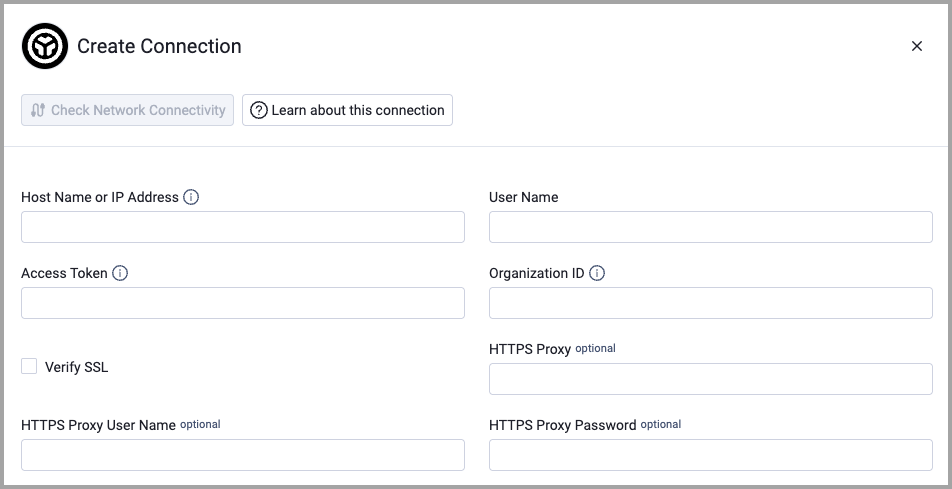
Optional Parameters
- Verify SSL - Select whether to verify the SSL certificate of the server against the CA database inside of Axonius. For more details, see SSL Trust & CA Settings.
- HTTPS Proxy - Connect the adapter to a proxy instead of directly connecting it to the domain.
- HTTPS Proxy User Name - The user name to use when connecting to the value supplied in Host Name or IP Address via the value supplied in HTTPS Proxy.
- HTTPS Proxy Password - The password to use when connecting to the server using the HTTPS Proxy.
To learn more about common adapter connection parameters and buttons, see Adding a New Adapter Connection.
Updated 3 months ago