
Microsoft Intune
Microsoft Intune is a management tool that offers mobile device and application management capabilities.
Note
This adapter is in addition to the Microsoft Entra ID (Azure AD) and Microsoft Intune adapter. Choosing the right configuration depends on your specific data needs. While the Microsoft Entra ID (Azure AD) and Microsoft Intune combined adapter includes a robust set of advanced settings and enrichments, the Microsoft Intune standalone adapter is more suitable for fetching Intune-specific data, ensuring a cleaner, more modular environment.
Configuring the combined adapter to fetch Entra ID data only and the standalone adapter to fetch Intune devices is currently the best practice for data separation. If you find that your workflow requires a specific advanced enrichment that is currently unique to the combined adapter, contact Axonius support to add them to the standalone adapter.
Asset Types Fetched
 Devices |
  Software |
  SaaS Applications
Before You Begin
APIs
Axonius uses the Microsoft Graph API.
Permissions
General Application Permissions
- DeviceManagementManagedDevices.Read.All - Required to fetch Intune Devices. To set this permission, refer to instructions for setting permissions on Entra ID, Microsoft 365, and Intune.
- DeviceManagementServiceConfiguration.Read.All
Permissions for Advanced Settings
See Advanced Settings for the full list.
Supported From Version
Supported from Axonius version 6.1
Connecting the Adapter in Axonius
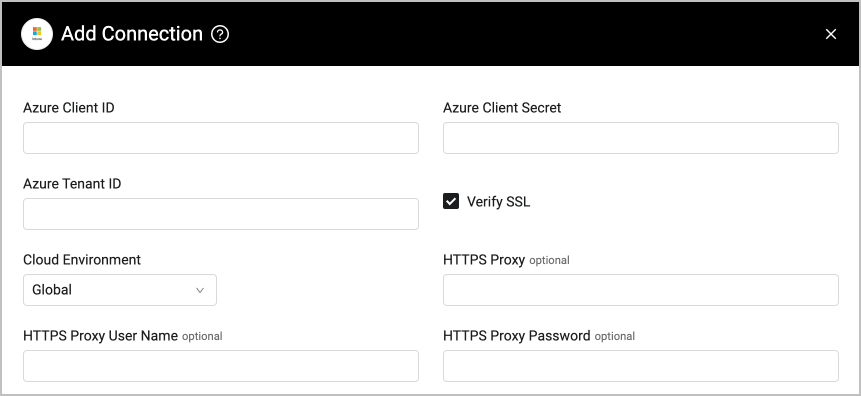
To connect the adapter in Axonius, provide the following parameters:
Required Parameters
- Azure Client ID - The Application ID of the Axonius application.
- Azure Client Secret - Specify a non-expired key generated from the new client secret.
- Azure Tenant ID - The ID for Microsoft Entra ID.
- Cloud Environment - Select your Microsoft Azure or Microsoft Entra ID cloud environment type.
Optional Parameters
- Verify SSL - Select whether to verify the SSL certificate of the server against the CA database inside of Axonius. For more details, see SSL Trust & CA Settings.
- HTTPS Proxy - Connect the adapter to a proxy instead of directly connecting it to the domain.
- HTTPS Proxy User Name - The user name to use when connecting to the value supplied in Host Name or IP Address via the value supplied in HTTPS Proxy.
- HTTPS Proxy Password - The password to use when connecting to the server using the HTTPS Proxy.
To learn more about common adapter connection parameters and buttons, see Adding a New Adapter Connection.
Advanced Settings
Note
Advanced settings can either apply for all connections for this adapter, or you can set different advanced settings and/or different scheduling for a specific connection, refer to Advanced Configuration for Adapters.
Endpoint Config
This section lists different data types to enrich Devices with. Enable Fetch Devices from Intune Devices to be able to select the enrichment data you're interested in.
The following table lists the Application permissions required to use each setting.
| Advanced Setting | Application Permission | Notes |
|---|---|---|
| All settings |
| |
| Fetch Devices from Intune Devices | DeviceManagementManagedDevices.Read.All | |
| Enrich Intune Devices with Windows Autopilot Device Identities |
| |
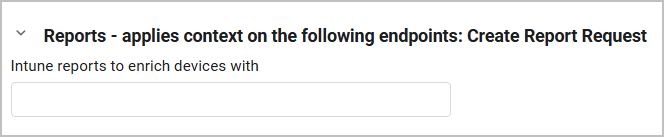
| Enrich Intune Devices with Intune Devices Reports |
| Expand the bottom Reports section to select specific Intune reports to enrich devices with.
|
| Enrich Intune Devices with Discovered Apps |
| |
| Enrich Intune Devices with Compliance Policy Settings | DeviceManagementConfiguration.Read.All | |
| Enrich Intune Devices with Security Baselines | DeviceManagementConfiguration.Read.All | |
| Enrich Intune Devices with Specific Fields | DeviceManagementManagedDevices.Read.All |
|
| Enrich Intune Devices with Windows Update Report |
| |
| Enrich Intune Devices with Windows 10 Endpoint Protection Config Statuses | DeviceManagementConfiguration.Read.All | |
| Fetch Software from Intune All Apps | DeviceManagementApps.Read.All |
Additional Advanced Settings
- Filter Devices by Ownership Type - Select which devices to fetch based on their ownership type: all devices, company-owned devices (filters by
managedDeviceOwnerType eq 'company'), and/or personal/BYOD devices (filters bymanagedDeviceOwnerType eq 'personal'). - Fetch Software from Intune All Apps - Select to fetch all applications registered in Intune. These applications are then saved in Axonius as Software assets and their Approval Status is set to Approved. See Software Registry for more information on approved / unapproved software.
Note
For details on general advanced settings under the Adapter Configuration tab, see Adapter Advanced Settings.
Version Matrix
This adapter was only tested with the versions marked as supported, but may work with other versions. Contact Axonius Support if you have a version that is not listed, which is not functioning as expected.
| Version | Supported | Notes |
|---|---|---|
| Graph API v1.0 | Yes | -- |
Related Enforcement Actions
- Microsoft Intune - Update Device
- Microsoft Intune - Delete Managed Device
- Microsoft Intune - Delete Autopilot Device
Updated 4 months ago