
Aqua Security
Aqua Security provides container and cloud native cybersecurity for teams using Docker, Kubernetes, serverless, and other cloud native technologies.
Use Cases the Adapter Solves
- Container and host inventory: Consolidate Aqua-monitored hosts and containers alongside all other assets in Axonius for a single source of truth.
- Vulnerability visibility: Surface vulnerability counts and CVE-level findings discovered by Aqua image scanning directly on the affected device.
Asset Types Fetched
Devices, Aggregated Security Findings, Users, SaaS Applications, Containers
Data Retrieved through the Adapter
Devices - fields such as: Host Name, Public Address, Vulnerabilities Found, Operating System
Users - fields such as: User Name, Email, User Full Name, User Role
Containers - fields such as: Name, Status, Owner Name, Permission
Aggregated Security Findings - fields such as: CVE ID, Software Name, Software Version, Severity
Before You Begin
Required Ports
- TCP port 443 (HTTPS)
Authentication Methods
Aqua Security supports two authentication methods, selected using the Use API v2 parameter:
- API v1 (default): The adapter authenticates with a user name and password against the
v1/loginendpoint . - API v2: The adapter authenticates using the user name as an API key and the password as a signing secret.
APIs
Axonius uses the Aqua Security REST API. The following endpoints are called:
POST v1/login- Authenticate and obtain a bearer token (API v1)POST v2/tokens- Authenticate using a signed request and obtain a bearer token (API v2)GET v1/hosts- Fetch host/device inventoryGET v1/containers- Fetch container inventoryGET v2/images- Fetch image data, enriched onto containers and devicesGET v2/images/{registry}/{repository}/{tag}/vulnerabilities- Fetch vulnerabilities for a specific imageGET v1/users- Fetch users (API v1)GET v2/users- Fetch users (API v2)
Required Permissions
Permission Verification: Official Aqua Security API documentation is behind a customer login (docs.aquasec.com) and could not be verified publicly.
Connecting the Adapter in Axonius
- Navigate to the Adapter Catalog, search for Aqua Security, and select the adapter.
- Click Add Connection.
- Provide the following parameters.
Required Parameters
- Aqua Domain – The hostname of the Aqua Security server.
- User Name and Password – The user name and password for the user used in the connection. For Use API v2, provide the API key as User Name and the API secret as Password.
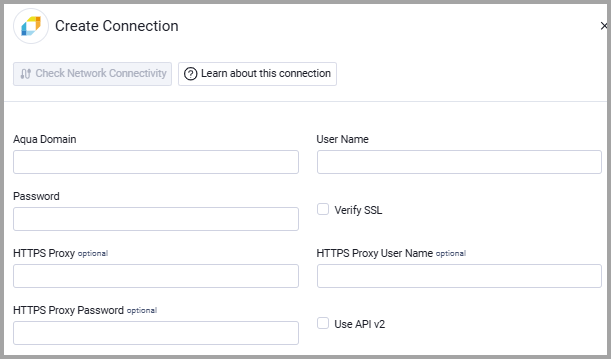
Optional Parameters
- Verify SSL - Select whether to verify the SSL certificate of the server against the CA database inside of Axonius. For more details, see SSL Trust & CA Settings.
- HTTPS Proxy- Connect the adapter to a proxy instead of directly connecting it to the domain.
- HTTPS Proxy User Name - The user name to use when connecting to the value supplied in Host Name or IP Address via the value supplied in HTTPS Proxy.
- HTTPS Proxy Password - The password to use when connecting to the server using the HTTPS Proxy.
- Use API v2 - Use API v2 for authentication and user fetching, instead of the default API v1. This is only to fetch users. If you want to fetch both users (from API v2) and devices you need to configure two connections.
To learn more about common adapter connection parameters and buttons, see Adding a New Adapter Connection.
Advanced Settings
Note
Advanced settings can either apply for all connections for this adapter, or you can set different advanced settings and/or different scheduling for a specific connection, refer to Advanced Configuration for Adapters
- Aqua status exclude list (optional, default: empty) - Specify a comma-separated list of Aqua statuses.
Updated about 2 months ago