
Rippling
Rippling provides an HR software used to collect, maintain, and analyze data for hiring, onboarding employees, and managing company culture.
Use Cases the Adapter Solves
- Employee Lifecycle Management: Track user accounts across hiring, onboarding, role changes, and offboarding to ensure access permissions align with current employment status and reduce security risks from orphaned accounts.
- IT Asset Accountability: Correlate employee data with device assignments and application access to maintain accurate asset ownership records and enforce accountability policies.
Assets Types Fetched
This adapter fetches the following types of assets:
- Users
Data Retrieved through the Adapter
Users - Fields such as Display Name, First Name, Last Name, Email Address.
Before You Begin
Required Ports
- TCP port 443 (HTTPS)
Authentication Methods
API Token Authentication
APIs
Axonius uses the Rippling REST API v2.0. The following endpoints are called:
GET /workers
Required Permissions
The API Key must have the employee parent scope plus one of the following permission approaches:
Approach 1: Broad Access (Recommended for Simplicity)
Use the worker parent scope with broad read access:
| Permission Name | Extent of Access |
|---|---|
| worker:read | Access to all employee information |
This approach provides access to all employee data fields and works with any Expand Fields configuration.
Note:
The worker.read permission implies inclusion of the compensation sub field. Customers who don’t want to pull that or other sensitive information into Axonious should instead define all of the other <FIELD>.read permissions, excluding worker.compensation.read. As shown below.
Approach 2: Granular Field-Level Access (Recommended for Security)
Use the worker parent scope plus specific field-level scopes:
Core User Data (Required):
worker:workEmail:read- Employee email addressesworker:name:read- Employee names (given name, family name, formatted name)worker:title:read- Job titlesworker:department:read- Department assignmentsworker:employmentType:read- Employment types
Additional Scopes (Based on Expand Fields Configuration):
The default Expand Fields setting requests requires the following scopes/permissions:
user- Requiresworkers.readorusers.readscopedepartment- Requiresdepartments.readscopeemployment_type- Requiresemployment-types.readscopelegal_entity- Requirescompanyscope
Important: The specific scopes required depend on your Expand Fields advanced setting configuration. If your API token lacks a scope for an expandable object, remove that object from the Expand Fields setting or the adapter connection will fail with a 400 error.
For a complete list of available scopes, see Scopes in the Rippling documentation.
Supported From Version
Supported from Axonius version 4.7
Connecting the Adapter in Axonius
Navigate to the Adapters page, search for Rippling, and click on the adapter tile.
Click Add Connection.
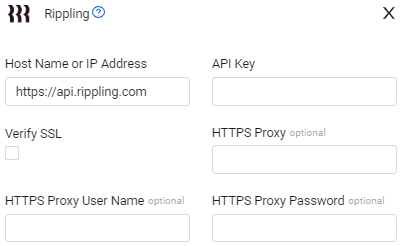
To connect the adapter in Axonius, provide the following parameters:
Required Parameters
Parameters
-
Host Name or IP Address (default:
https://rest.ripplingapis.com) - The hostname or IP address of the Rippling REST API server. Example:https://rest.ripplingapis.com -
API Key (required) - An API Key associated with a user account that has the Required Permissions to fetch assets. Refer to Manage API tokens for information about how to create an API token.
Optional Parameters
-
Verify SSL - Select whether to verify the SSL certificate of the server against the CA database inside of Axonius. For more details, see SSL Trust & CA Settings.
-
HTTPS Proxy (optional) - Connect the adapter to a proxy instead of directly connecting it to the domain.
-
HTTPS Proxy User Name (optional) - The user name to use when connecting to the value supplied in Host Name or IP Address via the value supplied in HTTPS Proxy.
-
HTTPS Proxy Password (optional) - The password to use when connecting to the server using the HTTPS Proxy.
-
To learn more about common adapter connection parameters and buttons, see Adding a New Adapter Connection.
Advanced Settings
Note:
Advanced settings can either apply to all connections for this adapter, or to a specific connection. Refer to Advanced Configuration for Adapters.
To learn more about Adapter Configuration tab advanced settings, see Adapter Advanced Settings.
- Expand Fields (default:
user,department,employment_type,legal_entity) - Comma-separated list of objects to expand per worker. Remove any entry the API token does not have access to.
Note:
If your API token does not have permissions to access certain fields (such as
legal_entityordepartment), you must remove those entries from the Expand Fields setting to prevent connection errors.
Updated 4 months ago