
Adobe Learning Manager
Adobe Learning Manager is a learning management system that provides automated training delivery, compliance tracking, skill development, and learner progress monitoring across enterprise workforces.
Use Cases the Adapter Solves
- Training Compliance Visibility: Monitor employee training progress and identify users who have not completed required compliance courses or certifications.
- Learning Progress Tracking: Track learner enrollment status, course completion rates, and identify at-risk users who may need additional support.
- User Group Management: Identify and manage learner groups based on departments, roles, or training requirements for targeted learning initiatives.
Asset Types Fetched
- Users, Groups
Data Retrieved through the Adapter
Users - Fields such as Display Name, Email Address, User Unique ID, User Type
Groups - Fields such as Name, Description, Group State
Before You Begin
Required Ports
- TCP port 443 (HTTPS)
Authentication Methods
OAuth 2.0 Refresh Token Authentication
APIs
Axonius uses the Adobe Learning Manager API v2. The following endpoints are called:
POST /oauth/token/refreshGET /primeapi/v2/usersGET /primeapi/v2/users/USER_ID/enrollmentsGET /primeapi/v2/userGroups
Required Permissions
The following permissions are required:
Application Administrator or Integration Admin Role
The account used for the adapter must have permissions to:
- Read Users - Required to retrieve user information from the Adobe Learning Manager platform
- Read User Enrollments - Required to access learner enrollment data, course progress, and completion status
- Read User Groups - Required to retrieve user group information and membership
Note: Adobe Learning Manager uses role-based access control. An Application Administrator or Integration Admin role is typically required to access the API endpoints. Consult your Adobe Learning Manager administrator for specific permission requirements.
Supported From Version
Supported from Axonius version 8.0.23
Setting Up Adobe Learning Manager to Work with Axonius
Before connecting the adapter in Axonius, you need to generate OAuth credentials in Adobe Learning Manager:
Follow the instructions in Authentication using OAuth 2.0
Connecting the Adapter in Axonius
Navigate to the Adapters page, search for Adobe Learning Manager, and click on the adapter tile.
Click Add Connection.
To connect the adapter in Axonius, provide the following parameters:
Required Parameters
- Host Name or IP Address - The base domain for the Adobe Learning Manager API. Default:
https://learningmanager.adobe.com - Client ID - The OAuth 2.0 Client ID generated from the Adobe Learning Manager custom application.
- Client Secret - The OAuth 2.0 Client Secret generated from the Adobe Learning Manager custom application.
- Refresh Token - The OAuth 2.0 Refresh Token generated from the Adobe Learning Manager custom application. This token is used to obtain access tokens for API requests.
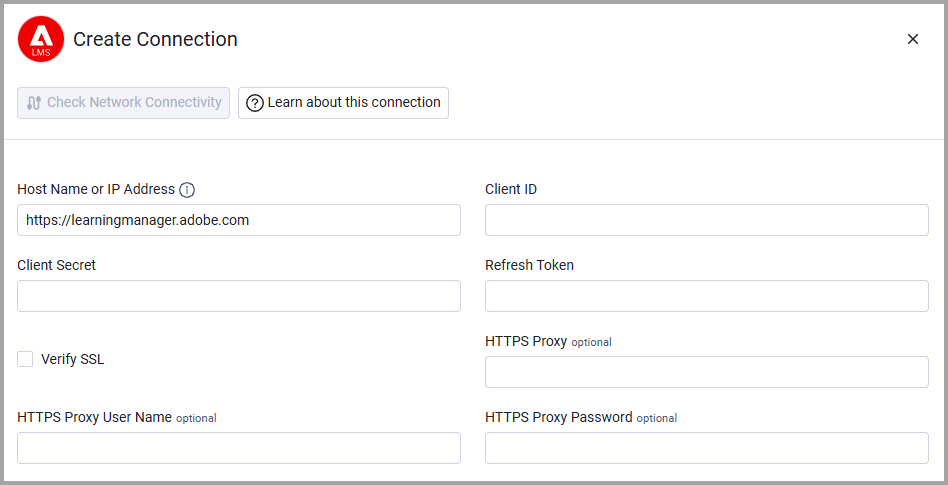
Optional Parameters
- Verify SSL - Select whether to verify the SSL certificate of the server against the CA database inside of Axonius. For more details, see SSL Trust & CA Settings.
- HTTPS Proxy - Connect the adapter to a proxy instead of directly connecting it to the domain.
- HTTPS Proxy User Name - The user name to use when connecting to the value supplied in Host Name or IP Address via the value supplied in HTTPS Proxy.
- HTTPS Proxy Password - The password to use when connecting to the server using the HTTPS Proxy.
To learn more about common adapter connection parameters and buttons, see Adding a New Adapter Connection.
Updated 5 months ago