
Zscaler Private Access (ZPA)
Zscaler Private Access (ZPA) is a zero trust network access solution that provides secure remote access to applications.
Use Cases the Adapter Solves
- Application Segment to Access Policy Correlation: Link Application Segments (Devices) to Access Policies (Firewalls) to understand which applications are protected by specific firewall rules and which AD Groups have access to them.
- AD Group Access Visibility: Resolve AD Group IDs to names and correlate them with Access Policies to identify which user groups have access to specific applications and servers.
Asset Types Fetched
- Devices, SaaS Applications, Network/Firewall Rules
Data Retrieved through the Adapter
The following data can be fetched by the adapter
- Devices - Fields such as Name, IP Address, FQDN, Server Groups, Ports
- SaaS Applications - Fields such as Application Name, Application ID, Ports, Protocols
- Firewall Rules (Access Policies) - Fields such as Policy Name, Rule Order, Application Segment Name, Application Segment ID
Before You Begin
Required Ports
TCP port 443 (HTTPS)
Authentication Methods
OAuth 2.0 Client Credentials
APIs
Axonius uses the Zscaler ZPA API . The following endpoints are called:
GET /app_connectorsGET /private_service_edgesGET /cloud_and_branch_connectorsGET /applicationsGET /access_policiesGET /global_policiesGET /userconfig/v1/customers/{customerId}/scimgroup/idpId/{idpId}
Required Permissions
The API credentials (Client ID and Client Secret) must be associated with a user account that has:
- Permission to read Application Segments, Access Policies, and Global Policies
- Permission to read SCIM Groups (for AD Group name resolution)
Supported From Version
Supported from Axonius version 6.1.56.0
Connecting the Adapter in Axonius
Navigate to the Adapters page, search for Zscaler Private Access (ZPA), and click on the adapter tile.
Click Add Connection.
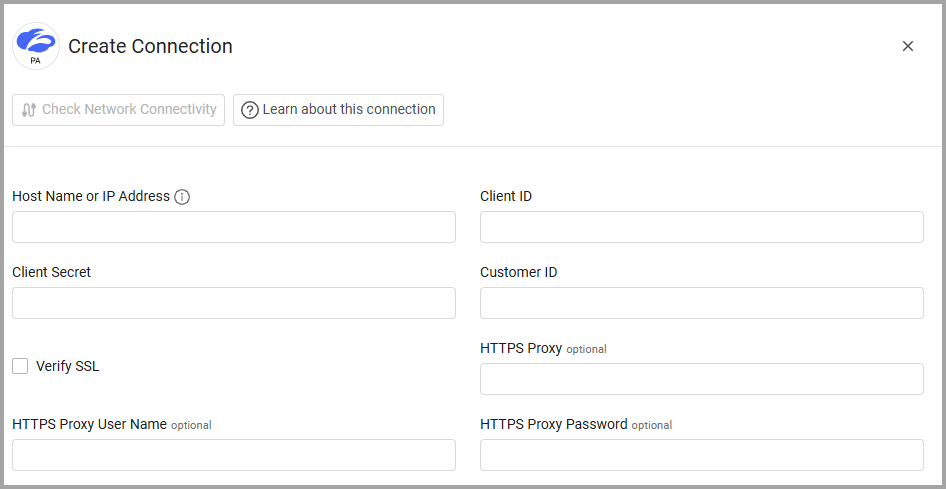
To connect the adapter in Axonius, provide the following parameters:
Required Parameters
-
Host Name or IP Address - The hostname or IP address of the Zscaler Private Access (ZPA) server that Axonius can communicate with via the Required Ports.
- If an organization logs into ZPA::Zscaler Private Access, then the hostname of the ZPA API Portal for that organization is
config.private.zscaler.com. - If an organization logs in to zpatwo.net, then the hostname of the ZPA API Portal for that organization is
config.zpatwo.net.
- If an organization logs into ZPA::Zscaler Private Access, then the hostname of the ZPA API Portal for that organization is
-
Client ID and Client Secret - The credentials for a user account that has permissions to fetch assets. For more information about authentication, see Getting Started.
-
Customer ID - The customer ID for a user account provided by Zscaler that has permissions to fetch assets.
Optional Parameters
-
Verify SSL - Select whether to verify the SSL certificate of the server against the CA database inside of Axonius. For more details, see SSL Trust & CA Settings.
-
HTTPS Proxy - Connect the adapter to a proxy instead of directly connecting it to the domain.
-
HTTPS Proxy User Name- The user name to use when connecting to the value supplied in Host Name or IP Address via the value supplied in HTTPS Proxy.
-
HTTPS Proxy Password - The password to use when connecting to the server using the HTTPS Proxy.
To learn more about common adapter connection parameters and buttons, see Adding a New Adapter Connection.
Advanced Settings
Note
Advanced settings can either apply to all connections for this adapter, or to a specific connection. Refer to Advanced Configuration for Adapters.
To fetch different asset types from specific endpoints, enable or disable the following options:
- Fetch Devices of sub type app_connector from App Connector Endpoint
- Enrich App Connector Endpoint with Server Group Endpoint
- Enrich Server Group Endpoint with Applications Endpoint
- Enrich App Connector Endpoint with Access Policy Endpoint
- Enrich App Connector Endpoint with Global Policy Endpoint
- Fetch Devices of sub type private_service_edge from Private Service Edge Endpoint
- Fetch Devices of sub type cloud_and_branch from Cloud and Branch Connector Endpoint
- Fetch Firewall of sub type access_policy from Access Policy Rules
- Enrich Access Policy Rules Endpoint with SCIM Groups Endpoint - Enable this option to resolve AD Group IDs to names by querying the SCIM Groups endpoint. This enriches Access Policy rules with human-readable AD Group names for better visibility into access controls.
- Fetch Firewall of sub type global_policy from Global Policy Rules
Note
To learn more about Adapter Configuration tab advanced settings, see Adapter Advanced Settings.
Updated 3 months ago