
BMC Helix ITSM - Create Ticket
BMC Helix ITSM - Create Ticket creates an incident in Remedy for all relevant entities.
See Creating Enforcement Sets to learn more about adding Enforcement Actions to Enforcement Sets.
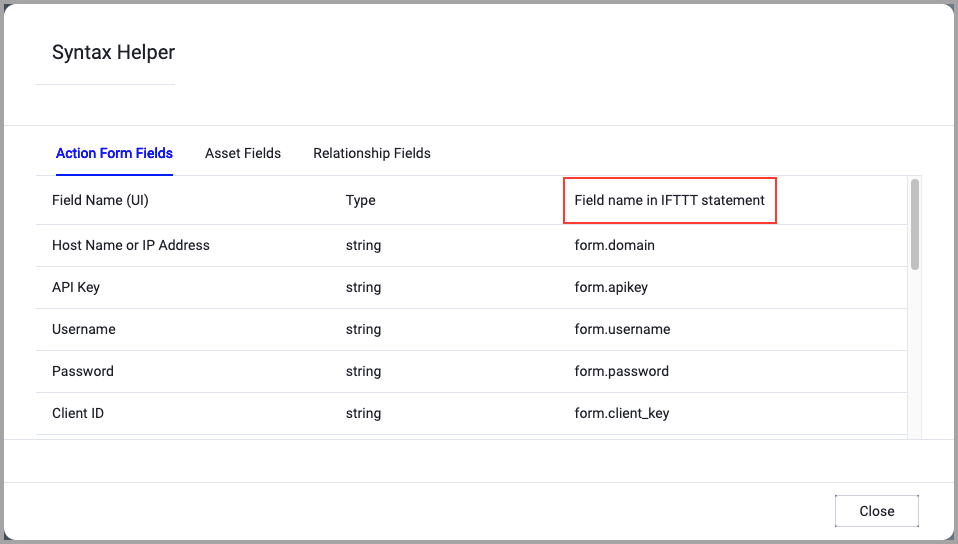
When accessing an enforcement action using the API, you must use the backend form of field names.
Use the Syntax Helper to find the correct name. In the enforcement action, enable Configure Dynamic Values and select Syntax Helper.
Note
- Not all asset types are supported for all Enforcement Actions.
- See Actions supported for Activity Logs, Adapters Fetch History, and Asset Investigation modules.
- See Actions supported for Aggregated Security Findings.
- See Actions supported for Software.
Required Fields
These fields are must be configured to successfully run the Enforcement Set.
- Action name - The name of this Enforcement Action. The system sets a default name. You can change the name.
- Configure Dynamic Values (optional) - Toggle on to enter a Dynamic Value statement. See Creating Enforcement Action Dynamic Value Statements to learn more about Dynamic Value statement syntax.
-
Split Tickets By - When enabled, group assets into different tickets based on a shared attribute. Click the adapter icon to select an adapter (or Aggregated), and then click the Select Adapter Field box to select the asset field used to generate a separate ticket for each unique value.
Note- The Split Tickets By option appears only in ticket creation actions, and does not appear in ticket-per-asset creation or ticket update actions.
- For assets containing multiple values, the system uses only the first value to perform the split.
- BMC Helix ITSM domain - The domain name of BMC Helix ITSM server.
- User name - The user name for the BMC Helix ITSM account.
- Password - The password for the BMC Helix ITSM account.
- Form name - Specify the form name.
- Ticket description - Enter a ticket description.
-
Compute Node - The Axonius node to use when connecting to the specified host. For more details, see Working with Axonius Compute Nodes.
Additional Fields
These fields are optional.
-
Verify SSL (Optional) (default: enabled) - Selects whether to verify the SSL certificate of the server against the CA database inside of Axonius. For more details, see SSL Trust & CA Settings. This setting is enabled by default on all new adapter settings. If you need to disable SSL verification, make sure you disable this setting.)
-
HTTPS Proxy (optional) - Connect the adapter to a proxy instead of directly connecting it to the domain.
-
First Name - User's first name.
-
Last Name - User's last name.
-
Service Type - The type of service the ticket is opened for. For example, User Service Restoration
-
Status - The status of the ticket. For example, Assigned
-
Impact - The impact of the ticket. For example, 1-Extensive/Widespread
-
Urgency - The urgency of the ticket. For example, 1-Critical
-
Reported Source - The source that reported the issue. For example, Direct Input
-
Add default ticket description - Enable this option to add a default description to the ticket. The message includes the Enforcement Set name and the selected query, the condition for executing the Enforcement, if such exists, and the number of current and previous results.
Message example:
The alert "testAlert" for the following query has been triggered: Missing Sophos_

_Alert Details_
_The alert was triggered because: The number of entities is above 0
The number of devices returned by the query:4
The previous number of devices was:4_

_You can view the query and its results here: https://demo-latest.axonius.com/devices?view=Missing Sophos_
NoteAs valid values of these parameters are customer specific, Axonius does not validate them. You must make sure the provided values are correct for the request to complete successfully.
- Enter the proper values for these body parameter fields:
- Assignee Groups - Specifies the group or groups to which the ticket is assigned in BMC Helix ITSM.
- Detailed Description - Provides extended details about the ticket beyond the standard description. Use this field to include additional context, technical details, or supplementary information related to the ticket.
- RLY_Categorization Tier1 - Specifies the primary categorization level for the ticket in a tiered categorization scheme.
- RLY Categorization Tier2 - Specifies the secondary categorization level for the ticket, providing more granular classification within the primary category set by Tier1.
- TicketID_RPY - A reference or link field used to associate the ticket with another related ticket ID or external identifier in the "RPY" system.
- ID Cliente - The client or customer identifier to be associated with the ticket.
- TemplateID - The ID of a predefined template in BMC Helix ITSM to use when creating the ticket
Note
These parameters are customer-specific custom fields in BMC Helix ITSM. Axonius does not validate the provided values. You must ensure that:
- The field names match exactly what is configured in your BMC Helix ITSM instance.
- The values provided are valid for your BMC Helix ITSM environment.
- Your BMC Helix ITSM form includes these fields if you intend to use them.
For more details about other enforcement actions available, see Action Library.
Updated 3 days ago