
Alation
Alation is a data intelligence platform that provides data catalog, governance, lineage, and data product capabilities for discovering, understanding, and governing enterprise data.
Use Cases the Adapter Solves
- Data Governance Visibility: Discover and track users and groups with access to your data catalog, enabling better governance and compliance oversight of who can discover and manage enterprise data assets.
- Data Product Management: Monitor and manage data products published in Alation, providing visibility into data asset ownership, status, and consumption across your organization.
Asset Types Fetched
- Users, Groups, Application Resources
Data Retrieved through the Adapter
Users - Fields such as Display Name, Email Address, Profile ID, Last Login
Groups - Fields such as Display Name, Email Address, Profile ID, URL
Application Resources - Fields such as Name, Status, Version ID, Contact Email
Before You Begin
Required Ports
- TCP port 443 (HTTPS)
Authentication Methods
API Token Authentication
APIs
Axonius uses the Alation Integration API. The following endpoints are called:
GET /integration/v2/user/GET /integration/v1/group/GET /dps/integration/data-products/v1/data-product/
Required Permissions
Server Admin - for Users and Groups
Consult your Alation administrator to ensure the user account has the necessary permissions for the endpoints you plan to use.
Supported From Version
Supported from Axonius version 8.0.23
Connecting the Adapter in Axonius
Navigate to the Adapters page, search for Alation, and click on the adapter tile.
Click Add Connection.
To connect the adapter in Axonius, provide the following parameters:
Required Parameters
- Host Name or IP Address - Base domain for the API, should contain a prefix of
http://orhttps://. Do not add any specific endpoints after the domain. Example:https://your-alation-instance.com - API Token - The API Access Token generated from your Alation instance. This is a short-lived token used to authenticate API requests.
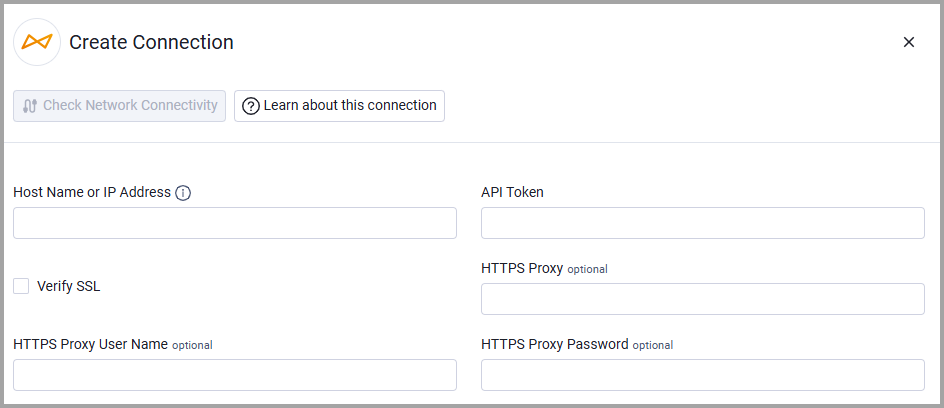
Optional Parameters
- Verify SSL - Select whether to verify the SSL certificate of the server against the CA database inside of Axonius. For more details, see SSL Trust & CA Settings.
- HTTPS Proxy - Connect the adapter to a proxy instead of directly connecting it to the domain.
- HTTPS Proxy User Name - The user name to use when connecting to the value supplied in Host Name or IP Address via the value supplied in HTTPS Proxy.
- HTTPS Proxy Password - The password to use when connecting to the server using the HTTPS Proxy.
To learn more about common adapter connection parameters and buttons, see Adding a New Adapter Connection.
Updated 5 months ago