
Juniper Junos
Juniper Junos connects to Juniper switches and routers.
Types of Assets Fetched
This adapter fetches the following types of assets:
- Devices, Network/Firewall Rules, Network Routes
Parameters
Required Parameters
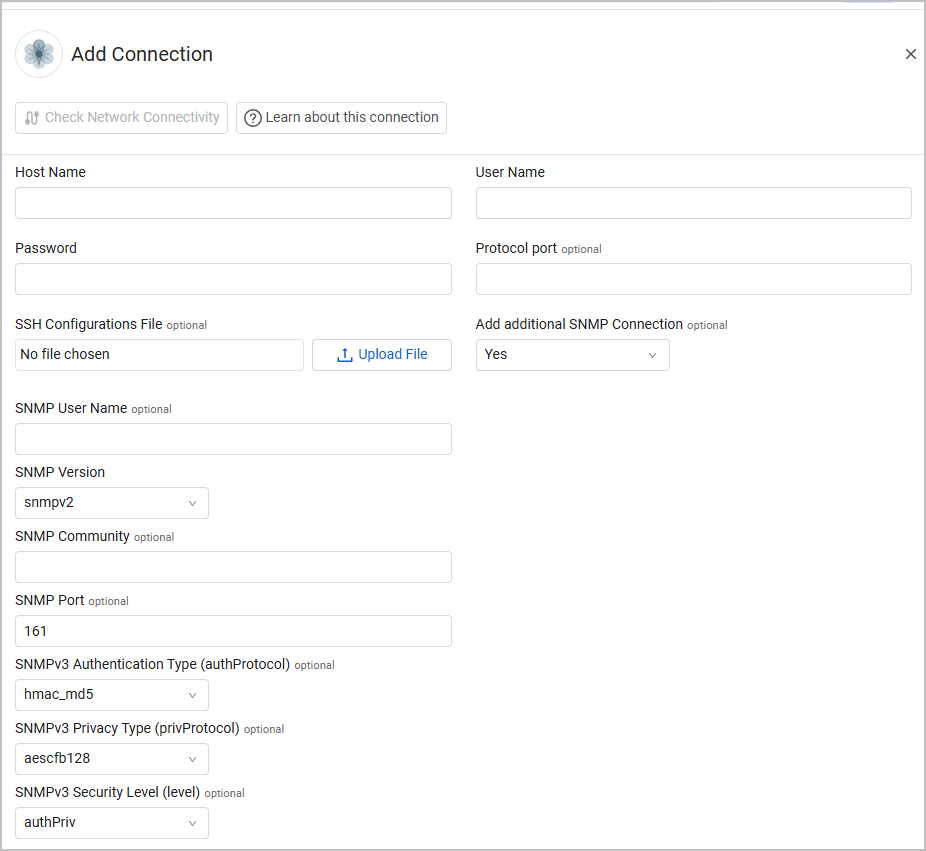
- Host Name (required) - The host name of the Juniper Junos server.
- User Name and Password - The user name and the password of a read-only user.
- Protocol Port - Specify if the connection needs to be on a non-standard port.
- SSH Configurations File - Provides the ability to use a custom SSH config file.
- Disable RPC - Select this option to disable the RPC (Remote Procedure Call) client and use SNMP only for data collection. This provides flexibility for environments where RPC access is restricted or unavailable, while still maintaining device visibility through SNMP. Enable this setting when:
- RPC access to Juniper devices is restricted or unavailable in your environment
- You want to rely exclusively on SNMP for data collection
- Security policies prevent RPC connections to network devices
Important: When Disable RPC is enabled, SNMP must be properly configured. The adapter will validate that SNMP is enabled and working before proceeding. If SNMP is not configured or fails to connect, the adapter will return an error.
Optional Parameters
- Add additional SNMP Connection (default: No) - Select Yes to add SNMP-based authentication to the connection. When you enable this option, the following fields appear:
- SNMP User Name
- SNMP Version - Select a version from the list.
- SNMP Port - The default is 161.
- SNMPv3 Authentication Type (authProtocol) - Select from the menu.
- SNMPv3 Privacy Type (privProtocol) - Select from the menu.
- SNMPv3 Security Level (level) - Select from the menu.
To learn more about common adapter connection parameters and buttons, see Adding a New Adapter Connection.
Advanced Settings
Note
Advanced settings can either apply to all connections for this adapter, or to a specific connection. Refer to Advanced Configuration for Adapters.
- Fetch Firewalls - Select this option to fetch firewalls.
- Fetch ARP Devices - Select this option to fetch ARP (Address Resolution Protocol) devices when using SNMP connections. This setting provides additional network visibility by retrieving devices discovered through ARP tables on Juniper network equipment.
Note
To learn more about Adapter Configuration tab advanced settings, see Adapter Advanced Settings.
Updated 6 months ago
Did this page help you?