
Axonius Release Notes 10.0.0
Release Date: October 18th 2026
These Release Notes contain new features and enhancements added in version 10.0.0
Introducing Axonius AI
Axonius AI is our series of platform capabilities that brings the Axonius inventory of assets and exposures (aggregated, correlated, and deduplicated) to AI. By anchoring AI in our durable context, you can do better investigations, automate tasks using agentic AI, and feed your AI agents with high efficacy and verifiable accuracy. Axonius AI shows up across three surfaces, all built on the same trusted foundation:
- Axonius AI Companion: Ask anything and act on it, in a conversation.
- Axonius AI Workforce: Watch your environment with a team of Virtual Workers that act on their own, inside the limits you set.
- Axonius MCP Server: Extend Axonius data into the AI tools, AI agents, and automations you already run.
AI Companion
The AI Companion is the interface for querying your asset data using natural language. It translates plain English questions directly into queries, charts, dashboards, and actions. Crucially, it displays the exact correlation path used so your analysts can verify the logic against your actual environment before making decisions.
- Get started: Read the guide on Your First Chat with Axonius AI.
- Value: Rapid data exploration and reporting without needing to master query syntax.
To activate Axonius AI you need the following
- You are signed in as a System Admin.
- Your Axonius environment is an Axonius hosted deployment.
- Axonius has added AI credits to your environment. (Visible in Credit Management.)
- You have one test user per role you plan to enable.
Then
- Enable Axonius AI in General Settings.
- Continue to set roles and permissions.
- Give credits to roles
AI Workforce
The AI Workforce is a platform-wide automation engine that executes end-to-end tasks based on your asset context. It manages ticket creation, policy enforcement, and case updates, allowing your team to streamline security operations without pivoting between multiple external tools.
- Put it to work: Check out the documentation on Working with the AI Workforce.
- Value: Autonomous workflow execution and streamlined remediation built directly into your platform operations.
Axonius MCP
The Axonius MCP Server makes your entire Axonius environment queryable in natural language from the external AI tools your security and IT teams already use. Whether you are using a desktop AI assistant, an IDE, low-code platforms, or building your own custom agentic workflows, it allows your external AI to access your environment’s ground truth in real time.
- Value: Feeds authoritative, decision-grade asset context directly into your existing external AI tools so your team can work on their harness of choice with the best asset context.
Cyber Assets New Features and Enhancements
The following new features and enhancements were added to Axonius Cyber Assets:
Asset Correlation Investigation
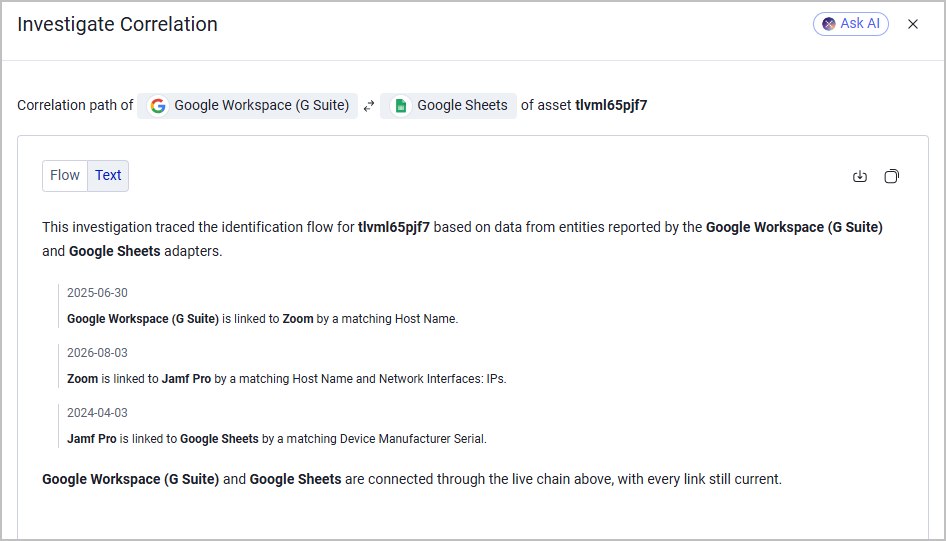
Axonius automatically merges matching asset data from multiple sources into a single inventory record. To give you complete visibility into how these decisions are made, you can now investigate why asset records were merged - or why they remained separate.
The Explain Correlation module shows the connections behind a merge, while the Explain Non-Correlation module helps identify why two devices did not match.
Use the Explain Correlation and Explain Non-Correlation options to view the specific field matches or discrepancies that drove each decision. This helps you quickly resolve incorrectly merged devices or unexpected duplicates without needing to submit a support ticket, making your inventory data transparent, auditable, and trustworthy. These options help you better understand and assess why device records were merged or why specific devices were not merged..
Customers with Axonius AI can also use the built-in AI agent to dig deeper into the asset comparison process and receive a detailed analysis of the compared data.
Devices Page
The following new features and enhancements were added to the Devices page.
New Preferred Device Type Field
The Device Type classification is now represented by an Axonius-managed preferred field: Preferred: Device Type. The field value is calculated post-correlation, and it replaces the legacy Device Type identifier field and its custom-query configuration, resulting from the Device Inventory Classification module. The new field covers much more data compared to the legacy identifier and maintains consistent classification across discovery cycles, which makes it considerably more accurate and reliable.
The Preferred Device Type field can now be used across the platform in the Query Wizard, reports, dashboards, Enforcement Sets, and more.
Additional Features:
- CrowdStrike sensors in Reduced Functionality Mode are counted as Inactive in Agent Coverage.
- Agent Coverage: admins can select to hide or unhide adapters from Agent Coverage.
- Agent Coverage: admins can set the number of days from which an agent is considered Inactive.
Exposures New Features and Enhancements
The following new features and enhancements were added to Exposures:
New Count Fields added to Aggregated Security Findings
The Aggregated Security Findings page now displays three new fields that represent a complete partition of the five potential Axonius Status values:
-
Open Security Findings - A count of all Security Findings whose Axonius Status is Open or Reopen.
-
Closed Security Findings - A count of all Security Findings whose Axonius Status is Closed.
-
Risk Accepted Security Findings - A count of all Security Findings whose Axonius Status field is Open/Closed- Risk Accepted.
Instead of displaying a single status field which might result in data loss, these fields together provide a complete, non-overlapping breakdown of the Security Findings group members per status. This allows users to see the real depth behind the group rather than one, flattened value.
Exception Management - New Email Templates Available
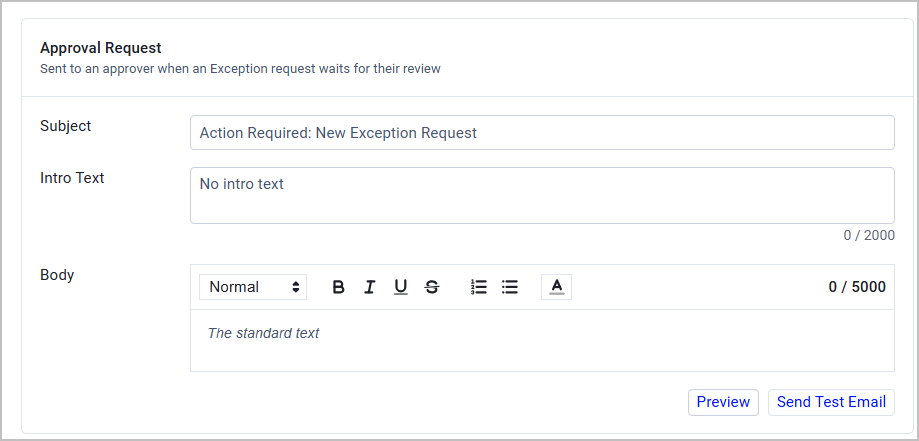
Admins using Exception Management can now define templates for each type of Exception email. This allows admins to align Exception-related notifications with their organization's tone, terminology, and processes. They can roll out changes with confidence and avoid sending the wrong message to stakeholders. In addition, recipients get clearer, more relevant guidance, which cuts confusion and follow-up questions.
In each template, admins can configure a custom subject, intro text, and an optional, rich-text body. Before saving the configuration, they can preview the email template or send a test email to their own email address.
The following email types support custom templates:
- New approval request
- Approval reminder
- Request approved
- Request denied
- Request update (moved to the next approver)
- Exception expiration warning
- Exception expired
Additional Changes and Updates to Exposures
- The exception-rule Instructions box is larger and includes a character counter.
- Risk Score: an opt-in "Round final score to a whole number" option is available.
- Risk Score Results Preview lets the user select both the asset and the security finding to preview.
- Stale preferred-field data is cleared automatically on fetch.
- Max CVSS is available as a field and filter on Security Findings.
- SLA published dates are shown on Security Findings.
- Total Open CVE Count is available as a field on asset pages.
- The following Exception fields are now queryable on Security Findings: Expose Business Justification, Evidence Link, Notes, and Expiration Date.
- Recommended Actions risk fields are available as filters and columns.
- Exception reason category is a selectable field on the Create Exception form.
- Adatpers can be excluded from reporting Static analysis findings.
- SLA KEV due date is shown on Security Findings.
- Approval statuses: Conditionally Approved is available as a status option.
- Clear Approval Status is available as a bulk action.
- Case asset ID history is tracked in the activity trail.
- Preferred CUs Behind Latest is shown as a field on asset rows.
- Vulnerability Repository Tags are shown as a field on the Security Findings table.
Auto-Remove Resolved Security Findings After a Set Number of Days
The Status Resolver now includes a configurable option to automatically remove Security Findings that have been closed for more than a specified number of days. The setting is under Data → Security Findings Data → Status Resolver. New customers have this enabled at 14 days by default; existing customers have it off by default. When enabled, the threshold applies retroactively — findings already past the threshold at the time of enabling are removed immediately. Administrators can adjust the day threshold at any time.
AI Attribute Fields for Software and SaaS Applications
Software assets, installed software on devices, and SaaS Applications now include dedicated AI attribute fields that surface the AI profile of each item. Seven specialized fields are populated automatically from the Axonius catalog and are visible in the Software page, software profile page, SaaS Applications page, and the Installed Software section of device profiles:
- AI: Deployment — Classifies the item as AI-Native, AI-Enhanced, or AI-Infrastructure/Framework.
- AI: Model Location — Indicates where the AI model runs: Local/On-Device, Cloud-Hosted (Vendor), or Private Cloud/Self-Hosted.
- AI: Autonomy Level — Ranges from Chat/Conversational (passive output) to Human-in-the-Loop to Autonomous Agentic (highest risk).
- AI: Integrations — Surfaces integration surfaces such as MCP (Model Context Protocol), Native API, and Local File System Access.
- AI: RAG Enabling — Indicates whether the item supports retrieval-augmented generation.
- AI: RBAC Supported — Indicates whether the item respects role-based access controls.
- AI: Vendor Training — Shows whether the vendor is confirmed to opt out of training on customer data, or whether training is allowed.
These fields let security teams query and filter by autonomy level, integration surface, and data governance controls to identify and prioritize the highest-risk AI tools across software and SaaS portfolios. The AI attributes section is suppressed for items with no AI classification, keeping profiles clean and relevant.
SaaS Applications New Features and Enhancements
The following new features and enhancements were added to SaaS Applications:
Control Whether Managed Applications Are Auto-Approved
A new setting in Settings → Enrichment lets administrators control whether managed SaaS applications are automatically approved. When Auto Approve Managed SaaS Applications is enabled, managed applications are marked as Approved by default - the existing behavior. When disabled, the approval status of managed applications is not changed automatically. The setting is enabled by default; disabling it does not retroactively change any existing approvals.
Additional changes
- SaaS Management Licenses show Possible Savings from Disabled Account Users.
- Bulk SaaS approval status can be changed for multiple selected accounts.
- SaaS application expansions list Custom Data as a data source (SaaS applications only).
- Application Settings can have a Parent Application assigned.
Software New Features and Enhancements
- Software reconciliation preserves a software asset's Notes across reconciliation cycles.
- A scheduled Approval List import from a CSV adapter connection is available in Software settings.
- Generated CPE (Axonius) is shown on software asset profiles.
- The software asset profile shows the device count for that software.
- Add Software suggestions are shown in the Software Findings panel.
Identities New Features and Enhancements
The following changes were made to Identities:
IGA Features Removed
As part of a strategic update to the Identities product, the following Identity Governance and Administration (IGA) features have been removed:
- Rules-based permission management
- Justifications
- Access campaign reviews
- Access request management
These options are no longer visible in the Identities menu, Identity Workspace, Managed Identities actions, or Settings. The Identity Workspace homepage has also been updated — sections and charts related to the removed features are no longer displayed.
Axonius Platform New Features and Enhancements
Dashboard
The following new features and enhancements were added to the Dashboards:
Timeline Charts
- Point Markers: Display discrete data points directly on line timelines for improved visual precision.
- Logarithmic Y-Axis: Toggle logarithmic scaling on the Y-axis to easily visualize and analyze exponential data ranges.
- Target Lines: Add reference or benchmark lines across timeline charts to quickly track goals and thresholds.
- Trendline Overlay: Add an optional trendline per line in a Query Timeline chart, displaying its per-day slope alongside the data (off per chart by default).
Pie & Donut Charts
- Outside Percentage Labels: Move percentage values outside the slices for cleaner readability on smaller segments.
- Slice Category Names: Display category names directly on slices for faster visual identification without relying on the legend.
- Compare to a Previous Date: Pie and donut charts can compare current segment values against a selected earlier date.
Pivot Charts
- Per-Value Colors: Assign custom color schemes per individual value for better category distinction.
- Measure Reordering: Customize the sequence of measures directly within the chart configuration.
- Top-N Lines: Limit display to the top N results to focus on key drivers and eliminate noise.
- Totals Toggle: Quickly enable or disable total summary rows/columns as needed.
- Count Objects in a List Field: A pivot measure can count the items within a list-of-objects field - such as Network Interfaces.
- Line Chart over Non-Date Dimension: A pivot Line chart can use any field as its dimension, not only dates - for example, CVEs per Published Year.
- Sort Stacked Bars by Segment: Sort stacked pivot bars by the value of a selected segment.
Segmentation Charts
- Expanded Segment Limits: Support for up to 50 distinct segments in a single chart view.
- Value Colours: Assign a display colour to individual field values in a Field Segmentation pie or donut chart; values without an assigned colour use the standard palette.
- Consistent Colours Across Charts (opt-in per chart): Set a field value to render in the same colour across every Field Segmentation and pivot chart that includes it.
- Custom Segment Order: Define a fixed display order for bar chart segments—for example, Critical, High, Medium, Low.
- Filter by Connection: Restrict a Field Segmentation chart to values sourced from selected adapter connections only.
- Use the Query's Refinement: In the Add Filter menu, apply the parent query's own refinement directly as a chart-level filter.
- Sort by Change Percentage: In bar charts with Compare to a Previous Date enabled, sort segments by their change percentage.
- Threshold Colours: Apply dynamic colour thresholds to segmentation and comparison tables; matrix tables also support threshold colouring.
- Segment Click-Through (opt-in): Enable "show only the clicked value" to restrict the click-through asset list to the selected segment only.
- Axis Maximum: Set a manual upper bound on a bar chart axis to align multiple charts to a shared scale.
- Show Total Calculation: Bar, stacked, and pie charts can display a total calculation indicator (on by default).
- Short Notation (K / M / B): Display large axis values in abbreviated form—K, M, or B—for example, 15.1M.
- Query Intersection Bar View: Display query intersection results as a bar chart with optional threshold colouring.
Asset Data Charts
- Field Renaming: Custom alias naming for fields directly within chart display settings.
- Export Data to CSV: One-click CSV export directly from the chart view.
- Top-N Rows: Filter and constrain asset data tables to display the top N rows.
- Multi-Value Wrapping: Text wrapping for fields containing multiple values to keep table layouts compact and readable.
- Link Cells Open Asset List: Asset Data cells displayed as links—such as Device Count—open the matching filtered asset list in a new tab.
- Row and Card Click-Through: Clicking an Asset Data row or card opens that asset's profile in a new tab.
- Resizable Columns: Resize Asset Data chart columns by dragging their borders; widths are saved per chart for users with edit access.
- Device Count Respects Refine Data: The Asset Data Device Count now applies the chart's Refine Data condition, consistent with the behaviour of the assets table.
- Column Alignment: Configure the text alignment of each Asset Data chart column individually—left, centre, or right.
- Cell Colour Rules: Define up to five conditional colour rules per field in an Asset Data chart to highlight cell values by condition.
- Charts on Asset Investigation Events: Asset Data and Field Summary charts can now be added to Asset Investigation events.
Dashboard Usability & Controls
- Optional Dashboard Owner: Assign and display a designated owner for clearer governance.
- Pin All: Pin all dashboard gadgets in place with a single click.
- Full Screen Mode: Present dashboards in borderless full-screen view for presentations and monitoring displays.
- Copy Image: Copy chart visuals directly to your clipboard to paste into documents or messages.
- Chart Accent Color: Customize accent colors across charts for unified dashboard branding.
- Presentation Mode: Rotate through a selected set of dashboards or a folder in full screen, via a menu dialog or the
?view=kiosk&rotate=&every=URL parameter. - Dashboard Manager Chart Search: Search for charts in Dashboard Manager; results show which dashboard each chart belongs to, and clicking opens the dashboard at that chart.
- Transfer Dashboard Ownership: Admins can transfer ownership of a Public or Restricted dashboard to another user from Dashboard Manager.
- Rename Chart In Place: Rename a chart inline from its title without opening the edit panel; the chart's cached data is preserved.
- Duplicate and Edit: Duplicate a chart and open its edit wizard immediately from the chart menu.
- Sort Charts A-Z: Sort all charts on a dashboard alphabetically in one action from Set Dashboard Order.
- Download Dashboard as Image: Download the full chart grid as a single PNG from the Dashboard menu.
- Capture Chart on Dark Themes: Capture Chart and Copy Image on a dark-themed page produce a light-background PNG; images also exclude the screen-reader-only data table.
- Recalculate Charts After Import (opt-in): Trigger background recalculation of all charts in an imported dashboard immediately after import.
- Chart Refresh Interval: Admins can set the chart data refresh interval to 6 hours (default), 12 hours, or 24 hours.
Query Pickers
- Search by Tag: Filter and locate queries directly using existing tag metadata.
Field Summary Charts
-
Maximum and Minimum: Field Summary charts now display the maximum and minimum values of a number or date field.
-
Gauge View: Field Summary charts offer a Gauge view with configurable Min and Max bounds, threshold colours, and a "Lower is better" toggle.
-
Yes/No Values (opt-in): Field Summary charts can display Yes and No instead of 1 and 0 for boolean field values.
Field Comparison Charts
- First Fetch Time Comparison: Field Comparison now includes the aggregated First Fetch Time as a comparable field, evaluated against its earliest recorded date; this also fixes "+N days" comparisons on this field, which previously failed.
Post-Quantum Cryptography Exposure Management
Axonius can help teams inventory cryptographic exposure using metadata from supported certificate, identity, cloud, and network adapters. Teams can query for RSA and elliptic-curve certificates, review related signals such as TLS policies and Kerberos encryption settings, and prioritize assets for investigation and migration planning. Query results can also support dashboards and reports.
Assets Pages
The following features were added to all assets pages:
- Browsing Available Columns Is Now Easier
- The Available Columns list in the Edit Columns panel now uses the same hierarchical layout as the Query Wizard. Complex fields such as Network Interfaces are grouped under a parent row, with sub-fields nested below and accessible by expanding a chevron. This reduces the top-level list significantly, making it easier to browse without scrolling through hundreds of entries. Searching still reaches every field, including sub-fields.
- Copy Field Syntax Directly from the Asset Profile
- On any asset profile page, hovering over a field name in the All Fields, Aggregated Fields, Preferred Fields, or adapter-specific field tables now reveals a copy icon. Clicking it copies the field's query path -for example,
specific_data.data.hostname- to the clipboard. This makes it easier to build queries and API calls without having to look up field paths separately.
- On any asset profile page, hovering over a field name in the All Fields, Aggregated Fields, Preferred Fields, or adapter-specific field tables now reveals a copy icon. Clicking it copies the field's query path -for example,
- Asset Investigation Fields Limit Increased to 100 per Asset Type
- The maximum number of Asset Investigation fields per asset type has been increased from 50 to 100, giving you more room to track the data points that matter to your organization.
- CSV Exports
- CSV Exports now run in the background. You get a notification when the file is ready, and it is listed on the Exports page.
- You can choose to export an asset table as ZIP (compressed CSV) file.
Additional Features
- Long column names now wrap in the Edit Columns panel instead of being cut off.
- Checked columns can be moved together as a group in the column picker.
- A column can be removed directly from its header without opening Edit Columns.
- Users can copy a column's individual cell values, and can use Copy Rows to copy full row data.
- The Export CSV dialog now shows a column checklist so users can choose which columns to include.
- The currently loaded query name can be copied from the query bar.
- The query bar shows an "Unsaved query" indicator and a "Clear query" button when a query has not been saved.
- The Asset Profile tab that opens by default for each asset type can be pinned per user.
- A Copy value action is available on field rows in the Asset Profile.
- Asset Graph Device Count values link to the relevant asset list.
- Asset Profile field tables can be exported to CSV.
- Enforcement Runs columns on the Asset page are resizable.
- The asset table remembers the user's selected page size across sessions.
- Adapter icons on asset rows show the connection name on hover.
- Bulk Add Note is available for multiple selected assets.
- The enforcement run selector shows recently used enforcements at the top.
- Device Sub-Type is available as a field on asset pages.
- Column headers can be given custom display names.
- The last folder used in the column or field picker is remembered.
- A role's default folder for queries is configurable.
- Fields can be marked as favourites and surfaced at the top of field lists.
- View refinements (saved column/sort/filter combinations) can be saved per view.
- Column widths are saved per view.
- Refine Data supports filtering to the latest or earliest value in a multi-value field.
- "Next days/hours from now" is available as a relative time option in Refine Data.
- Navigation groups in the left pane are real browser links and open in a new tab with middle-click.
- Query Timeline and Query Comparison each keep their own row-level filter after a delete or drag reorder.
- Domains & URLs global search includes Name in its search fields by default.
- Query Timeline supports a "use one day of each period" display mode.
Tags and Custom Fields
- Tag descriptions can be added and edited from the Tags Management page.
- Tags show Created By and Last Updated By fields.
- A Remove all custom fields action is available from the custom fields menu.
- A Tags Management role permission group controls access to tag routes. No changes in behavior for existing users.
- Tag search works across all asset types from a single search bar.
- Asset profile: Enforcement Runs
- When an asset's ID changes (for example, after an unlink gives the asset's old ID to the unlinked record), the asset's Enforcement Runs tab now also lists the runs that ran on the asset under its former ID, up to the change. A Former Asset ID column names that ID. Before, these runs were missing and, when the asset had no runs under its new ID, the tab did not show. The CSV export include these runs too.
Query Wizard
- Field Comparisons Inside Complex Field Conditions
- The Query Wizard now supports field comparison conditions inside complex field (match) conditions. When building a condition on a complex field such as Adapter Tags or Network Interfaces, you can add a child row that compares one sub-field against any other asset field — including custom fields. For example, you can find assets where a tag's key matches a pattern and that same tag's value differs from a specific custom field, bound to the same tag entry. This condition works in both Live Data and Latest Snapshot views.
- Adapter Name Shown on Icon Hover
- Hovering over an adapter icon in the Query Wizard now displays the adapter's name in a tooltip. This applies to the field menu's category icons, and to the adapter icons shown on child rows of complex field and asset entity conditions.
- See All Selected Values on Hover
- When a Query Wizard value field contains multiple selected values and shows a +N counter, hovering over the counter now displays a tooltip listing all selected values. This lets you review what is selected without reopening the value picker.
Query Management
The following new features and enhancements were added to the Queries:
Saved Queries
- The Save Query folder picker can create a new folder without leaving the dialog.
- The Queries page can be exported to CSV.
- Ctrl/Cmd-click on Run Query opens the query in a new tab.
- A filter and column for "Always keep cached" are available on the Queries page.
- Change Access is available for up to 200 checked custom queries at once, with each query validated individually.
- The predefined CERT Top Exploitable queries now follow CISA's Top Routinely Exploited Vulnerabilities advisories through 2023. New "2022 - CERT Top Exploitable" and "2023 - CERT Top Exploitable" queries are added, and 5 malformed CVE IDs in the existing queries are fixed. The results of these queries may change after the upgrade.
Action Center
New Tickets Page on the Action Center
Tickets now have their own page in in the Action Center, next to Cases. Use this page to track every ticket opened from Axonius, across all your ticketing systems, in one place.
- One status language: every ticket is mapped to a standard status (Open, In Progress, Closed, Cancelled), whichever system it comes from.
- Overdue flagged automatically: open tickets past their due date get an Overdue badge.
- Last Synced: see how current each ticket's status is, based on the last sync between Axonius and the ticketing system.
- Focused ticket view: Each ticket has a side drawer that shows just what you need to follow up, with links to the source system.
Cases
- Cases Kanban cards show a progress indicator.
- A case's Assets tab shows each linked ticket's assignee and due date.
Workflows
- Multiple workflows can be run at once from the Workflows list.
- Run Query in a workflow wizard's query picker opens the query in a new tab.
- Enforcement Sets can be sorted by Folder Path and filtered to show only sets directly in the selected folder.
- Workflows support optional Notes per step. A note icon appears on the step on the canvas.
- Viewers can be given permission to filter Enforcement results.
- External actions are available as a workflow action type.
- Workflow steps show a hover card summarising the step's configuration.
- The transformation step includes a test box to preview output before saving.
- Run order for discovery-scheduled workflows is configurable.
Monitoring
- Labels can be added to Monitoring rules for grouping and filtering.
- Monitoring rules can be exported and imported.
- Alert-on-change rules can be configured to fire when a monitored value changes.
- Changed-by rules attribute a change to the user who made it.
- The permission name for Monitoring was updated to Monitoring instead of Findings. Existing roles keep their permissions.
Reports
- Report Emails can include an option for CSV-only delivery without the PDF attachment.
- Reports with no content no longer generate an empty Table of Contents page in the PDF.
- Report Emails can be scheduled on a specific weekday of the month (for example, the second Tuesday).
- Opt-in: reports keep the user's query order within each asset type across sections.
- A per-report "Print all table rows (up to 200)" switch prints Asset Data table rows across additional PDF pages (12 rows per page, with a "N more rows: see CSV" note when rows are cut). Table of contents and page numbers include these rows pages.
- Opt-in: dashboard charts are included in the report Email body.
- Reports can be organised into folders.
- Opt-in: Data Analysis CSVs are attached to report Emails.
- Opt-in: empty CSV files are skipped from report Email attachments.
- Report PDF generation history is shown on the report detail page.
- Opt-in: scheduled report Emails are skipped when the report has no data.
- Saved queries print in the order listed within each asset type in PDF reports.
- An optional Reply-To address can be set on report Email configuration.
- Reports can be searched by name.
Asset Graph
- Saved Asset Graphs keep their node positions across sessions, and a Re-arrange button resets the layout.
Adapter Pages and Adapter Interface
The following updates were made to the common functionality across all adapters:
Adapter Interface
Export and Import Advanced Configuration
- Added the ability to export and import Advanced Configuration for individual adapter connections. The Advanced Configuration tab now includes Export to JSON and Import JSON controls, enabling users to copy compatible advanced configuration values between connections of the same adapter. Sensitive values such as passwords and vault fields are excluded from exports.
Resize Edit Connection Drawer
- The Edit Connection drawer can now be resized. Drag its left edge, or hover the edge and click Expand to open it to 95% of the screen. In the ServiceNow adapter's Advanced Configuration, the Table Schema Mapping table now fills the drawer at any width, and all of its columns show without scrolling.
Additional Features
- Ingestion rules support regex replace as a transform operation.
- An unused custom adapter can be deleted from the Adapters page.
- Notes can be added to adapter Advanced Settings and Ingestion Rules fields.
Activity Log
Detailed Auditing for System Settings Changes
Activity Log entries for settings changes now include the specific fields that were modified, along with the previous and new values. Coverage has been extended to External Integrations, Privacy and Security, and System settings, in addition to User and Role Management and Access Management, which were already covered. Sensitive values such as passwords are never included in log entries.
Additional Features
- Activity Logs record the access level before and after a dashboard permission change, and the former name of a renamed chart.
- Activity Log configuration edits show changed keys first in the detail view. Fetch History 'Yes' tooltip lists the changed keys.
- The Activity Log records which password-manager vault was enabled, disabled, or changed (field names only).
- Activity Log export and delete action names are more descriptive.
System Settings
The following updates were made to various System settings:
- Option to Remove "Aggregated" Prefix from CSV Export Column Titles
- A new setting in System Settings → CSV Export — Remove "Aggregated" prefix from field names - lets you export files with cleaner column headers. When enabled, aggregated columns are titled
Host NameandNetwork Interfaces: IPsinstead ofAggregated: Host NameandAggregated: Network Interfaces: IPs. Adapter-specific columns retain their adapter prefix. The setting is off by default and applies to all CSV exports, including reports, enforcement actions, and the REST API.
- A new setting in System Settings → CSV Export — Remove "Aggregated" prefix from field names - lets you export files with cleaner column headers. When enabled, aggregated columns are titled
- API Rate Limiting
- A new API Rate Limit section in System Settings → API lets administrators enable per-key rate limiting and set a maximum number of API requests per minute for each API key. When the limit is exceeded, the API returns HTTP 429 with a
Retry-Afterheader. Rate limiting applies to requests made with an API key and secret or with an OAuth2/MCP bearer token; browser sessions are not counted. The setting is off by default.
- A new API Rate Limit section in System Settings → API lets administrators enable per-key rate limiting and set a maximum number of API requests per minute for each API key. When the limit is exceeded, the API returns HTTP 429 with a
- Searchable, Consistent Data Scope Pickers
- Every place where you pick a data scope now offers search and lists data scopes in the same order: Global (Unrestricted) first, then A to Z. Connect as in the user menu now has a search box, so you can find a data scope quickly even when there are hundreds of them.
Email Connections Now Require Encryption in Verified and Unverified Modes
Important: This change can stop email from being sent after an upgrade if your mail server does not support encryption.
The Use SSL for connection setting (System Settings > External Integrations > Email) now enforces encryption when it is set to Verified or Unverified.
What changed
Previously, if the mail server did not support STARTTLS, or the encrypted connection could not be established, Axonius logged the error and sent the email without encryption. Now, if Axonius cannot establish an encrypted connection in Verified or Unverified mode, it stops, does not log in to the mail server, and does not send the email.
The Unencrypted option is unchanged. Axonius still tries to encrypt the connection and sends the email without encryption if it cannot.
Who is affected
Systems where Use SSL for connection is Verified (the default) or Unverified, and the mail server does not support STARTTLS. These systems were sending email without encryption and will stop sending it after the upgrade. Everything that uses email is affected, including: Scheduled reports, Enforcement Center emails, Email-based multi-factor authentication (MFA) codes etc.
If email-based MFA is on and email stops working, users cannot sign in until the issue is fixed. Fixing it requires access to the system settings by other means, such as support.
What to do
Choose one of the following:
- Recommended: Enable STARTTLS on your mail server with a certificate that Axonius trusts. If you use Verified, upload the CA file in the email settings. To test the server, run:
openssl s_client -starttls smtp -connect <mail server>:<port> - Set Use SSL for connection to Unencrypted to restore the previous behavior. Email is then sent without encryption if the server does not support it.
Note: Axonius-hosted (SaaS) deployments and mail sent through Microsoft Graph are not affected. Verified mode checks the server certificate chain but does not check that the certificate matches the server host name
Settings and Roles
- Read-Only (Restrict Live Data) Role
- A new predefined role, Read-Only (Restrict Live Data), is a copy of the Read-Only role with the addition of the new Restrict Live Data permission under Platform Capabilities. Users with this permission cannot use live data on asset tables: the data source dropdown offers only Latest Snapshot and Historical Date, and the default view in user settings is set to Latest Snapshot and is disabled. This overrides the system setting, even when it is set to live data. Do not apply the permission to users who have other permissions that add or modify data.
- The login page background image is customisable.
- Announcement pop-ups can be disabled per user.
- The login message can be configured to show as a pop-up in addition to the login page banner.
- After a session timeout, logging in again returns the user to the page they were on.
- Settings > Data Custom Data and Tags Management entries did not appear here in new Navigation, they are now restored.
- The Preferred OS fields are picked from a list of configured adapters.
- A "View discovery cycle status" role permission is available. It is added to every role that can run discovery.
- Per-connection rows are shown in adapter fetch alert emails.
- SSL Trust and CA Settings list each uploaded CA certificate file and whether the trust store uses it.
- A role's home page is configurable.
- Connection-failure notification recipients are configurable per connection.
- Role drawer asset permissions are sorted alphabetically.
Data Scopes
- Fetch History and Fetch Events views can be shared across all data scopes.
- A Shared query can be shared with specific selected data scopes.
- Opt-in: Data Scopes also update when a discovery cycle ends.
- Data scope asset counts are shown on the Data Scopes list.
General
- Tables: open query links in a new tab
Query links in tables can now be opened in a new tab with Cmd/Ctrl-click, middle-click or the new "Open Link in New Tab" menu item.
Adapter and Enforcement Action Updates
New Adapters
The following new adapters were added:
-
Britive - Britive is a privileged access management platform that offers just-in-time access provisioning, permission visibility, and identity governance across cloud infrastructure and SaaS environments. (Fetches: Users, Groups, Security Roles)
-
Fujitsu ISM - Fujitsu ISM (Infrastructure Manager) is an infrastructure management platform that provides centralized monitoring, firmware lifecycle management, and hardware inventory for Fujitsu servers, storage arrays, and network switches. (Fetches: Devices, Groups)
-
Huawei iMaster NCE-Campus - Huawei iMaster NCE-Campus is a campus network management platform that provides visibility and control over network infrastructure devices, endpoints, and user connectivity across enterprise campus networks. (Fetches: Devices, Users)
-
Living Security - Living Security is a human risk management platform that provides security awareness training, phishing simulation, and identity risk scoring for workforce identities. (Fetches: Users)
Updated Adapters
The following adapters were updated:
-
Alibaba Cloud - The Fetch Users setting has moved from the legacy advanced settings to the Users endpoint configuration under Endpoints Config; existing configurations are migrated automatically with no action required.
-
- The AWS adapter now fetches EKS pod containers as Container assets.
- Added the option to fetch AWS Bedrock Knowledge Bases as Knowledge Sources. This includes:
- An option to include data sources for each fetched Bedrock Knowledge Base
- An option to fetch document count, failed document count, and S3 URI information for each data source
-
Aviatrix - Updated Aviatrix adapter infrastructure and User Interface. Existing connection URLs are migrated automatically.
-
Backstage - The adapter now enforces the Verify SSL setting. If a Backstage connection uses a self-signed certificate, ensure the certificate is trusted before running the adapter.
-
BloxOne Threat Defense - Updated BloxOne Threat Defense adapter infrastructure and User Interface. Existing connections and advanced settings are migrated automatically.
-
Citrix DaaS - Added an option to fetch Delivery Groups and their users. When enabled, the adapter fetches Citrix Delivery Groups as Groups and the users granted access to those Delivery Groups as Users.
-
- Added the an option to exclude devices with hostnames starting with any configured prefix. The adapter filters out matching devices at the CrowdStrike API query level before fetching, thus reducing unnecessary data transfer and fetch time.
- Added the option to fetch cloud resources inventoried by Falcon Cloud Security (CSPM) and map selected Azure resource types to Axonius asset types.
- Corrected the label of the Get number of agent versions behind latest sensor installer for devices' OS advanced setting.
- Improved agent version calculation so that Windows Server devices are correctly matched against Windows sensor installer versions.
-
CrowdStrike Falcon Identity Protection - Added a Verify SSL connection setting to control SSL certificate verification for OAuth token requests and GraphQL connections.
-
- Added the Excluded Account Secret Types advanced setting to exclude account records that match specified secret type values.
- Added the Excluded Account Platform IDs advanced setting to exclude account records that match specified platform ID patterns, with support for * and ? wildcards.
-
- Added an option to fetch 'Security problems' remediation items (process groups per host), which retrieves remediation items and associates process groups with the host on which their process-group instances run. When enabled together with the "security-problem extra information" advanced setting, Security Findings can include host-specific process-group data such as process group name, ID, status, and load origins.
- Security Finding status is now read correctly from the
security problem statusfield.
-
- Renamed the visualization query advanced setting to Elastic Search Query.
- Renamed the visualization label advanced setting to Hostname Label.
-
- The Calculate last seen using only "Last Seen Time" advanced setting has been moved to the parser configuration.
- The Exclude devices without IP addresses advanced setting has been moved to the global endpoint configuration.
-
GitHub - Added an option to fetch personal access tokens as Secrets when using GitHub App authentication.
-
HashiCorp Vault - This adapter now fetches KV v2 secrets as Secrets assets. It discovers KV v2 mounts, lists secret paths, and retrieves secret metadata for those paths.
-
HPE Aruba Networking Central - Added OAuth 2 Client Credentials authentication support for the New Central (HPE GreenLake) platform, using only Client ID and Client Secret.
-
IBM Guardium Data Protection - Added the Fetch Online Report Rows As advanced setting, which controls whether rows retrieved from enabled online reports are created as Database or Device assets. Select Devices to retain the previous behavior of creating Device assets from online report rows.
-
IBM Tivoli Application Dependency Discovery Manager (TADDM)
- Shortened the names of the Fetch size and Depth size advanced settings. Existing saved values are migrated automatically.
- New connections using a bare host address now use port 443 by default. If your IBM Tivoli TADDM server uses port 9431, include :9431 in the host address.
-
- Added support for fetching Kubernetes Workloads as Containers.
- Added support for fetching Discovered Virtual Servers as Load Balancers.
-
- Replaced the Tab Types connection setting with individual fetch switches (Fetch Cloud, Fetch Domains, Fetch Network, Fetch Repositories, Fetch Webapps, and Fetch Incidents). Existing tab selections are migrated automatically.
- Moved the Risk Level connection setting into the API v2 settings section.
- The adapter no longer retrieves application assets from the mobileapps tab. Update any queries, dashboards, or workflows that reference ImmuniWeb application assets.
-
- Added an option to fetch data from the Subnets endpoint as Network assets.
- Reorganized and rephrased several advanced settings (Fetch Roaming Devices, Fetch Infra Appliances As Devices, Fetch IP Spaces, Fetch Address Blocks, and Parse Network Tags As Fields) to reflect their respective endpoint configurations.
-
iTop - The Exclude users records advanced setting has been renamed to Fetch users records and converted to a positive switch. Existing saved values are inverted automatically during migration to preserve your previous user-fetch behavior.
-
Ivanti Connect Secure - Added an option to fetch Licenses for License Server or VA-SPE connections.
-
Ivanti Service Manager - This adapter now supports Custom Parsing for Device and User assets.
-
Microsoft Active Directory (AD)
- Added a new advanced setting, Classify Windows Failover Clusters as Compute Services (default: enabled), to control whether Active Directory cluster objects with the MSClusterVirtualServer or MSServerCluster object class are classified as Compute Services. Clear the option to keep cluster assets in Devices only.
- The AD Supported Encryption Types field was removed from Active Directory entities. Ensure to update any saved queries, reports, or workflows that reference this field.
-
Microsoft Azure - Added an option to convert qualifying Advisor Recommendations into Security Findings based on their security category or risk factors. Enabling this also removes converted recommendations from Advisor Recommendations to prevent duplicate reporting.
-
Microsoft Entra ID (formerly Azure Active Directory) and Microsoft Intune
- Added an option to fetch Reports & Microsoft 365 Apps Settings (Graph API), which collects Microsoft 365 app-installation options and tenant report settings as Application Settings assets through Microsoft Graph.
-
Microsoft Intune - Added a new Encryption States endpoint (disabled by default) that retrieves encryption state information for Intune devices. When enabled, the endpoint enriches Device assets with encryption details in Hard Drive Details, including encryption readiness state, policy setting state, and BitLocker/FileVault status.
-
Nutanix Prism Central - Added an option to fetch Licenses as assets, including per-cluster consumption and entitled features.
-
Palo Alto Networks Prisma Cloud Workload Protection - This adapter now supports Custom Parsing configuration for Container assets.
-
Personio - Added the Fetch Employments advanced setting. When enabled, the adapter fetches employment details for each person, including position title, employment type, employment start and end dates, termination date, and termination reason, and adds them to existing User assets.
-
phpIPAM - Added support for Custom Parsing for Network assets in addition to Device assets.
-
Pivotal Cloud Foundry - Added an option to fetch Droplets as Compute Image assets. This option is available only when the connection uses API V3.
-
- The Fetch inactive users advanced setting has been moved to the global endpoint configuration.
- The Fetch settings advanced setting has been moved to the global endpoint configuration as a fetch switch.
-
Red Hat Advanced Cluster Security (StackRox)
- The adapter has been renamed from StackRox to Red Hat Advanced Cluster Security (StackRox) to reflect the product's current branding.
- Compute Image and Container assets now include installed software from image scan components, including the software name and version. Security Findings now include the affected software name and version, fixed version, ACS severity, NVD CVSS score, CVSS version and vector, EPSS probability and percentile, and vulnerability dates and links.
-
- Added the option to filter fetched agents by machine type.
- Added the option to fetch only agents that were active within a specified number of days.
-
ServiceNow - Added support for the Secrets asset type when configuring a ServiceNow table schema mapping. You can now map a ServiceNow custom table to create Secrets assets in Axonius.
-
SolarWinds Network Performance Monitor
- Added the option to limit fetched nodes to those matching a specific custom property name using the new Filter Nodes by Custom Property Name connection parameter.
- Added the option to specify the value that the custom property must equal using the new Filter Nodes by Custom Property Value connection parameter.
Both parameters must be configured together for node filtering to take effect.
-
- The Parse hostname and serial number if hyphen is surrounded by spaces advanced setting has been renamed to Parse Hostname Serial Only With Spaces and moved to the global endpoint configuration.
- The Parse label as Asset Name & Host Name advanced setting has been renamed to Parse Label As Name and moved to the global endpoint configuration.
-
TalentLMS - Updated TalentLMS to the current adapter framework. Existing connection URLs are migrated automatically.
-
Tenable.sc (SecurityCenter) - Added the option to collect browser extension details from Firefox, Google Chrome, and Microsoft Edge on Windows and macOS devices using the new Fetch extensions from Firefox, Chrome, and Edge on Windows and macOS advanced setting (default: disabled). When enabled, the adapter retrieves extension name, version, status, browser, and user details and adds them to each device's Browser Extensions field.
-
- The adapter now classifies Container Repository resources as Compute Services, Governance Policy resources as Configurations, Resource Group resources as Organizational Units, and Secret Container resources as Secrets.
- IP_RANGE is no longer fetched by the adapter, and existing Wiz adapter configurations automatically have IP_RANGE removed from the asset-type configuration.
-
- Renamed the Fetch devices locations setting to Fetch Locations and moved it to Endpoints Config. Existing values are migrated automatically.
- Renamed the Fetch installed software setting to Fetch Installed Software and moved it to Endpoints Config. Existing values are migrated automatically.
New Enforcement Actions
The following Enforcement Actions were added:
-
Freshservice - Create Problem per Asset - Creates a Freshservice Problem for each asset that matches a selected query or is selected on an asset page, links each created Problem to the source asset, and adds it to the Axonius Tickets module.
-
Nessus - Create and Launch Scan - Creates a Nessus Network Vulnerability Scan or Web Application Scan from the assets returned by a query. The action supports target sources including Devices (IPs), Networks (CIDRs), and Domains & URLs, and can launch the scan immediately or apply a recurring schedule.
-
Sectigo - Add Custom Deployment Location - Adds a custom deployment location to an SSL certificate for assets returned by the selected query or selected on the relevant asset page.
-
Sectigo - Approve SSL Certificate Request - Approves selected SSL certificate requests in Sectigo for assets returned by a query or selected on an asset page.
-
Sectigo - Decline SSL Certificate Request - Declines selected SSL certificate requests in Sectigo for assets returned by a query or selected on an asset page.
-
Sectigo - Delete Custom Deployment Location - Deletes a custom deployment location from an SSL certificate for assets returned by the selected query or selected on the relevant asset page.
-
Sectigo - Renew SSL Certificate - Renews selected SSL certificates in Sectigo for assets returned by a query or selected on an asset page.
-
Sectigo - Revoke SSL Certificate - Revokes selected SSL certificates in Sectigo for assets returned by a query or selected on an asset page.
-
Sectigo - Update Custom Deployment Location - Updates a custom deployment location for an SSL certificate for assets returned by the selected query or selected on the relevant asset page.
-
Smartsheet - Suspend user - Deactivates a Smartsheet user for assets returned by the selected query or selected on the asset page.
Updated Enforcement Actions
The following Enforcement Actions were updated:
- The following Enforcement Actions were updating to honor Data Refinement in the trigger query, so only the refined entity records returned by the query are processed instead of all records for the selected entity.
- Authorize Asset - Tailscale
- Axonius Network Discovery - Enrich Asset Data
- Enrich Asset Data - Cyberint
- Enrich Asset Data - EPEAT
- Enrich Asset Data - Lenovo
- Enrich Asset Data - OpenCTI
- Greynoise - Enrich Asset Data
- Have I Been Pwned - Enrich Users' Data
- Tufin SecureTrack - Enrich Asset Zone
- Web Server Information - Enrich Asset Data
- Axonius - Send Email per Asset - The Custom message field now uses a rich-text editor, allowing you to format the email message sent by the Send Email per Asset action.
- Axonius - Send Email to Assets - The Custom message field now uses a rich-text editor with a 10,000-character limit, allowing you to format the email message sent by the Send Email to Assets action.
- Microsoft Entra ID (formerly Azure AD) - Suspend user - Added an option to enforce assets only from the selected connection option, which constrains the action to suspend only the Microsoft Entra ID user record from the connection selected for the action. When this option is disabled, the action uses the first available Microsoft Entra ID record for the asset.
- Nessus - Add IPs to scan
- Added a new Target Source parameter to select the asset type used to create scan targets: Devices (IPs) to use IP addresses and hostnames, Networks (CIDRs) to use CIDR blocks, or Domains & URLs to use a base URL or domain.
- Added a new Override Current Target List parameter (default: enabled) to replace the scan's current target list with extracted targets. Disable this option to add extracted targets to the existing target list instead.
- SharePoint - Send CSV
- Added an option to select whether to export live query results, the latest completed history snapshot, or a history snapshot for a specific date. When the latter is selected, you can specify the snapshot date.
- SysAid - Create Incident - The SysAid - Create Incident enforcement action now includes an optional Request user name parameter. Enter a SysAid user name to set that user as the request user on the incident; if the user cannot be found in SysAid, Axonius creates the incident without a request user.
- Windows WMI actions: option to disable SMBv1
The Run Windows WMI Scan, Deploy Files and Run Shell Command on Windows Assets, and WMI mailbox forwarding actions, and the WMI adapter connection, now offer a Disable SMBv1 during negotiation option. Deploy Files and Run Shell Command also adds an SMB version selector for remote files. New actions start with SMBv1 disabled, and existing configurations keep their current behavior. We recommend enabling the option on existing actions. - WMI - Create or Delete DNS Records - Added a new Host additional parameter to support for double-hop execution. This allows the action to connect through an intermediate host before managing DNS records on the configured DNS server.
Fixed Bugs
Authentication & Connectivity
-
Addigy - Fixed an issue where the adapter failed to fetch data after Addigy deprecated API v1 endpoints, which now return HTTP 410 Gone. The adapter now supports Addigy API v2. To restore connectivity, update existing connections by selecting Use API v2 and providing an API Key in the connection settings. The Host Name or IP Address field now defaults to
api.addigy.com. -
Amazon Web Services (AWS) - Resolved false access denied warnings reported for IAM operations when using AWS Organizations with cross-account roles, so the adapter no longer reports permission errors for accounts where IAM permissions are correctly configured.
-
BIND - Fixed a connection migration issue that caused existing BIND adapter connections to fail after upgrading. Connections using legacy S3 configuration values are now automatically repaired during schema migration and no longer require manual recreation.
-
Cisco Adaptive Security Appliance (ASA) - Fixed an issue where the HTTP Interface connection method failed with 400 Bad Request errors because the required ASDM User-Agent header was not being sent with each endpoint request.
-
Cisco Unified Communications Manager - Fixed an issue where IP addresses were not populated for phone devices when the RIS service returned a 403 response on the default connection port. The adapter now automatically retries the request on port 8443 and reuses that port for subsequent requests when the retry succeeds.
-
Delinea Secret Server - Fixed an OAuth client-credentials authentication failure that prevented the adapter from connecting to Delinea Platform (
*.delinea.app) environments. The adapter now sends the correctclient_credentialsgrant type and the requiredxpmheadlessscope when requesting tokens, restoring authentication without requiring any changes to existing connection configurations. -
GitHub - Fixed an issue where HTTP 401 authentication errors were not surfaced in the UI, causing fetches to end without explanation when credentials were unauthorized.
-
HashiCorp Vault - Fixed an issue where valid credentials from the LDAP and Active Directory secret engines were incorrectly rejected as invalid. The adapter now correctly reads credentials from the standard Vault response envelope for these secret engine types.
-
ManageEngine ServiceDesk Plus - Fixed ticket creation failures in workflows that process multiple assets by reusing OAuth connections per client instead of re-authenticating for each asset, preventing OAuth rate limit exhaustion.
-
Microsoft Intune - Fixed the adapter to surface credential expiry errors in fetch events so that expired client secrets are reported as authentication failures instead of being silently ignored.
-
Pentera - Fixed an issue where a stale cached authentication token could override the current TGT configured in the adapter connection, causing authentication failures.
-
Snow Atlas - Fixed an issue where the adapter retried unauthorized (HTTP 401) responses, causing fetch timeouts instead of failing immediately on authentication errors.
-
Twilio - Fixed an issue where the AWS Credentials and Public Keys endpoints returned 404 and 401 errors because all endpoints shared the same domain setting. Added a dedicated IAM Domain connection setting for the AWS Credentials and Public Keys endpoints, with a default value of
https://accounts.twilio.com. Users must configure the new IAM Domain setting and grant the required IAM permissions (twilio/iam/credentials-aws/listandtwilio/iam/public-keys/list) in the Twilio Console. -
Veritas NetBackup - Added an API Version connection setting that allows selecting the media-type version sent in login and data-request headers, resolving authentication failures with NetBackup servers that require a specific API version.
Data Accuracy
-
Apple Business Manager v2 - Fixed the Last Seen value so that it reflects the time of the fetch rather than the device's updated date, preventing devices from being incorrectly excluded by the default last-seen threshold.
-
Black Kite V2 - Fixed an asset correlation issue where subdomain records incorrectly overwrote parent domain URL assets instead of being tracked as distinct assets.
-
Cisco Meraki - Fixed an issue where Cisco Meraki devices were incorrectly classified as Mac OS when the OS field was unavailable and the device manufacturer was Apple, causing asset correlation mismatches.
-
CSV - Send to SFTP - Fixed an issue where selecting Excel as the export format uploaded a plain CSV file instead of a valid Excel workbook. The enforcement action now correctly uploads an .xlsx file when Excel is selected as the export format.
-
Google Cloud Platform (GCP) - Fixed GCE Compute VM parsing so that a load balancer's frontend IP address is no longer reported as the VM's public IP; only public IPs from the Compute VM instance data are now reported.
-
Microsoft Defender External Attack Surface Management (Defender EASM) - Fixed an issue where IP addresses fetched from Defender EASM were not being added to the standard network interface field, preventing EASM devices from correlating with devices from other adapters that share the same IP address.
-
Microsoft Defender for Endpoint (Microsoft Defender ATP) - Fixed an issue where locally administered, potentially randomized MAC addresses were being used for device identification, causing duplicate device records to appear after each fetch for devices with randomized MAC addresses enabled.
-
Microsoft Entra ID - Fixed an issue where the Service Principal Type field was populated inconsistently across users, with some records showing the correct value and others showing nothing. A duplicate field definition caused non-deterministic parsing behavior, and removing the duplicate ensures the field is populated consistently for all records.
-
Netskope - Fixed an issue where public NAT IP addresses appeared in device network interfaces, causing devices to be classified incorrectly as public. Public NAT IP addresses are now stored in the dedicated NAT Public IP field.
-
Qualys Cloud Platform - Fixed an issue where, when the same vulnerability ID (QID) was detected on multiple ports, all detection rows for that QID incorrectly displayed the same port value instead of each row showing its corresponding port, status, results, and dates.
-
- Fixed processing of entity-scoped ROLE and APP settings to evaluate all returned records instead of only the first, preventing authorized profiles from being incorrectly flagged as misconfigured.
- Fixed an issue where password policy Application Settings were incorrectly flagged as misconfigured. The adapter now correctly translates Salesforce password policy values regardless of the letter casing returned by the Salesforce API.
-
Software Management - Fixed an intermittent 500 error when updating software approval status via the REST API for software entries where individual version statuses were not explicitly configured; version entries now correctly inherit the top-level approval status.
-
SQL Server - Fixed SQL query execution so that a configured custom query is honored instead of defaulting to the configured table query, preserving custom query output including column aliases.
-
watchTowr - Fixed an issue where the domain status filter did not apply to IP addresses or subdomains, causing assets with excluded statuses to still appear in results. Added new optional advanced settings to filter fetched IP addresses and subdomains by status independently.
-
Zafran - Fixed asset type identification for Zafran cloud assets so that compute images, containers, compute services, and serverless functions are correctly tracked as separate asset types.
-
Zscaler Web Security - Fixed an issue
Data Completeness
-
Akamai CDN Cloud - Fixed a pagination issue where DNS zone retrieval returned only the first page of results instead of all available zones: added a new advanced setting, DNS Zones Page Size, to control the number of DNS zones requested per page.
-
Beamy - Updated SaaS application parsing to use the SaaS application converter for application names, resulting in more applications being successfully ingested.
-
BigFix - Fixed an issue in large deployments where installed software data was lost because the shared device data passed through the processing queue grew too large, causing associated software records to be dropped silently.
-
BMC Atrium CMDB - Fixed an issue where devices fetched using the ARSYS API source contained only the hostname and no other attributes. Malformed field-query construction caused the adapter to request fields incorrectly; the fix ensures all configured device fields are properly requested and returned.
-
Breachsense - Resolved fetch failures caused by a missing required API query parameter by adding optional Search Term for Devices and Search Term for Users advanced settings, which allow customers to specify a monitored domain, email address, username, IP address, or keyword to filter fetched results for each asset type.
-
Duo Beyond - Fixed an issue where the Duo Update User enforcement action failed to process successful API responses, causing the action to report failure even when the user record was updated correctly in Duo.
-
GitLab - Updated the background vulnerability-fetch flow to read projects staged by the main fetch, ensuring Aggregated Security Findings are properly collected during background fetches.
-
Google Threat Intelligence Attack Surface Management (ASM) - Fixed pagination and result extraction to correctly read asset data from the API response, resolving an issue where the adapter returned no Domains and URLs assets.
-
Ivanti Neurons for ITSM - Fixed network interface parsing so that IP and MAC addresses from network adapters are correctly mapped to individual network interface entries, rather than being combined with device-level values.
-
Linux SSH - Fixed an issue where installed software discovered during the Axonius - Run Linux SSH Scan enforcement action runs was not being processed as Software assets. The enforcement action now parses installed software for each device it successfully creates, and the software is registered as Software assets when Software Management is enabled.
-
Microsoft Active Directory (AD) - Fixed an issue where enforcement actions that used nested array field paths (such as LDAP attribute values in the Add or Update LDAP Attributes of Assets action) failed silently or raised errors instead of applying the configured values.
-
Microsoft Defender for Endpoint (Microsoft Defender ATP) - Fixed an issue where device and vulnerability data was incompletely fetched due to improper export blob download handling and incorrect authorization headers sent to storage URLs, causing the number of fetched devices to drop significantly.
-
- Fixed an issue where compliance policy settings data was not populated even when the Enrich Intune Devices with Compliance Policy Settings option was enabled.
- Fixed an issue where Compliance Policy Settings enrichment data was not preserved across report chunks during a fetch, resulting in missing compliance data for devices processed in later chunks.
-
Nexthink - Fixed an issue where custom-parsed installed software fields visible on device records were not propagating to the Software Management module.
-
NodeZero - Updated weakness data retrieval to support the Horizon3 AI API's new format, which returns a download URL for weakness data instead of inline CSV content.
-
OpenStack - Fixed an error that prevented Compute Images from being fetched when using the Fetch Compute Images from Compute Images advanced setting.
-
Palo Alto Networks Cortex Cloud - Fixed an issue where fetches for Devices and Containers failed with a server error caused by an unsupported filter format in the asset category query.
-
Palo Alto Networks Cortex XDR - Fixed running process data so that process records are correctly associated with devices using the agent ID rather than hostname, resolving an issue where running processes were not appearing for devices despite being fetched.
-
RedSeal - Fixed an issue where enabling the Fetch Metrics Data setting caused the adapter to fail and return no data. The adapter now safely handles devices where the device kind or primary capability is absent in the API response.
-
SailPoint IdentityNow - Fixed user group fetching by migrating governance group retrieval from the deprecated beta API endpoint to the supported workgroups v1 endpoint.
-
Tenable.sc (SecurityCenter) - Enhanced Aggregated Security Findings parsing to include fixed software version and file path data from vulnerability plugin output, providing additional context for remediation planning.
-
Tenable Vulnerability Management - Fixed an issue where compliance findings with a blank actual value were silently dropped during data collection, causing a subset of expected compliance findings to not appear in Axonius.
-
Veeam - Fixed an issue where some backup jobs were not included in fetch results. Backup references that provide only a UID instead of an ID are now correctly processed and retained during fetches.
-
Workday - Fixed an issue where future-dated worker terminations were not returned by the adapter, causing Workday termination workflow triggers to resolve to no assets.
Parsing
-
AppViewX CERT - Fixed an issue where the certificate subject common name was not being parsed from source data, which prevented certificate asset correlation based on this field.
-
EasyDNS - Enhanced DNS record parsing to capture all DNS record types, including MX, CNAME, and TXT records, as structured record data with additional fields such as record ID, host, type, data, TTL, priority, and last-modified time.
-
Elastic Fleet - Fixed OS version parsing so that operating system metadata, including kernel versions, is correctly processed using the shared OS parsing path, resolving incorrect OS version values populated on devices.
-
Invicti Platform Cloud - Fixed an issue where the URL field was blank for all URL assets. The adapter now correctly reads the URL from the nested asset detail response, with the top-level URL field retained as a fallback.
-
Microsoft Endpoint Configuration Manager (MECM) (formerly SCCM) - Fixed incorrect Windows OS build parsing that caused the patch version to populate the OS Build field instead of the correct Windows build number for devices with extended build strings.
-
NetBox - Added parsing of Virtual Chassis and Virtual Chassis Master fields from device records, making these values available in Axonius for asset correlation.
-
OS Enrichment - Fixed OS version parsing for Linux distribution strings in hyphenated formats, such as ubuntu-24.04.3 and debian-12, so that End of Life information is correctly populated for affected devices.
-
Shodan - Fixed the HTTP Location field to collect all distinct HTTP location values from banner data rather than only the first value, and added a new HTTP Locations list field exposing the complete set of parsed locations.
-
Splashtop - Fixed OS field parsing to use the canonical OS version value from the API, preventing session-related data such as domain, logon, and user information from being incorrectly included in the OS string.
-
Tenable.sc (SecurityCenter) - Fixed an issue where certificate assets had incorrect Issuer Common Name values. The parser now reads the Common Name only from within the appropriate certificate block, preventing values from later sections of the plugin output from being incorrectly applied to the issuer field.
-
Tenable Vulnerability Management - Fixed file path parsing to collect all Path values from plugin output instead of only the first one.
-
Zscaler Web Security - Fixed an issue where the Zscaler Web Security adapter inferred incorrect SaaS applications from NSS logs, because non-browser traffic and embedded third-party domains were counted as applications. Improved Zscaler NSS-log processing to infer SaaS applications from browser activity more reliably by updating the pipeline as follows: the adapter filters non-browser traffic, classifies domains using referrer relationships and the SaaS Applications Repository, and records inference outcomes in fetch events.
Performance
-
Abnormal Security - Added retry logic with exponential backoff for GET requests that receive transient server errors (HTTP 500, 502, 503, and 504), improving adapter resilience to temporary API unavailability.
-
Amazon Web Services (AWS) - Improved the performance of the AWS adapter when SSM is enabled by batching EC2 tag requests for up to 100 instances per call. This reduces the total volume of tag API calls, preventing rate-limit slowdowns that could cause fetch times to increase significantly.
-
Check Point Harmony Endpoint - Fixed an issue where the adapter returned zero assets due to HTTP 429 rate-limit errors on job-result poll requests. A delay is now added before the first job-result poll after job submission, preventing the immediate requests that triggered rate-limiting by the Check Point API.
-
Microsoft Azure - Optimized firewall rule processing for virtual machines connected to large network security groups by deduplicating shared security groups across network interfaces and aggregating destination port ranges into a single rule per address prefix, reducing the number of generated firewall rule rows and preventing assets from exceeding size limits.
-
Rapid7 InsightVM - Fixed vulnerability pagination so that transient HTTP 502 and 503 responses are retried, preventing incomplete Aggregated Security Findings counts that were previously caused by silently truncated fetches.
-
Tanium Comply - Fixed endpoint fetch pagination to stage all pages locally before parsing begins, preventing Gateway pagination cursors from expiring during processing on large tenants.
-
Upwind - Added retry logic with exponential backoff for rate-limited (HTTP 429) and transient server-error responses, improving fetch reliability when the Upwind API returns temporary errors.
-
Veritas NetBackup - Fixed an infinite pagination loop that occurred when the Veritas NetBackup API returned the same page repeatedly, which previously caused fetches to run indefinitely and fail.