
Axonius Release Notes 9.0.6
Release Date: September 6, 2026
These Release Notes contain new features and enhancements added in version 9.0.6.
Exposures New Features and Enhancements
The following new features and enhancements were added to Exposures:
New Ticketing Flow
Axonius introduces a new ticketing flow where users can open one or more tickets directly from selected assets or a query result, with ticket content pre-filled from asset data.
Note:
Currently this feature is only supported for creating tickets in Jira. Support for additional ticketing systems will be added in the near future.
From any Assets page, select one or more rows - or run a query and create tickets for the entire result set - and click Create Ticket.
When creating tickets, users can:
- Define the ticket title and description in a rich-text editor using dynamic value tokens that resolve from asset data, with a live preview as they type
- View a live ticket count that shows exactly how many tickets will be created based on the current configuration
- Test Tickets to validate the configuration on a single sample asset before running the full batch
Creating Tickets from Recommended Actions
The new ticketing flow is also available from the Recommended Actions page (for Exposures customers only). Users can open a ticket for a recommended remediation or mitigation directly from the Action drawer itself, so the fix Axonius that recommends - along with the Security Findings it affects - moves straight into the relevant ownership team's workflow. In addition, exclusively in Recommended Actions, users can:
- Select to include or exclude specific groups of Security Findings from the process- for example, Security Findings that are missing ownership data.
- Control how many tickets are created by grouping Security Findings by one or more asset fields
See Creating Tickets from Recommended Actions for the full workflow.
Risk Score Enabled for Sub-Assets
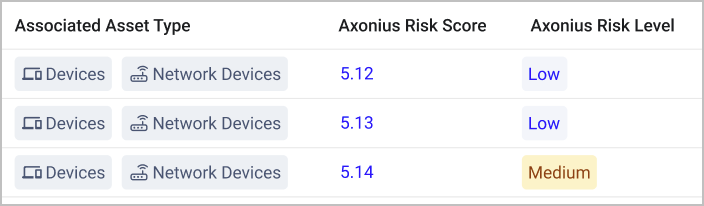
Users can now create Risk Scores for sub-assets. A sub-asset is a filtered view of a parent asset - for example, Network Devices are a sub-asset of Devices; Repositories are a sub-asset of Application Resources; and more.
When users configure a Risk Score for a sub-asset, they can select both score types (per Asset or per Security Finding), and their behavior is the same as the regular asset Risk Scores. When a Risk Score configuration exists on both a sub-asset and its parent asset and they both apply to the same asset or Security Finding, the sub-asset's configured score takes precedence over the parent's at the evaluation stage.
Dynamic Charts Added to Remediation Ownership and Recommended Actions
New dynamic charts were added to the Remediation Ownership and Recommended Actions pages:
On Remediation Ownership, the new charts visualize how the workload is distributed among owners: the number of Security Findings per owner, and the number of Owned vs. Unowned Security Findings in the system.
On Recommended Actions, the charts show the number of actions each remediation owner is responsible for, as well as the distribution of action sub-types.
The new charts provide real-time visual insights and empower security teams to drive 100% accountability across their remediation workflow: track workload distribution, pinpoint unassigned findings, and ensure every recommended action has a clear owner with real-time visual insights.
Axonius Platform New Features and Enhancements
System Settings
The following updates were made to various System settings:
New Network Route Enrichment Settings
Two new global settings are now available for Network Routes enrichment:
- Network Routes Enrichment - Controls whether the Network Routes enrichment pipeline runs during discovery cycles. When this is disabled, the enrichment is skipped entirely.
- Zones to Exclude - Users can now enter zone names whose subnets they want to exclude from Network Routes enrichment. As the enrichment starts, all network assets whose zone matches any entry here are fetched and their CIDR blocks are added to the exclusion list.
New Data Enrichment Setting - Define the Number of Supported Major OS Versions
Under Settings > Enrichment, the following setting was added: Number of Supported Major OS Versions. This setting allows users to define how many recent major OS versions are considered supported for each OS type. Based on this configuration, Axonius populates the Is Supported OS Version Device field, with a default of one supported major version per OS type for any OS type that is not explicitly configured.
Okta Universal Logout Support
Axonius now supports Okta Universal Logout, which allows Okta's Identity Threat Protection (ITP) to immediately terminate a user's active Axonius sessions when Okta detects a security risk, such as compromised credentials or session hijacking. See Configuring Okta Universal Logout.
Adapter and Enforcement Action Updates
New Adapters
The following adapters were added
-
DataDome - DataDome is a bot protection platform that provides real-time detection and blocking of online fraud, account takeover, API abuse, and DDoS attacks across websites and mobile applications. (Fetches: Business Applications, Firewalls)
-
Zentral - Zentral is an endpoint visibility and management platform that provides device inventory, compliance monitoring, and binary authorization for Apple, Linux, and Android endpoints. (Fetches: Devices, Users)
-
Zero Touch - ZeroTouch is a unified endpoint management and security platform that provides real-time device provisioning, patch management, application deployment, and remote endpoint action capabilities. (Fetches: Devices)
Updated Adapters
The following adapters were updated:
- Arnica.io - Improved how repository data is fetched: the adapter now retrieves repository information directly from the
/v1/inventory/reposendpoint instead of aggregating it from findings data. This change provides more accurate and complete repository information.
-
BeyondTrust Password Safe - Added support for OAuth 2.0 Client Credentials authentication in addition to the existing API Key authentication method.
-
Check Point Infinity - Added support for API Key authentication as an alternative to username and password when connecting to a Management Server.
-
Cisco Catalyst Center (formerly Cisco DNA Center)
- Added the option to fetch device license compliance details and Smart Account pool usage metrics by enabling the new Fetch Licenses advanced setting.
- When Fetch Licenses is enabled, the adapter creates License assets and enriches device records with license information, including expiry status, feature license details, and account pool metrics.
-
Cisco Firepower Management Center
- Removed the Fetch ARP table from firewall devices advanced setting. The adapter no longer fetches ARP table data from firewall devices.
- Access and NAT firewall rule assets no longer include a policy device name in their asset ID or firewall name.
-
CrowdStrike Falcon - The Enrich Configuration Assessment with Rule Name advanced setting was renamed to Enrich Configuration Assessment with Rule Information to reflect expanded enrichment capabilities. This setting now enriches configuration assessment findings with additional rule metadata fields, including Recommendation, Rule Group, and Compliance Frameworks.
-
Custom Files - Added an option to set the Last Seen value of Devices or Users to the current time.
-
CyberArk Endpoint Privilege Manager - Added support for ISPSS authentication, enabling customers migrated to the CyberArk Identity Administration platform to connect by configuring the Identity Administration sub-domain and the EPM API application alias.
-
Datadog - Added the Fetch Application Settings advanced setting to fetch account-, user-, and role-level settings as Application Settings assets, including ownership, domain and IP allowlists, governance notifications, identity providers, roles, sensitive-data scanning, and user settings.
-
- Added Application Settings as a new asset type, providing visibility into security-related configuration settings for Boomi environments, including authentication methods, user privileges, and SCIM provisioning status.
- Added a new Account ID connection setting that is required to enable Application Settings fetching. Existing connections that do not include an Account ID continue to fetch only Devices data.
-
DNSFilter - Added an option to filter fetched devices by Organization ID when connecting the adapter.
-
Efecte - Added an advanced setting to exclude Efecte application installation records marked as hidden from Installed Software.
-
Elasticsearch - Added the Fetch application settings advanced setting to fetch cluster settings, API keys, users, and security settings as Application Settings assets.
-
- Added the State field for devices, which indicates whether a device is active or archived.
- Added a new advanced setting to exclude devices with no or empty Last Seen value from fetch operations.
-
Google Cloud Platform (GCP) - Added the option to fetch Google Cloud Artifact Registry repositories as Compute Services assets.
-
Harness - Added the option to fetch Application Settings from Harness, providing visibility into authentication mechanisms, role assignments, LDAP configuration, session timeouts, and security policies.
-
- Added Gateway as a new selectable option in the "Devices type to fetch" advanced setting. When selected, Gateway records are added as Axonius Devices.
- Added an option to fetch extended details for Gateway devices, such as serial number, model, operating system, status, group name, and uplink information. When enabled, each Gateway uses one additional API call. The number of concurrent gateway detail requests is configurable, with accepted values from 1 to 25.
- Added a new API rate limit setting to control the maximum number of API calls per second.
-
- Added support for populating the Device Manufacturer field from the physical server chassis data when that information is available. Added a new advanced setting to use HPE as a fallback Device Manufacturer value for devices whose primary chassis does not report a manufacturer.
-
IFS Assyst - Added the option to parse records whose Status Name starts with "App" as Business Applications instead of Devices by enabling the new Parse Records with Status Name Starting with "App" as Business Applications advanced setting.
-
Keycloak - Added the Fetch Application Settings advanced setting to fetch realm settings and user-profile settings as Application Settings assets.
-
Microsoft Entra ID (formerly Azure Active Directory) and Microsoft Intune - Added two new options to the Fetch users Last Sign-In - How to fetch advanced setting:
- Non-interactive sign-ins, such as token refreshes, background service authentications
- Automated processes, in addition to interactive sign-ins, providing
The new options provide more complete visibility into user activity and application usage.
-
RUCKUS Cloud - Added JWT Token authentication as an alternative to the existing API Key authentication method. When JWT Token is selected, users provide an OAuth2 Client ID and Client Secret to authenticate with RUCKUS Cloud. Existing connections using API Key authentication continue to work without any changes.
-
- Added the option to fetch Saviynt accounts as Account/Tenant assets from the
getAccountsendpoint. When enabled, you can optionally limit fetched accounts to those with an Active status. - Added the option to fetch entitlement details for each user from the
getEntDetailsforUsersendpoint.
- Added the option to fetch Saviynt accounts as Account/Tenant assets from the
-
ServiceNow - Replaced the Parse operational status advanced setting with Custom Parsing rules. Existing connections that had this setting enabled are automatically migrated during upgrade to two equivalent custom parsing rules - one for the Operational Status field and one for the Asset Operational Status field -with no manual action required.
This is what your Devices Custom Parsing section should look like after migration: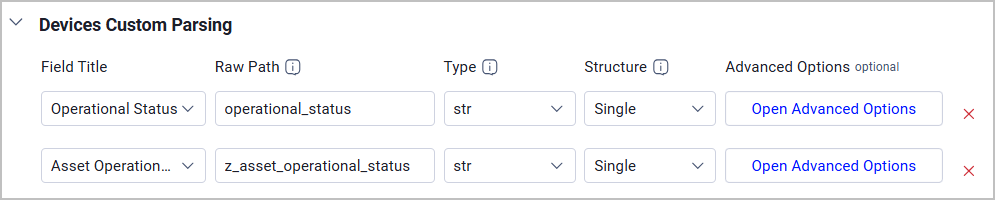
-
SonarQube Server - Added the option to fetch Application Settings from SonarQube, including account, user, and role configuration settings.
-
Splunk - Added an Owner field to the Fetch Schema Mapping connection configuration setting, enabling you to specify the Splunk owner namespace for each search or report to control which user context is used when fetching data.
-
Tripwire Enterprise - Added support for fetching Users assets from Tripwire Enterprise, including user account details, role assignments, and group memberships.
-
Wiz - Extended the List of tags to parse as fields advanced setting to support all asset types in addition to Devices and Users, allowing you to promote specific Wiz tags into standalone queryable fields across all asset types fetched by the adapter.
New Enforcement Actions
The following Enforcement Actions were added:
-
AWS - Create Security Hub Findings - Creates one AWS Security Hub finding for each asset returned by the selected query or selected on the relevant asset page. Running the action again updates the existing finding instead of creating a duplicate.
-
Infoblox - Update Device with DNS Records - Enriches devices in the selected query with Infoblox DNS records (A Records and Host Records) that resolve to their IP addresses, and writes the matched records to the device's Infoblox adapter record as Linked DNS Records.
-
LogicMonitor - Add Device - Adds a device to LogicMonitor for assets returned by the selected query or assets selected on the relevant asset page.
-
Microsoft MECM - Deploy Application to Devices - Deploys a named MECM application to the devices returned by the selected query by replacing the target collection's device membership with the selected device hostnames and creating the application deployment.
Updated Enforcement Actions
The following Enforcement Actions were updated:
-
Cherwell - Update Tickets - Updated to allow setting the incident Status field to a user-configured value (such as Resolved or Closed), enabling incidents to be resolved or closed directly from Axonius.
-
Ivanti Neurons for ITSM - Create Incident - Updated the action to use field mappings instead of individual incident-field inputs. Use Map Axonius Fields to Required Ivanti Neurons ITSM Incident Fields for required values and Map Axonius Fields to Additional Ivanti Neurons ITSM Incident Fields for optional or custom values.
-
Send Assets Data - TRIMEDX Device Vulnerabilities - Updated to automatically pull device vulnerability data from the Network Inspector adapter, removing the need for manual field mapping configuration. The Source Device ID Field and Map Axonius fields to TRIMEDX device vulnerability fields parameters have been removed.
-
Send Assets Data - TRIMEDX Vulnerabilities - Updated to automatically pull vulnerability data from the Network Inspector adapter, removing the need for manual field mapping configuration. The Source Device ID Field, Vulnerability ID Field, and Map Axonius fields to TRIMEDX vulnerability fields parameters have been removed.
-
Jira Service Management - Update Tickets - Updated to correctly assign tickets for on-premises Jira instances. Previously, the action only worked for Jira Cloud instances. This fix allows users with on-premises Jira deployments to update ticket assignees through the enforcement action.
Fixed Bugs
Authentication & Connectivity
-
Azure Key Vault - Fixed authentication failures in sovereign cloud environments (Azure US Government, Azure China, and Azure Germany) by ensuring that credentials authenticate against the correct cloud-specific login authority instead of always defaulting to the public cloud endpoint.
-
CyberArk Privileged Account Security - Added the Allow Concurrent Sessions connection setting, which enables concurrent session support during adapter authentication to prevent the CyberArk vault from force-logging off the Axonius session mid-fetch when it detects multiple simultaneous sessions from the same API user. This is added both to the adapter and the vault.
-
GitLab - Fixed connection handling for gitlab.com cloud (SaaS) instances to skip the Account Settings endpoint that returns HTTP 403 for cloud tenants.
-
Op Innovate WASP - Fixed the API authentication header format to match the vendor's required
Authorization: Api-Keyspecification, resolving 401 Unauthorized errors that prevented the adapter from connecting successfully. -
Palo Alto Networks Cortex Xpanse
- Fixed the users fetch API endpoint URL, which was missing the required v1 path segment and caused fetches to fail with a 500 error.
- Fixed an issue where enabling the "Fetch confirmed vulnerabilities from external services" setting without the required Attack Surface Testing license caused the entire fetch to abort; the adapter now displays a warning and continues fetching the remaining data.
Data Accuracy
-
BeyondTrust Remote Support - Update Jump Client - Fixed the enforcement action so it uses the correct field name in the update payload and no longer requires a Jump Group ID, ensuring the action successfully updates Jump Client records.
-
Eracent - Fixed an enrichment key mapping issue that prevented device records from matching correctly with asset endpoint records, ensuring device enrichment data is accurately associated during fetches.
-
EUVD Vulnerability Enrichment - Fixed the affected products field in EUVD vulnerability data to strip whitespace, apply consistent title-case formatting, and remove duplicate entries from the list.
-
FortiManager - Fixed policy package fallback for VIP device association so that network routes are correctly captured for publicly exposed hosts when a policy package has no scope member.
-
Jira Service Management - Update Tickets - Fixed the enforcement action to correctly assign tickets on on-premises Jira instances by using the correct field for on-premises deployments instead of the field applicable only to Jira Cloud.
-
Kaseya VSA - Fixed a device count mismatch caused by an incorrectly formatted OData query parameter, and improved async request retry logic to prevent duplicate requests and ensure consistent and complete device counts.
-
Nightfall DLP - Added the Nightfall agent to the agent names enumeration so that it appears correctly in the query builder's "Agent Versions: Name" dropdown, enabling users to filter and build queries for devices with the Nightfall agent installed.
-
Op Innovate WASP - Added parsing of AWS ARN resource IDs from the vendor API into the cloud ID field, enabling cloud-resource correlation for assets managed by Op Innovate WASP.
-
Salesforce - Fixed a false positive where the "Maximum Invalid Login Attempts" policy was incorrectly flagged as non-compliant when configured with the Salesforce-recommended value of 3.
-
ServiceNow - Fixed duplicate CMDB records that occurred when table data was fetched using different display-value modes.
-
Static Analysis - Fixed false-positive CVE matches caused by versionless OS CPE values incorrectly overriding versioned CPE values from other adapters, improving CVE detection accuracy.
-
watchTowr - Fixed the domain status filter so that selected statuses are passed to the API as individual values rather than as a comma-separated string, ensuring that only domains matching the selected statuses are returned.
-
- Removed the REGION option from the adapter's selectable asset types to prevent region data from being incorrectly classified as device assets.
- Fixed an issue where the Normalized Cloud Provider field retained a stale value after the Cloud Provider field was explicitly cleared.
Data Completeness
-
Adapter Advanced Settings - Resolved an internal server error (HTTP 500) that was returned when retrieving advanced settings for certain adapter configurations via the API.
-
Arnica.io - Updated the adapter to fetch repository data directly from the Arnica inventory API instead of aggregating it from findings, providing more complete and accurate repository information including repositories with no associated findings.
-
Blancco Management Portal - Fixed a pagination error caused by requesting 100 records per page, which exceeded the API's maximum allowed page size of 10 and prevented records from being fetched.
-
BMC Atrium CMDB - Added support for fetching software data from BMC_Product instances in CMDB; enable the new Fetch Software (BMC_Product) advanced setting to retrieve application software inventory data for devices.
-
CyberArk Privilege Cloud - Updated the Account Activities fetch to skip HTTP 500 responses instead of aborting, allowing the fetch to complete even when individual account activity requests encounter server errors.
-
Dell TechDirect - Fixed enrichment action failures caused by missing adapter routing data, ensuring that enrichment operations complete successfully.
-
DNSFilter - Added an optional Organization ID connection field. When configured, the adapter fetches only devices belonging to the specified organization; when left empty, the adapter fetches all devices accessible to the authenticated account.
-
Halcyon - Fixed the adapter to automatically fetch devices and users from all accessible tenants in multi-tenant environments.
-
HAProxy - Fixed an issue where the HAProxy adapter was collecting data via API v2 routes instead of v3 routes for frontends, frontend ACLs, binds, and SSL certificates. Existing HAProxy connections will now automatically use the correct API v3 routes during fetches.
-
Microsoft Azure - Added heartbeat count and last heartbeat timestamp fields to virtual machine records when the heartbeat fetch is enabled.
-
Netskope - Added the option to fetch application events concurrently. When enabled, the adapter divides the application-event fetch period into four-hour time ranges and processes up to four ranges at the same time, ensuring all SaaS application event data is retrieved.
-
Nudge Security - Fixed a pagination issue where the start index was incorrectly set to 0 instead of 1, causing the first page of results to be skipped and resulting in incomplete data fetches.
-
One Identity Safeguard - Added the Active Directory SID field to enable SID-based asset correlation.
-
Preferred Subnet Calculation - Added support for /29 CIDR masks in automatic subnet calculation, ensuring that assets on /29 networks receive the correct subnet value in the Preferred Subnet field.
-
Qualys Cloud Platform - Updated the vulnerability knowledge base fetch to include QIDs from both fixed and active detections, resolving cases where some CVEs were missing from fetched vulnerability data.
-
Salesforce - Update Ticket - Fixed the Salesforce Update Ticket enforcement action to correctly read and apply field values from both the Additional Fields JSON and Ticket Additional Settings field mappings when updating Salesforce cases, resolving failures that occurred when only the Ticket Additional Settings tab was used to configure field mappings.
-
Snyk - Fixed an error that caused the adapter to fail consistently when processing application resources with the "Ignore security findings that were fixed more than X days ago" setting configured.
-
watchTowr - Fixed a pagination issue where the IP addresses endpoint would stall and fail to return data for pages beyond the first, preventing all IP address records from being fetched.
Parsing
-
Broadcom Layer7 API Gateway - Fixed XML parsing of service and user list responses to correctly handle the nested item and resource element structure returned by the RESTMAN API, restoring data retrieval for services and users.
-
Orca Cloud Visibility Platform - Removed the non-functional 'Orca tags to parse as fields' and 'Parse all Orca tags as fields' advanced settings, which were silently failing to create the expected custom fields.
-
OS Enrichment - Added StorageGRID OS classification so that NetApp appliance nodes reporting StorageGRID operating system strings are correctly identified as StorageGRID instead of being misclassified as NetApp ONTAP.
-
Palo Alto Networks Prisma Cloud Workload Protection - Fixed security finding status parsing so that only recognized status values are applied to findings.
-
SailPoint IdentityIQ - Fixed an issue where dynamic date fields were stored as text strings instead of datetime values; the adapter now correctly identifies and stores date and datetime values, including ISO-8601 timestamps with numeric UTC offsets.
-
ServiceNow - Fixed incorrect parsing of the 'Assigned To Business Unit' field, which was experiencing the same parsing issue previously resolved for the Physical Location field.
-
SQL Server - Fixed the SQL query sanitization logic to correctly handle SQL keywords that appear as string literal values in WHERE clauses, preventing valid read-only queries from being incorrectly blocked.
-
Tenable Vulnerability Management - Fixed a user parsing error that occurred when Tenable returned unrecognized permission codes, ensuring users with unknown codes are correctly marked as non-admin rather than causing a parsing failure that left affected users without admin status.
-
Trellix ePolicy Orchestrator (ePO) - Fixed an issue where small integer values, such as status codes, were incorrectly classified and displayed as datetime values in dynamic query fields. Status codes and other small numeric values are now correctly identified as integers.
-
Zabbix - Fixed operating system classification so that FreeBSD devices are correctly identified as FreeBSD rather than Linux.
Performance
-
BitSight Security Ratings - Added retry handling with bounded exponential backoff for HTTP 503 responses, making transient service-unavailable errors more resilient and improving the reliability of data fetches.
-
Microsoft Entra ID (formerly Azure Active Directory) and Microsoft Intune - Refactored the Entra user query helper to use the adapter instance instead of multiprocessing, resolving slow discovery where the adapter appeared connected but did not complete fetching data.
-
runZero - Optimized data processing by filtering API responses to retain only fields used by the adapter before storage, significantly reducing fetch time for environments with large datasets.
-
Tenable Vulnerability Management - Increased POST retry attempts and reduced the per-page request size for web application data to prevent incomplete fetch results caused by transient gateway errors.