
Axonius Release Notes 9.0.4
Release Date: August 9th, 2026
These Release Notes contain new features and enhancements added in version 9.0.4.
Exposures New Features and Enhancements
The following new features and enhancements were added to Exposures:
New Fields for Axonius Threat Intelligence
The data sourced from Axonius Threat Intelligence was enhanced with multiple new fields. These fields provide risk-prioritization context based on observed exploitation activity, including numeric and textual threat scores, exploitation trends, attacker geography and objectives, key CVE lifecycle events, and more. Specifically, the new Exploitation Status field offers five severity-based categories, from "Under Active Exploitation" to "No Known Exploit", which helps prioritize CVEs based on real-world exploitation evidence - not only CVSS or severity.
Risk Score Management - New Design and Capabilities
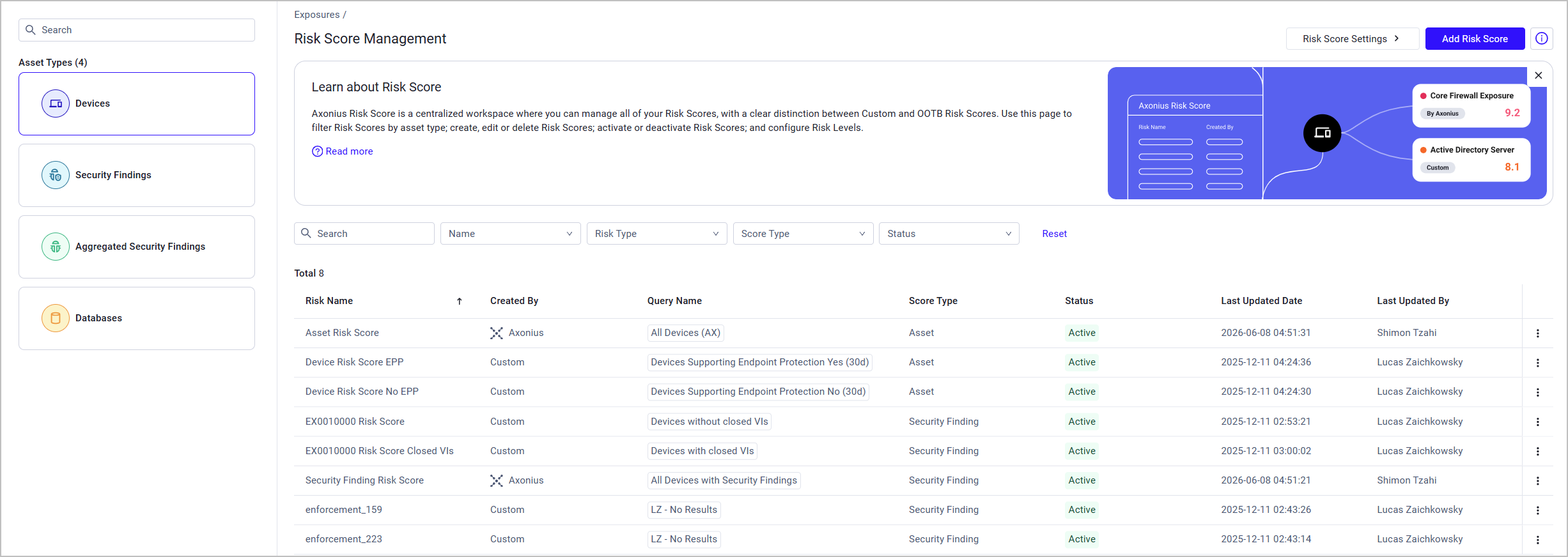
The Risk Score Management page was transformed into a centralized hub where users can create and manage Risk Scores in a more streamlined, efficient way. The updated experience introduces:
- A dedicated Asset Types side panel, allowing users to easily navigate between different Risk Scores based on their asset type.
- A Risk Score table that provides a clear, full-screen view of all Risk Scores and their basic information such as name, creator, score type, last update date, and more. Users can click on a Risk Score row to view its details, and use row-level actions to edit, delete, activate, or deactivate it.
- Direct access to creating new Risk Scores and Risk Level settings.
- An ability to search and filter Risk Scores.
Cyber-Physical Assets – New Features and Enhancements
The following new features and enhancements were added to Axonius Cyber-Physical Assets
Device Intelligence Hub
The new Device Intelligence Hub pairs Axonius Network Inspectors' passive discovery with protocol-aware active queries, safely enriching incomplete OT device profiles without disrupting physical processes.
- Flags devices with incomplete profiles so you can target them for enrichment.
- Lets you create a query-based scan job that defines the exact scope, adapter, and schedule — run once or on a recurring schedule, during your approved maintenance windows only.
- Supports rate-controlled active scanning for BACnet (UDP 47808), Modbus (TCP 502), and CIP (TCP 44818), built on an extensible framework so more protocols will be added over time.
- Provides a centralized, auditable fetch history across all scanning adapters.
Axonius Platform New Features and Enhancements
Assets Pages
The following features were added to all assets pages:
Export and Import Dashboards on Asset Profile Pages
Users can now import and export asset profile page dashboards - from one asset profile page to another. This is relevant mainly when you have more than one environment and need to move dashboards between environments.
- Importing dashboards is only possible between assets of the same type.
- Dashboards should be exported/imported in JSON format.
- Dashboards are imported from a selected file on your machine.
Query Management
The following new features and enhancements were added to Queries:
Imported Queries Inherit Source Folder Visibility
When importing queries into a different data scope folder, Axonius previously forced all imported queries to a "Public" status, bypassing any existing privacy settings. Now, imported queries automatically inherit the privacy status (Private, Public, or Shared) of the destination folder, ensuring sensitive queries are not accidentally exposed during import.
Adapter Pages and Adapter Interface
The following updates were made to the common functionality across all adapters:
Adapter Interface
Increased the maximum value for the Repeat scheduled discovery every (hours) adapter discovery scheduling setting from 24 to 48 hours. Users can now configure adapters to run discovery cycles up to once every 48 hours.
Action Center - Workflows
The following new features and enhancements were added to the Action Center:
Bulk Run for Workflows
Workflows now process multi-asset queries and events in a single bulk run, rather than triggering a separate run for each asset. One run can process a large amount of assets without hitting the workflow execution ceiling
All assets are available together in the Workflow context, enabling users to loop through them individually using a Repeat For Each node, or aggregate results across all assets into a single action - for example, opening one ticket for all affected devices.
Run History now displays the number of assets processed per run. Action nodes show a new Partially Successful status when results are mixed across assets, along with per-asset statuses (Successful, Failed, In Progress). Mid-workflow Event nodes include new asset continuation options — All, Subset, and Intersection - that control which assets proceed when an event fires during a bulk run.
System Settings
The following updates were made to various System settings:
Azure Key Vault - Selecting a Cloud Environment
Customers who use the Azure Key Vault integration must select now the Azure Cloud Environment their instance is deployed in. Each cloud environment has different DNS suffixes for Key Vault access, and Axonius automatically constructs the correct Key Vault URI based on the selection. The possible cloud environments are: Public, US Government, US Government DoD, China, or German.
New Adapters
-
A10 ThreatX - ThreatX (by A10 Networks) is a managed API and web application protection platform (WAAP/WAF) that provides Layer 7 threat detection and blocking via behavioral analytics, bot protection, DDoS mitigation, and API discovery. It operates as a reverse-proxy SaaS. (Fetches: Devices, Load Balancers, URLs)
-
BD Alaris - BD Alaris is an IV pump management platform that provides device inventory, firmware tracking, and connectivity monitoring for infusion pump controllers and their serially attached modules via a dedicated MS SQL database. (Fetches: Devices)
-
Blancco Management Portal - Blancco Management Portal is a data erasure management platform that provides centralized visibility, certified audit reporting, and device lifecycle tracking for enterprise IT decommissioning workflows. (Fetches: Devices)
-
GlobalSign GCC - GlobalSign GCC is a certificate management platform that provides SSL certificate ordering, issuance, and lifecycle query capabilities through a SOAP-based web service API. (Fetches: Certificates)
-
HarfangLab - HarfangLab is an EDR/EPP platform that provides endpoint behavioral analysis, threat detection, and agent/sensor management across servers and workstations. (Fetches: Devices)
-
Personio - Personio is an HR platform that provides personnel data management, absence tracking, and organizational structure for workforce administration. (Fetches: Users, Organizational Units)
-
Philips PerformanceBridge Focal Point - Philips PerformanceBridge Focal Point is a clinical surveillance management server that aggregates patient monitors, PIIC hosts, access points, and access point controllers across healthcare facilities via SNMP. (Fetches: Devices)
-
Tanium Reporting - Tanium Reporting is a Tanium platform module that provides custom report creation, data exploration, and export of endpoint inventory, software, and compliance data sourced from the Tanium Data Service. (Fetches: Devices, SaaS Applications, Aggregated Security Findings)
-
TXOne StellarOne - TXOne StellarOne is an OT endpoint security platform that provides centralized management, policy enforcement, and threat protection for industrial control system endpoints. (Fetches: Devices)
Updated Adapters
-
- Added support for fetching DNS zones as Network Services, providing visibility into zone configurations including zone type, DNSSEC status, and DNS records.
- Added support for fetching GTM domains as Load Balancers, providing visibility into global traffic management configurations including balancing methods and datacenter details.
-
Auth0 - Added support for fetching Application Settings from the Auth0 Management API, enabling you to monitor and validate security-critical tenant configuration settings directly in Axonius, including authentication requirements, session policies, and legacy API controls.
-
Axonius BACnet Scanner - Added support for query-driven scanning, enabling the adapter to scan devices that match a saved query in Axonius instead of requiring manually specified IP address ranges.
-
Axonius CIP Scanner - Added support for query-driven scanning, enabling the adapter to scan devices that match a saved query in Axonius instead of requiring manually specified IP address ranges.
-
Axonius Modbus TCP Scanner - Added support for query-driven scanning, enabling the adapter to scan devices that match a saved query in Axonius instead of requiring manually specified IP address ranges.
-
BMC Helix ITSM - Added support for connecting through an IBM API Connect API gateway, enabling OAuth2 client credentials authentication to obtain access tokens and route API requests through the gateway's service path.
-
Citrix ADC - Added the option to fetch Network Address Translation (NAT) rules from NetScaler appliances. When enabled, the new Fetch NAT Rules advanced setting retrieves both inbound (DNAT) and reverse (SNAT) NAT rules as Network Route assets.
-
- This adapter now fetches Tickets.
- Added a new Remove Mapped Keys connection parameter that removes source field names after they are mapped to Axonius canonical field names, preventing duplicate fields from appearing when source CSV field names differ from canonical names.
- Added new license identifier mappings for related vendor name and name fields to improve automatic field mapping when importing license data.
- Fixed a duplicate entry in the license identifiers where the license type identifier was listed twice.
- When selecting SMB Share as a File Source, users can now download only the file with the latest last-write timestamp from the specified path.
-
Delinea Privileged Remote Access - Added the option to enrich user records with last login data from the Entity User endpoint, populating the Last Seen field when the advanced setting is enabled.
-
Elasticsearch - Increased the maximum value of the Hour range filter advanced setting from 72 hours (3 days) to 168 hours (7 days), allowing users to fetch logs from a longer time range.
-
F5 BIG-IP iControl - Added the option to fetch virtual server availability status, including availability state, enabled state, and status reason, when the relevant advanced setting is enabled.
-
FortiDLP - Renamed the adapter from NextDLP to FortiDLP to reflect the product's acquisition by Fortinet and current branding, and updated the vendor to Fortinet. Existing connections continue to work without any configuration changes.
-
Genesys Cloud - Added the option to fetch role assignments, division information, and permission grants for users via a new optional Role Assignments advanced setting.
-
- Added a new optional Occurrence Details advanced setting that, when enabled, fetches detailed occurrence information for each incident, including file paths, commit SHAs, repository names, author details, and exact line and column locations where secrets were detected.
- Updated the Host Name or IP Address connection setting tooltip to clarify how to configure the domain for both SaaS and self-hosted GitGuardian deployments.
-
Google Workspace (G Suite) - Added a new required OAuth scope (
https://www.googleapis.com/auth/admin.directory.device.chromebrowsers.readonly) for the Enrich Browser Extensions advanced setting. Users who have enabled this setting must grant the additional scope to continue using this feature. -
Intrigue - Added a new optional Domain connection setting that allows users to override the default API domain (https://api.intrigue.io) to connect to custom Intrigue instances.
-
JFrog Xray - Added a new Violations Pagination Page Limit advanced setting that allows users to configure the maximum number of pages fetched from the Violations endpoint. The default limit was increased from 1,600 pages (40,000 violations) to 10,000 pages (250,000 violations).
-
JumpCloud - Added an option to fetch Primary User from the
Assets/Devicesendpoint. When enabled, the adapter fetches primary user information from the/v2/assets/devicesAPI endpoint and, if standard system user data is unavailable, uses it to populate the Last Used Users field for devices. -
LeanIX - Added support for connecting through a Layer7 API Gateway, enabling OAuth 2.0 client credentials authentication to route LeanIX API calls through the gateway's service endpoint.
-
Lexsynergy - Added an API Version connection setting to support both API v1.9 (default) and API v1.10, enabling connections to environments running the newer API version.
-
Men&Mice DNS Management - Added session-based authentication support via a new Use Session Authentication connection setting, for environments where Basic Authentication is disabled on the server.
-
- Added the option to enrich Front Door CDN Profile data with origin group details, including origin group names, host names, origin host headers, enabled states, and Azure origin IDs, via a new Enrich Front Door CDN Profile Data advanced setting.
- This adapter now fetches Azure Static Web Apps as Application Services, including fields such as Default Hostname, Custom Domains, Public Endpoint URL, SKU Name, SKU Tier, and Staging Environment Policy.
-
Microsoft Entra ID (Azure AD) and Microsoft Intune - Added the option to parse the serial number of Apple devices fetched from Intune as the Asset Name.
-
Palo Alto Networks Panorama - Added a new API Key Generation Method connection setting that allows administrators to select the GET method exclusively for API key retrieval, preventing account lockouts on systems with strict failed-login policies.
-
Paycom - Added support for fetching supervisor details for employee records, enriching user records with the manager's email address.
-
Qualys WAS - Added the option to enrich URL assets with IP addresses using DNS lookup. When enabled, Axonius performs a DNS lookup on each web application's domain and populates the IP Addresses field on the URL asset.
-
Remedio (formerly Gytpol) - Updated the adapter display name and logo to reflect the vendor's rebranding from Gytpol to Remedio. The adapter now appears as "Remedio (formerly Gytpol)" in Axonius. Existing connections continue to work without any changes.
-
SailPoint IdentityIQ - Extended the Fields to exclude from fetch and Fields to include exclusively from the fetch advanced settings to also apply to data retrieved via the Fetch SailPoint Accounts as Users feature.
-
- Added the option to fetch Groups as identity assets. When enabled, users are enriched with their associated group memberships.
- Added the option to fetch Security Roles as identity assets. When enabled, users are enriched with their admin role assignments. Enabling this option adds a per-user API request and may increase fetch time on large tenants.
-
ServiceNow - Enhanced Application Services enrichment with nested field linking support, automatically populating additional reference fields including vendor, managed-by user, cost center, assignment group, and associated enabling services without requiring additional user configuration.
-
Silverfort - This adapter now fetches service accounts as Users, including risk assessment fields such as privilege level, usage patterns, and risk scores. Service accounts are now enabled by default.
-
- Added mutual TLS (mTLS) authentication support with new optional Certificate file and Private key file connection settings, enabling client certificate-based authentication with Splunk servers that require mTLS.
- Added a new required Verify SSL connection setting to control SSL certificate verification for HTTPS connections.
-
SQL Server - This adapter now fetches Business Applications as assets, enabling users to import business application data from Microsoft SQL Server, MySQL, Oracle, and PostgreSQL databases.
-
Tenable.sc (SecurityCenter) - Removed the Run background fetch every X hours advanced setting. background fetch jobs are now triggered by the Axonius platform scheduler instead of a user-configured interval.
-
Tenable Vulnerability Management
- Changed the default value for the Parse OS from network fingerprinting for unauthenticated devices advanced setting from False to True for new adapter connections. This enables OS information from network fingerprinting data to be populated by default for devices that were scanned without authentications.
- Improved Linux kernel OS string parsing for more accurate OS detection of Linux-based devices.
-
- Added the Fetch Application Control Rulesets advanced setting, which enriches device records with Application Control Ruleset details including ruleset name, type, version, and creation and modification timestamps. This setting requires Fetch policy details to be enabled.
-
Tripwire Enterprise - Updated the password field label to "Password / API Token" to clarify that both traditional passwords and API tokens are supported for authentication.
-
UKG Pro (Ultimate Software UltiPro) - Added a Custom Parsing advanced setting that allows users to define custom field mappings from raw API data, creating new fields with custom names and optional prefixes.
New Enforcement Actions
-
Delinea Platform - Delete User - Deletes users from the Delinea Platform for assets returned by the selected query or selected on the relevant asset page. For cloud users, the action permanently deletes the user; for federated (AD-synced) users, the action removes them from the cloud without deleting them from the source directory service.
-
Figma - Update Group - Updates group attributes in Figma via the SCIM v2 API, including display name, external ID, and group membership.
-
Figma - Update User - Updates user attributes in Figma via the SCIM v2 API, including user name, active status, display name, job title, seat type, and other profile fields.
-
Halo - Link Device to User - Links a Halo device asset to a user account in HaloITSM.
-
LogicMonitor - Delete Device - Deletes a device from LogicMonitor for assets returned by the selected query or assets selected on the relevant asset page.
Updated Enforcement Actions
-
CrowdStrike Falcon - Add or Remove Tagging Group to/from Assets - Added gateway selection support, allowing users to execute the action through a specific gateway when the CrowdStrike Falcon API is not directly accessible from the Axonius instance.
-
HTTP Server - Send to Webhook - Added a new optional Map Axonius fields to custom field names parameter that allows users to rename Axonius field keys in the JSON payload sent to the webhook, enabling the payload to match the destination system's expected schema without requiring additional transformation logic.
-
Ivanti Neurons for ITSM - Create Computer - Replaced individual hardcoded parameters (Name, Status, Serial Number, and others) with a JSON-based field mapping approach that allows users to map any Axonius device field to any Ivanti field, including custom fields.
-
Ivanti Neurons for ITSM - Update Computer - Replaced individual hardcoded parameters with a JSON-based field mapping approach, allowing users to choose exactly which Axonius fields to send to Ivanti and to map to Ivanti custom fields.
-
Make LeanIX Factsheets - Added support for API Gateway connections when using stored credentials from a LeanIX adapter connection that has API gateway routing enabled.
-
Microsoft AD - Change Asset OU, Microsoft AD - Disable Assets, Microsoft AD - Enable Assets, Microsoft AD - Remove Assets from AD and Microsoft AD - Add or Update LDAP Attributes of Assets - These actions are now restricted to assets fetched by the specified Active Directory adapter connection configured in the action settings. This enables domain scoping in multi-domain environments.
-
Microsoft MECM - Add or Remove Assets to/from Collection (PS-based) - Added new Port and Use SSL for WinRM Connection parameters, allowing users to customize the WinRM session port and SSL settings when connecting to the SCCM server.
-
Splunk - Delete User, Splunk - Delete Assets, Splunk - Create and Update Assets - Added mutual TLS (mTLS) authentication support with new optional Certificate file and Private key file connection settings, enabling client certificate-based authentication with Splunk servers that require mTLS.