
Axonius Release Notes 9.0.5
Release Date: August 24th, 2026
These Release Notes contain new features and enhancements added in version 9.0.5.
Axonius Platform New Features and Enhancements
Dashboard
The following new features and enhancements were added to the Dashboards:
Chart Enhancements
Consistent CSV Export Across All Chart Types
CSV export is now available for all visualization types — Bar, Pie, Donut, Stacked Bar, Line, Table, and Venn — across all compatible widgets (Pivot Chart, Query Intersection, Query Comparison, Field Segmentation, Adapter Segmentation, Matrix Data, Field Summary, and Query Timeline). Exported files now consistently include:
-
Both count and percentage values for applicable visualizations
-
A Total row as the first data row beneath the header
-
Full numeric values instead of abbreviated notation (for example, 4000 instead of 4K)
-
Column headers in title case
-
File names in the format:
Axonius - [Chart Name] - DD Month YYYY, HH.MM AM/PM.csv
Assets Pages
The following features were added to all assets pages:
Streamlined Custom Data Editing
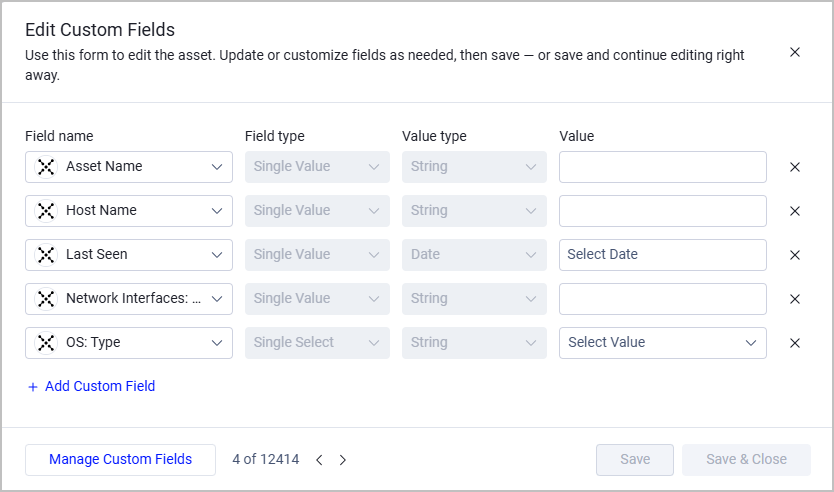
Creating and editing custom fields across your assets is now faster and more consistent. A new, unified editing experience replaces the previous experience, which contained separate Create and Edit dialogs. The new panel opens directly from the asset table. Fields displayed are based on your active table columns, so you see exactly what's relevant to your current view.
Three new options are available:
-
Create a new asset - After you enter values, you can either save your entry and exit the dialog, or save your entry and immediately open a fresh editor, so you can create multiple assets in sequence without interruption.
-
Edit a single asset - When you are done editing custom fields on the asset, you can either save your entry and exit the dialog, or save your entry and immediately open a fresh editor, so you can edit multiple assets in sequence without leaving the editor.
-
Bulk edit - Select multiple assets and update shared fields in a single action; only fields you fill in are changed, leaving all other field values untouched.
Clearing a field's value removes that field from the asset on save.
Query Wizard
IP Range Filter for IPv4 Fields
Query filters for IPv4 fields now include a new Range operator, allowing users to search for assets with IP addresses that fall within a specified From-To range.
Adapter Pages and Adapter Interface
The following updates were made to the common functionality across all adapters:
SSL Certificate Verification
Updated the default value for SSL certificate verification (Verify SSL) from disabled to enabled for all new adapter connections. This security enhancement ensures SSL certificates are verified by default when connecting to external systems. Existing connections are not affected and retain their current settings.
Adapter Parallel Connection Fetching
Axonius now supports parallel connection fetching for select adapters. A new optional Adapter Discovery Configuration setting, Number of connections to fetch in parallel, lets users control the number of connections an adapter processes simultaneously. Parallel connection fetching can improve performance when an adapter has multiple connections configured. The following adapters are currently supported: Claroty CTD, F5 BIG-IP iControl, Infoblox DDI, Salesforce, VMware ESXi and vSphere.
Note:
This setting applies to scheduled discovery only; manual per-connection fetches are not affected.
Activity Log
Impersonation Visibility in HTTP Activity Logs
HTTP activity logs now include an Impersonated by field for actions taken during an impersonation session. Previously, logs attributed all actions to the impersonated user, making it difficult to determine who actually performed them. Both the acting user and the impersonated user are now clearly recorded for every action taken during impersonation.
System Settings
The following updates were made to various System settings:
OAuth 2.1 Support for Service Accounts
Service accounts now support OAuth 2.1 as an authentication method in addition to the existing API key and secret option. Administrators can configure the authentication method per service account from the service account drawer. When OAuth 2.1 is selected, a client ID and client secret are generated; access tokens are issued via the /api/oauth2/token endpoint and are invalidated automatically when credentials are reset or a new token is generated.
Monthly Scheduling Options for Historical Snapshots
Historical snapshot scheduling now supports monthly recurrence options in addition to the existing interval and day-of-week settings. Users can schedule snapshots to run on:
- The first day of the month
- The last day of the month
- A specific calendar day of the month, for example, the 5th or 15th
Data Scopes: Separate Adapter-Level and Connection-Level Selection
When configuring a data scope by adapter connections, selecting all individual connections for an adapter no longer automatically upgrades to an adapter-wide selection. The behavior is now as follows:
- Selecting individual connections — scopes access to those specific connections only; new connections added to the adapter in the future are not automatically included
- Selecting the adapter (parent checkbox) — includes all current and future connections for that adapter
Existing data scope configurations are unaffected by this change.
Data Scopes: Include-Only Field Filtering by Adapter
Field-level adapter scoping in data scopes now supports an Include only mode alongside the existing Exclude mode. When set to Include only, the data scope shows only fields retrieved through the selected adapters. Labels and tooltips for both field-level and asset-level adapter scoping have been updated to more clearly distinguish their scope:
- Define asset access by adapter connection — filters assets based on the selected adapter connections
- Define field access by adapter connection — filters fields retrieved through the selected adapters; supports both Include only and Exclude modes
Existing configurations are unaffected by this change.
New Vulnerability Enrichment Source - GitHub Advisory Database
Added the GitHub Advisory Database as a new CVE enrichment source. To enable it, navigate to Settings > Enrichment > CVE Enrichment Settings, and toggle on Enrich software vulnerabilities from GitHub Advisory Database. Then, select which advisories to fetch:
- Fetch GitHub Reviewed Advisories - Fetch curated advisories (recommended)
- Fetch GitHub Unreviewed Advisories - Fetch community-contributed advisories
Data enriched from GitHub Advisory Database includes CVSS v3/v4 scores, EPSS data, affected package information with version ranges, CWE IDs, and exploit availability details.
File Support when Connecting an Adapter Using an Enterprise Password Manager
Sensitive file fields such as client certificates and private keys can now be retrieved from a configured password manager (vault) instead of being uploaded directly to Axonius. This new capability extends the existing vault integration to include file fields in addition to password fields.
The supported file fields are:
- Client certificate files (.pem)
- Client private key files (.pem)
- Advanced configuration files (JSON/XML)
- Other credential files marked with the credentials format
Network Routes Enrichment Configurations
Added the Workstation OS Types to Exclude setting to the Network Routes Enrichment Configurations section in Global Settings which allows you to exclude specific device operating systems from Network Routes enrichment to improve performance in large environments.
Version Numbering
The version number shown on the About page (Settings) has been updated - the build/patch number is now displayed separately under a "Cumulative Update" label (e.g., "9.0.5, Cumulative Update 10") instead of as a fourth version digit, so customers can more easily see when only bug fixes (no new features) have been applied.
Adapter and Enforcement Action Updates
New Adapters
-
Black Duck Polaris- Black Duck Polaris is an application security platform that offers static analysis, software composition analysis, and dynamic testing across application portfolios and projects. (Fetches: Aggregated Security Findings, Application Resources, Business Applications, SaaS Applications)
-
Cisco IoT Control Center (IoTCC) - Cisco IoT Control Center is a connectivity management platform that offers device activation, usage monitoring, rate plan administration, and security controls for cellular IoT deployments. (Fetches: Devices)
-
Invicti Platform Cloud- Invicti Platform is a dynamic application security testing platform that provides proof-based web application and API vulnerability scanning. (Fetches: Aggregated Security Findings, Business Applications, SaaS Applications, URLs)
-
Mashery (Boomi Cloud API Management) - Mashery is an API management platform that provides API lifecycle management, access control, security monitoring, and analytics for enterprise APIs and connected applications. (Fetches: Application Services, Business Applications, Organizational Units, Secrets, Security Roles, URLs, Users)
-
Mindtickle - Mindtickle is a sales enablement platform that offers sales readiness training, content management, conversation intelligence, and coaching tools for revenue teams. (Fetches: Groups, Users)
-
Smart SD- Smart SD is an IT asset inventory and site management platform that provides asset tracking, site membership enrichment, and incident ticketing support. (Fetches: Devices)
-
StrongDM- StrongDM is a Privileged Access Management platform that delegates access to databases, servers, clusters, websites, and clouds through a proxy network. (Fetches: Devices)
Updated Adapters
-
AppViewX CERT- Added the option to enrich certificates with cipher, TLS version, and port scan data from AppViewX discovery jobs by enabling the new Enrich certificates with discovery data advanced setting and providing a Discovery Name.
-
Azure Defender for IoT - Added an option to parse MAC addresses that Azure Defender for IoT has identified with as uncertain (“Guess” MAC addresses). When enabled, all MAC addresses are parsed, including those marked as "Guess" by Azure Defender for IoT's detection algorithms. When disabled, only MAC addresses with confirmed certainty are parsed.
-
Certero - Added the option to disable the fetching of Certificate assets via a new Certificate advanced setting, which is enabled by default.
-
Cisco Adaptive Security Appliance (ASA) - Added a new Connection Method setting that allows users to choose between the Legacy REST API and the HTTP Interface method, which is required for connecting to Cisco Firepower 2100 and 2120 hardware models where the REST API endpoints are not available.
-
Cisco Identity Services Engine (ISE) - Added support for connecting to Cisco ISE through an API Gateway, allowing users to route API requests through Layer7 or IBM API Connect gateways in environments where direct connections are not possible.
-
CrowdStrike Falcon - The CSPM Account / Tenants Settings advanced setting now includes a new account type: OCI (Oracle Cloud Infrastructure account). Select this option to enable ingestion of OCI tenancy name, tenancy OCID, home region, user information, and CSPM Status.
-
- This adapter now fetches Software assets from CSV and JSON files, enabling users to bring software inventory data from external sources into Axonius.
- Updated the label for the custom URL parsing advanced setting from "URL Custom Parsing" to "Domains & URLs Custom Parsing" to better reflect the type of data it parses. The functionality remains unchanged.
- Added an option to configure a custom field delimiter for CSV files, allowing users to specify any single character (such as a semicolon or pipe) instead of the default comma.
- SMB file retrieval now supports Distributed File System (DFS) paths. When enabled, the system can resolve DFS referrals to access files on network shares that use DFS namespaces, both standalone and domain-based.
-
Dynatrace - Added the option to recategorize Dynatrace PaaS HOST entities (Kubernetes, OpenShift, and AWS ECS Fargate) as Container assets instead of Devices or Compute Services.
-
Exabeam - Added a new Fetch Application Settings advanced setting that enables the adapter to retrieve user account status and role configuration data from the Exabeam Access Control API as Application Settings assets.
-
ExtraHop Reveal(x) 360 - Added a new advanced setting to prevent the adapter from automatically classifying devices as network infrastructure based on their ExtraHop role values.
-
FortiManager - Added an option to fetch "Where Used" relationship data for NAT object types, including Central SNAT entries, IP Pools, Virtual IPs (VIPs), and VIP Groups.
-
FortiSASE- Added a new advanced setting, Vulnerable Endpoints, that enriches devices with CVE vulnerability findings detected by FortiSASE's security scanner, including CVSS scores, severity ratings, and detected file paths.
-
- Added support for fetching Security Roles and Permissions assets when the Role Assignments advanced setting is enabled.
- Added the Role Assignments advanced setting, which enriches users with their assigned roles and permissions and creates separate Security Role and Permission assets.
-
Google Cloud Platform (GCP)- Added an option to fetch Google Cloud Secret Manager Secrets, to retrieve secret metadata from Google Cloud Secret Manager across your GCP projects. When enabled, the adapter retrieves secret configuration details such as replication policies, rotation schedules, and expiration settings.
-
Google Security Operations SIEM REST
- Added a new UDM - Aggregated endpoint that retrieves aggregated UDM event data based on custom queries, enriching device assets in Axonius.
- Added the option to enable custom parsing to define how to parse specific fields from raw data fetched by the adapter.
- Changed the default time range for the UDM endpoint from all historical data to the last 30 days when the number of days field is left empty.
- Added the option to enable or disable the Assets endpoint through advanced settings.
-
Hexnode - Added the Fetch Installed Software advanced setting, which when enabled fetches installed application data for each device from the Hexnode applications endpoint and populates Software assets in Axonius.
-
HPE GreenLake for Compute Ops Management- Added support for fetching devices from the GreenLake Devices Management API, expanding device discovery to include devices that may not be visible through the Compute Ops Management interface alone.
-
IFS Assyst - Added a new Fetch Application-to-Server Relations advanced setting that retrieves application-to-server relationships from IFS Assyst and populates the Installed Software field on device assets.
-
Infoblox IPAM and DHCP- Added support for fetching Application Settings assets, allowing users to monitor DHCP and DDNS security configuration settings across Infoblox infrastructure.
-
Ivanti Neurons for ITSM - Added the Network Adapters advanced setting, which when enabled fetches detailed network interface card (NIC) information for each configuration item, enriching devices with IP addresses, MAC addresses, subnets, manufacturer details, and PCI device identifiers.
-
MarkMonitor - Added DNS resolution support for domain assets, enabling the adapter to resolve domain names to IP addresses and CNAME chains. The new Resolve DNS Records advanced settings group includes options to enable resolution, configure a query timeout in seconds (default: 2), and choose between the system DNS resolver or the Quad9 public DNS resolver.
-
-
Reclassified multiple Azure resource types to more appropriate asset categories to improve accuracy in asset inventory and policy targeting. For the full, updated list, see Microsoft Azure Services Fetched as Assets.
Note
You might need to update your queries, charts, and any other resources that use Microsoft Azure assets due to the reclassification.
-
Enriched Kubernetes Agent Pool assets with additional configuration details, including node count, VM size, autoscaling settings, OS type, and Kubelet configuration.
-
Enriched Kubernetes Pod assets with additional details, including pod phase, IP addresses, namespace, container images, and container statuses.
-
This adapter now fetches Azure AI Search services, Azure AI Bot services, and Machine Learning online endpoints as Compute Services assets.
-
Added support for fetching File Systems assets, including Azure File Shares and Azure NetApp Volumes.
-
This adapter now fetches URL assets from Azure Front Door and CDN profiles, including hostname, base URL, domain, provisioning state, enabled state, and resource state information.
-
-
Microsoft Entra ID (formerly Azure Active Directory) and Microsoft Intune- Added an option to fetch URL assets from service principal and application data, providing visibility into application URLs associated with service principals in your Entra ID tenant.
-
Nucleus Security - Added the Page Size advanced setting to control the number of items fetched per API request when retrieving devices and findings.
-
Omnissa Workspace ONE (Airwatch) - Added the option to use the device's friendly name (DeviceFriendlyName) as the Asset Name in Axonius instead of the device's reported hostname.
-
PagerDuty - Added a new advanced setting, Fetch Licenses, that fetches PagerDuty license information and links licenses to users. This setting requires an API token with the licenses OAuth scope and is only available when Axonius SaaS Management is activated.
-
Palo Alto Networks Cortex XSOAR - Added the Incident Lookback Days advanced setting, which allows you to specify how many days back to fetch incidents from, giving you better control over the incident data retrieved.
-
Proofpoint Security Awareness Training - Added the Phishings Extended advanced setting, which when enabled fetches extended phishing simulation event details for users, including source IP addresses, browser information, and WHOIS geolocation data (city, state, country, ISP, and organization).
-
- Added the User Custom Parsing for flexible field mapping from Saviynt user data.
- Added the advanced settings option to fetch detailed user access entitlement information, including entitlement type, display name, description, and associated accounts, through a new Fetch access details entitlements advanced setting.
- Added Page size and Enrichment batch size advanced settings to optimize API performance and control concurrent enrichment batching for large Saviynt deployments.
-
SD Elements - Added the option to enrich project data with task information, including task status, priority, and assigned user, by enabling the new List Tasks by Project advanced setting.
-
SecurityScorecard- Added the option to fetch Software assets by fetching ASI asset details that retrieves CPE (Common Platform Enumeration) strings from open port data discovered by SecurityScorecard's ASI API, and parsing them into Software records, including software name, version, and vendor.
-
ServiceNow- The "Use asset raw device field as Asset Name" advanced setting was removed from the adapter. Existing connections with this setting enabled will be automatically migrated during the platform upgrade to an equivalent, Custom Parsing rule that maps the asset raw field to the Asset Name built-in field.
-
SNMP - Added support for IP ranges and CIDR notation in the Host Name connection setting, allowing a single adapter connection to discover and fetch data from multiple SNMP devices.
-
Snowflake Data Warehouse- Device Custom Parsing is now supported, allowing you to map custom columns from Snowflake database views to Axonius device fields, including correlation fields such as hostname, IP address, MAC address, and serial number.
-
- Added support for fetching data from Splunk saved search reports in addition to search macros.
- Nine separate Splunk Search Macros List connection settings were removed from the system and replaced with a new unified Fetch Schema Mapping field that maps search macros and reports to Axonius asset types.
- Added support for fetching Application Settings assets from Splunk Enterprise, providing visibility into security-critical configuration settings including authentication, encryption, session management, and cluster configuration.
- Tanium Comply- Added an option to specify how many days back to fetch vulnerabilities, which helps reduce the volume of vulnerability data retrieved during adapter connections.
-
ThousandEyes - Added support for fetching Application Settings assets from ThousandEyes, starting with CloudTrail integration status for AWS accounts, enabling you to identify accounts with disabled CloudTrail.
-
Twilio - Added the option to fetch Twilio account information by enabling the new List Accounts advanced setting.
-
VMWare ESXi and vSphere - Added a new Discovery Scheduling setting, “Number of connections to fetch in parallel”, that allows up to 3 ESXi/vSphere connections to be fetched simultaneously. This improves fetch performance for environments with multiple vCenter servers or ESXi hosts.
New Enforcement Actions
-
IFS Assyst CMDB - Create Item - Creates a new configuration item in IFS Assyst CMDB for assets returned by a selected query or assets selected on the relevant asset page.
-
IFS Assyst CMDB - Update Item - Updates an existing configuration item in IFS Assyst CMDB for assets returned by a selected query or assets selected on the relevant asset page.
Updated Enforcement Actions
-
Jira Service Management - Create Insight Asset per Asset- Added the option to check whether an asset already exists in Jira by name before creating it, updating the existing asset instead of creating a duplicate.
-
- Replaced the legacy JSON-based field mapping with a new visual Map Fields wizard that supports dropdown-based target field selection, data transformations, and static prefix or suffix concatenation.
- Added CSV import and export support for field mappings, including new concat_prefix and concat_suffix columns.
- Reorganized advanced settings into three categories: Main Asset Configuration, Related Asset and IRE Configuration, and Legacy Options.
Adapter Renaming
- UKG Pro (Ultimate Software UltiPro) was renamed UKG Pro to reflect the vendor's current UKG Pro branding.
Fixed Bugs
Authentication & Connectivity
-
1E - Fixed a bug where certificate-based authentication failed when the primary token endpoint was unavailable and the adapter fell back to the Tachyon endpoint. The adapter now correctly regenerates a fresh JWT token for the fallback authentication attempt, ensuring successful authentication through the Tachyon endpoint.
-
CyberArk Privilege Cloud - Fixed an ISPSS authentication issue where the adapter was set to refresh the token on a hardcoded 30-minute interval, while the API issues tokens that expire after 15 minutes. This mismatch caused authentication failures and no data being returned after the token expired. The adapter now reads the actual token expiry time from the API response and calculates the refresh interval dynamically.
-
Enforcement Center - Fixed a bug where Enforcement Center actions configured with an explicit gateway would ignore that gateway setting when using stored adapter credentials. Actions now correctly route through the configured gateway.
-
Microsoft Defender for Endpoint (Microsoft Defender ATP)- Fixed an issue where a connection failure during a device fetch was silently swallowed by the adapter, causing the fetch to be reported as successful with 0 devices instead of surfacing the error. Connection failures are now properly logged and reported in the Fetch Events log.
-
SharePoint - Send CSV- The enforcement action now returns detailed error messages when execution fails, enabling users to diagnose and resolve failures instead of receiving a generic parsing error.
-
- Fixed an issue where SaaS application data could not be fetched for customers using ZIdentity or OneAPI (OAuth) authentication, because the adapter was calling an endpoint that does not accept Bearer token authentication.
- The adapter now displays a specific, actionable error message when a 401 Unauthorized response is returned while fetching SaaS applications, directing users to verify that the API user has Shadow IT Analytics permissions.
Data Accuracy
-
Business Applications - Fixed an issue where clicking the device count link in the Business Applications module produced a "Could not create filter" error.
-
Cisco Advanced Malware Protection (AMP) - Fixed an issue where the adapter was incorrectly populating the Public IP field with the organization's outbound NAT/WAN IP address rather than the individual asset's public-facing IP, causing non-exposed assets to appear as internet-reachable. The adapter now validates IPs and only classifies genuinely public IPs in the Public IP field.
-
CrowdStrike Falcon - Fixed an issue where the Hostname and Platform fields in alerts fetched as incidents were empty or missing. These fields are now populated with improved accuracy using multiple data sources and fallback logic.
-
Custom Files - Fixed a bug where empty strings in list fields were stored as null values instead of being excluded, causing queries for non-empty fields to incorrectly return assets with no actual field data.
-
Elasticsearch - Fixed an issue where osquery hardware serial numbers from conflicting Elasticsearch documents were incorrectly merged into a single device record, causing physically distinct devices to be over-correlated into a single Axonius asset.
-
Fortinet FortiGate- Fixed an issue where the FortiGate adapter did not correctly populate access ranges for firewall policies with Virtual IP (VIP) matching enabled, causing FortiGate devices to be excluded from computed network routes in the Exposures engine and resulting in incorrect exposure classifications.
-
Ivanti Security Controls - Fixed an issue where CVEs were incorrectly surfaced as active vulnerabilities for patches whose scan state was Installed, Found, or Informational. To resolve this, an option to add vulnerabilities only for missing patches was added, restricting vulnerability data to patches with a MissingPatch scan state only.
-
Jamf Pro - Fixed an issue where the adapter was incorrectly classifying the device's last known IP address as a Public IP, causing non-exposed assets to appear as internet-reachable. The adapter now stores this value in a dedicated field instead of the Public IP field.
-
Jira Service Management (Service Desk) - Fixed a bug where Enforcement Center actions would write reference attribute values as literal strings instead of resolving them to the correct JSM object references when the value was already in object key format (for example, "ITSM-5186"), resulting in incorrect data being written to the CMDB.
-
- Fixed an issue where Azure Container App assets were incorrectly classified as Containers instead of Compute Services, causing correlation failures with assets from other sources. Existing queries, saved searches, and enforcement actions that filter for Azure Container Apps using the Containers asset type will need to be updated to reference Compute Services.
- Added a Fully Qualified Domain Name field for Azure Container App assets.
-
Microsoft Defender for Endpoint (Microsoft Defender ATP) - Expected 404 responses for machines not found in the missing KBs endpoint were incorrectly surfacing as Error-level events in Adapter Fetch History, causing customer confusion despite no functional impact. These responses are now logged at the appropriate warning level.
-
Microsoft Intune - Improved the error messages displayed when the Delete Managed Device enforcement action fails, so that errors now clearly distinguish between authentication or configuration issues and devices that are not enrolled in Microsoft Intune.
-
Network Exposures - Fixed an issue where devices with only private IP addresses were incorrectly marked as internet-exposed based on Azure Network Security Group (NSG) rules.
-
Network Routes - Fixed an issue where Azure devices with Network Security Group (NSG) rules allowing inbound internet traffic were incorrectly classified as "Unknown" instead of "Internet Exposed." The Network Routes engine now evaluates Azure NSG rules to correctly determine internet exposure for Azure assets.
-
Palo Alto Networks Panorama - Address groups with the same name defined in multiple Panorama device groups were incorrectly sharing CIDR resolutions, causing firewall rules to display incorrect associated addresses. The adapter now resolves address groups independently per device group so that each group's local definitions take precedence correctly.
-
Rapid7 InsightVM - Fixed an issue where the adapter was incorrectly populating the Software Name field in vulnerability data by extracting names from CVE identifiers, resulting in inaccurate values such as "msft" appearing in the Vulnerability Repository. The adapter no longer derives software names from vulnerability IDs.
-
SentinelOne - Physical devices running VMware software were incorrectly classified as virtual machines when VMware host-side network adapters (VMnet) were present on the device. The adapter now correctly identifies such devices as physical.
-
Static Analysis
- Fixed false-positive CVE associations where CVEs targeting specific vendor software were incorrectly matched to unrelated applications with similar names due to partial product name overlap. CVE matching now handles generic product name components more accurately to prevent these incorrect associations.
- Fixed an issue where all devices running CylanceProtect were incorrectly flagged for CVE-2018-10722 regardless of the installed version. The Static Analysis engine now validates that CylanceProtect version numbers are numeric before evaluating CVE version boundaries, preventing false positive CVE associations.
-
Trellix ePolicy Orchestrator (ePO) - Fixed an issue where stale System Encryption State and Disk Status values persisted on a device asset after the Drive Encryption query returned an empty result.
-
VMWare ESXi and vSphere - Fixed an incorrect CPU count calculation where the adapter was reporting the socket count instead of the total core count for virtual machines configured with more than one core per socket. ESXi/vSphere devices now display accurate CPU and core counts.
-
Zscaler Web Security - SaaS application counts were calculated incorrectly when the server did not return a count value. Application counts are now calculated accurately.
Data Completeness
-
Akamai Kona WAF - Fixed an issue where property version data was not being fetched due to an invalid API pagination parameter, resulting in 400 Bad Request errors from the Akamai PAPI API.
-
Amazon Web Services (AWS) - Route53 DNS records were missing or appearing as duplicates in the asset inventory due to incorrect asset ID generation. Each Route53 DNS record now has a unique asset ID based on the hosted zone and DNS name, ensuring all records appear as separate assets.
-
Cisco - Added a new Fetch Interfaces as Devices advanced setting that controls whether switch interfaces from SSH connections are created as separate device assets; when disabled, interface data is still used to enrich the switch device.
-
- Resolved an issue where the adapter was limited to fetching a maximum of 5,000 vulnerabilities per host. The adapter now uses a global prefetch approach with cursor-based pagination to retrieve all Spotlight vulnerabilities, ensuring complete vulnerability data for hosts with more than 5,000 vulnerabilities.
- Resolved a pagination limitation that prevented fetching more than 10,000 alerts when fetching alerts as incidents. The adapter now uses cursor-based pagination to retrieve all alerts without an offset cap.
-
CyberArk Privilege Cloud - Fixed an issue where users fetched from static role members were silently dropped and never saved, due to a key name mismatch in the adapter's ID instructions. Users from static role members are now correctly fetched and assigned asset IDs.
-
Data Scopes API - Fixed an issue where the cloud account restriction status and device sub-entity settings fields were missing from the Data Scopes API v2 response, preventing API clients from accessing these configuration values.
-
HTTP Server - Send to Webhook - Added a new Only include entity fields parameter that excludes system metadata from the webhook payload, sending only the fields configured in your query columns.
-
Logitech Sync - Fixed an issue where the adapter returned zero devices due to incorrect pagination key paths that did not match the actual API response structure.
-
Qualys - Add Tags to Host Asset - Fixed an issue where the action failed with a 400 error when multiple assets in the same enforcement run shared the same tag name. After the first asset created the tag successfully, all subsequent assets with the same tag name caused the action to fail. The action now detects when a tag already exists in Qualys and reuses its ID instead of attempting to create a duplicate.
-
Red Hat IDM - Added a new LDAP Search size limit advanced setting to address fetch truncation caused by the server's configured LDAP size limit. When configured with the server's size limit value, the adapter automatically re-queries using alphabetic prefix filters to fetch all devices and users beyond the server's default limit. This prevents incomplete asset data when your environment has more records than the LDAP server returns in a single query.
-
ReliaQuest GreyMatter - Fixed an issue where the asset name and publicly accessible status were not being retrieved from the GreyMatter API, causing these fields to be missing from device records.
-
runZero - When a vulnerability contained multiple CVEs, only the primary CVE appeared as a separate row in the security findings table, with secondary CVEs buried in a sub-field and not individually queryable. Each CVE in a multi-CVE vulnerability now appears as its own individual entry in the security findings table.
-
ServiceNow - Fixed an issue where fetch error events did not identify which tables encountered errors, making it difficult to diagnose fetch failures. Error messages now include the names of the affected tables.
-
Tenable Vulnerability Management - Web Application Scanning (WAS) vulnerability fields, including severity, VPR score, family, and solution, were missing from WAS vulnerability records when the system-level deduplication flag was enabled. These fields now populate correctly.
-
Vicarius - Fixed an issue where enabling the Fetch Installed Software setting caused fewer devices to be returned compared to fetches with the setting disabled. The adapter now stores all devices to a local database before enriching them with installed software data, ensuring the complete device inventory is returned regardless of the setting.
-
VMware NSX - Fixed an issue where the Applied To field was not populated for NSX firewall sections that define group associations at the rule level rather than the section level, causing Group IDs to be missing from many firewall rules.
-
Wiz - Fixed an issue where the adapter fetch failed with a None type error when advanced configuration settings were enabled but left at their default values without explicitly entering a value.
Parsing
-
Admin By Request - Delete Computer - Fixed an error that caused the Delete Computer action to report a failure even though the deletion had completed successfully on the Admin by Request side. The action now correctly handles the empty response body returned by the Admin by Request API on successful deletions, instead of attempting to parse it as JSON.
-
Dynatrace - Fixed incorrect parsing of the local IP address field, which previously split the IP address string into individual characters instead of storing it as a single IP address. Also corrected the hostname resolution priority so that the local hostname now takes precedence over other detected hostnames for more accurate device identification.
-
GEM One - Fixed multiple field name mismatches between the adapter's field mappings and the actual GEM One API response, ensuring that fields such as IP addresses, key expiration dates, device serial numbers, and encryption key details now parse correctly.
-
Ivanti Security Controls - Installed software version and architecture information were not parsed from the combined product name string (for example, "VMware Tools 13.1 x64"), leaving the Version field empty in the Axonius UI. Software names are now parsed to separately populate the name, version, and architecture fields.
-
Palo Alto Networks Cortex XSOAR - Fixed the severity field data type, which was incorrectly configured as a string instead of an integer. Severity values are now correctly typed, enabling accurate filtering, querying, and write-back operations via enforcement actions.
-
PDQ Inventory - Fixed an issue where Windows Task Schedules data added via the Tables To Fetch setting was not populated in device fields because the adapter was reading incorrect JSON keys from the API response. Task name, folder, next run time, and status fields now populate correctly after the next fetch.
-
ServiceNow - Fixed an issue where the Physical Location field displayed raw JSON objects instead of human-readable location names. The field now correctly shows the location display name.
-
Sysdig - Secure - Fixed vulnerability and package data parsing for the Sysdig Secure API v1 scan results format. The adapter now correctly handles the updated API structure where vulnerability data is organized as a dictionary with reference-based lookups, and where the field
resourceDetailshas been renamed torecordDetails. Vulnerability and package data is now populated accurately for containers and hosts. -
Trend Micro Vision One - Fixed an issue where hostname, asset name, IP address, and MAC address fields were not being parsed even when the data was present in the API response. These fields are now populated from all available data locations in the API response.
Performance
-
GitHub - Fixed an issue where HTTP 429 rate limit errors that occurred on the asynchronous enrichment path (for example, dependency graph SBOM requests) were silently dropped with no notification to the user. The adapter now emits a fetch warning event listing the URLs and repositories that were skipped when rate limit retries were exhausted, giving administrators visibility into rate-limiting impact on their data.
-
- Added a new Test Grades Filter advanced setting that lets you select which security test grades to fetch, defaulting to non-passing grades (F, D, C, and B) to reduce fetch duration and memory usage.
- Added an All option to the Cloud Asset Types advanced setting to fetch every cloud resource type at once instead of selecting individual types.
- Resolved extremely long fetch times by implementing concurrent page retrieval with up to eight workers, optimizing page sizes per endpoint, and switching Discovery Evidence fetches to cursor-based pagination.
- Fixed an issue where a timeout error on the Action Items endpoint caused incomplete data to be silently stored without any error notification in the UI.
-
Microsoft Entra ID (formerly Azure Active Directory) and Microsoft Intune
- Improved the performance of group app role assignment fetching by switching to batch API requests, reducing the risk of timeout failures in environments with a large number of groups.
- Fixed redundant credential retrieval from external vault systems (such as CyberArk, HashiCorp Vault, and Thycotic) during adapter connection. Credentials are now retrieved only once per connection, reducing unnecessary network calls to vault systems and improving adapter connection times.
-
Netskope - Improved the performance of the Netskope adapter for large deployments by increasing the device pagination limit from 400 to 5,000 devices per page, significantly reducing the number of API calls required during discovery.
-
Palo Alto Networks Cortex XDR - Added automatic rate limit handling to the Palo Alto Networks Cortex XDR adapter. When the API returns an HTTP 429 (Too Many Requests) response, the adapter now reads the Retry-After header and automatically retries the request after the appropriate delay, preventing fetch failures caused by API rate limiting.
-
Wiz - Resolved fetch timeouts and rate limit errors during network exposure fetches by implementing automatic retry with exponential backoff for HTTP 429 responses, request pacing at five requests per second, and per-asset-type querying so that one failing type does not abort the remaining fetch.