
Axonius Release Notes 8.0.22
Release Date: April 19th 2026
These Release Notes contain new features and enhancements added in version 8.0.22
Exposures New Features and Enhancements
The following new features and enhancements were added to Exposures:
New Risk Score Normalization Logic
To ensure consistent Risk Score ranges and prevent dashboard misalignment, Axonius now applies a specific normalization logic based on the calculation method and input field types of each Risk Score.
- When a Risk Score is calculated per Security Finding Per Asset, all input field values are normalized to a 0–10 range.
- When a Risk Score is calculated per Asset, all input field values are normalized to a 0–100 range.
It is important to note that some field values are pre-normalized by Axonius, while other values must be normalized properly by the user.
Axonius Platform New Features and Enhancements
Dashboard
The following new features and enhancements were added to the Dashboards:
Chart Enhancements
Percentage View is Available for Charts
The ability to view chart values as relative percentages rather than absolute values has been added. In the Presentation section of the chart configuration pane, under Value type, select Percentage. When using threshold colors, the maximum value is 100%.
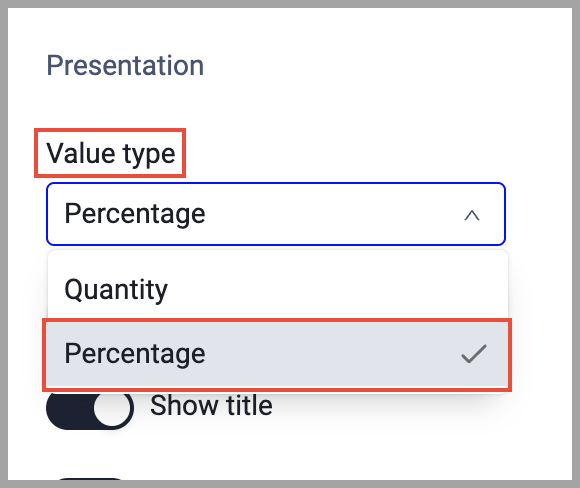
This capability was added to the following charts and visualizations:
| Chart | Visualization |
|---|---|
| Pivot | Bar |
| Pie | |
| Stacked | |
| Query Intersection | Venn |
| Pie | |
| Query Comparison | Bar |
| Pie | |
| Table | |
| Adapter Segmentation | Bar |
| Matrix Data | Stacked |
General Updates
Dark Theme
Axonius now natively supports Dark Theme.
If the browser is set to dark mode, Axonius automatically matches this setting.
From their Avatar the user can now select Browser, dark or light, so that Axonius will now be displayed in a way that matches your preference and system.
Workflows
New Events
The following Events were added:
- Microsoft Teams - Message Received Event - Adds a workflow trigger event for messages received in Microsoft Teams. This event allows workflows to be triggered when users send messages to Teams channels or direct messages via a Microsoft Teams Outgoing Webhook.
New Adapters
- Adaptive Security - Adaptive Security is a security awareness and phishing simulation platform that provides human risk management, employee training, and behavioral analytics to reduce social engineering and email-borne threats. (Fetches: Users, Devices)
- AudioCodes OVOC - AudioCodes OVOC is a unified communications management platform that provides voice, video, and messaging services for enterprise communications. (Fetches: Devices)
- DefectDojo - Defect Dojo is an open-source application security assessment and vulnerability management platform. (Fetches: Aggregated Security Findings, SaaS Applications, Application Services)
- DryRun Security - DryRun Security is an AI-native application security solution that provides contextual code analysis and automated security insights to detect and mitigate vulnerabilities during software development workflows. (Fetches: Application Resources)
- MPS Monitor Cloud - MPS Monitor Cloud is a platform that provides remote monitoring and management of print and multifunctional device fleets via a web portal and APIs. (Fetches: Devices)
- Netwrix Endpoint Protector - Netwrix Endpoint Protector is an agent-based DLP solution that provides device control, content-aware protection, and enforced encryption for endpoint security management. (Fetches: Devices, Users)
- Odoo - Odoo is an integrated suite of applications that provides ERP, CRM, inventory, and accounting modules to manage business operations efficiently. (Fetches: Devices, Aggregated Security Findings, Users, Roles, SaaS Applications)
- Seraphic Security - Seraphic is a browser security platform that provides zero-trust access controls, secure web gateway capabilities, and protection against web-based threats and SaaS application risks. (Fetches: Devices)
- Sublime Security - Sublime Security is an email security platform that provides detection and response for phishing and email threats using signals, automation, and security workflows. (Fetches: Users)
Updated Adapters
- 1E - This adapter now supports certificate-based JWT authentication, meeting 1E version 9.x requirements.
- Arnica.io - Changed asset parsing to classify Arnica assets as Repositories instead of Devices.
- Abnormal Security - The time filter on this adapter is now by hours instead of by days.
- Akamai Application Security - Renamed adapter from Akamai API Security to Akamai Application Security.
- Aruba Mobility Master - Parsed SSID (Essid field) from the Aruba Mobility Master API for improved wireless access point information.
- Bishop Fox - Added the Activities endpoint for API version 5 to provide updated vulnerability assessment data.
- Bitdefender GravityZone Business Security - Added an option to fetch missing patches and parse them into the Security Findings table on the Devices page
- Claroty xDome - Added advanced configuration option to use device name as hostname instead of DHCP hostname.
- Cloudflare DNS - Cloudflare Spectrum applications are now fetched as domains and URLs for network route visibility enhancement, instead of as devices.
- Entuity - This adapter now supports API Access Token authentication in addition to the existing User Name and Password authentication method. This allows users in SAML-only environments to authenticate using an API Access Token instead of traditional credentials.
- EfficientIP SOLIDserver DDI - Added the option to parse DNS Records as Domains and URLs for improved network visibility.
- Exabeam - Added the option to fetch Users as assets.
- ForeScout CounterACT - This adapter now supports parsing hostnames from the Macintosh Hostname field (
mac_hostname). - FortiManager - Added API Key based authentication to the adapter.
- Google Cloud Platform (GCP) - Added support for fetching Google Cloud DNS Managed Zones as separate assets with domain and DNS record information.
- HPE Aruba Networking ClearPass Policy Manager - Improved extended data fetch performance by implementing pagination with days filter to control data retrieval scope.
- IBM Maximo - API Key Authentication can now be used for this adapter.
- Jira Service Management (Service Desk) and Jira Service Management (Service Desk) Fetch Tickets - These adapters now support the option to provide a list of ticket IDs and enrich them with membership data
- Microsoft Azure - The adapter no longer fetches Machine Learning Web Services.
- Oracle Cloud - Added the option to fetch OCI tenancies as assets.
- Outpost24 - Added support for XMLAPI Application Token (APPTOKEN) authentication method that automatically exchanges tokens for temporary REST API access.
- Palo Alto Networks Panorama - This adapter now fetches certificate data.
- Palo Alto Networks Prisma Cloud - Added an option to fetch and parse Azure AD Member objects as Users instead of Devices, with field mapping for Azure-specific user attributes.
- PDQ Inventory - Added new Advanced Configuration section called Custom SQL Queries that allows customers to define their own SQL queries against the PDQ SQLite database with automatic results joining to devices.
- PingFederate - The Ping Federate adapter now supports fetching Application Services (data stores) and CA Certificates through two new optional advanced settings. These additions enable users to retrieve additional certificate data from the Certificate Authority endpoint and collect information about configured data stores in PingFederate.
- Qualys Cloud Platform - Added the option to parse Mac FileVault disk encryption status information into the Hard Drives aggregated field.
- ServiceNow
- Added an option to specify multiple views per single table for greater flexibility.
- Reorganized the Installed Status and Operational Status exclude/include list fields for easier filtering.
- Silverfort - Added support for multiple API key categories in adapter connection to align with Silverfort's latest authentication model requiring separate keys for each endpoint category. Now 5 API keys are required to connect the adapter.
- SmartHub INFER - Added organization ID (org_id) to the connection schema to support authentication and data fetching from multiple organizations.
- SolarWinds Network Performance Monitor - Added a new advanced setting that allows parsing the hostname from the Node Description field.
- Tanium Interact - Added an option to fetch Users from complex Tanium sensor data.
- Tenable.asm - Added an option to use the original Hostname field as the hostname instead of the standard Hostname field.
- Tenable.sc (SecurityCenter)
- Added an option to fetch
last_seendata from Plugin 60035 for mobile repository devices.
- Added an option to fetch
- Tenable Vulnerability Management
- Changed the configuration of heavy field ingestion so that users can select specific fields to ingest.
- Changed the vulnerability severity configuration so that users can select which severities to fetch (multi-select).
- Vulcan Cyber - Implemented more granular export controls to provide finer-grained management of vulnerability export operations. The time filter has changed from "last modified in X days" to "first seen in X years"
- Wiz
- The adapter's Advanced Settings interface was reorganized by grouping related configuration options under collapsible sections. Following this reorganization, sub-options only appear when their parent feature is enabled. This reduces clutter and makes the configuration process more intuitive.
- The default behavior for new connections was adjusted to optimize performance for typical use cases: new connections will not fetch cloud user assets by default. For a new account to fetch cloud users, you must actively selectCloud user asset types to fetch.
- In accordance with the previous change, the Fetch cloud user assets advanced setting was removed.
- ZipHQ - This adapter now fetches Users, Groups, Roles, and Organizational units. Advanced settings filter the data fetched for each of these asset types.
New Enforcement Actions
- Jira Service Management - Notify Issue - Sends Jira-native notifications to team members upon ticket creation via the notify API.
- Palo Alto Networks Panorama - Disable Firewall Rule - Disables security firewall rules directly via the Panorama XML API with optional commit functionality.
- Tenable Vulnerability Management - Add IP Addresses to Tag Value - Appends IP addresses to existing tag values in Tenable Vulnerability Management without overwriting current tag data.
Updated Enforcement Actions
- Microsoft Azure - Send JSON to Azure Storage - Added the option to authenticate with Azure Client Credentials as an alternative to SAS Token.
- HaloITSM - Create or Update Device - The Site ID parameter is now required.
- Qualys Cloud Platform - Add IP Addresses to Asset Group - Extended to support Network entity type and CIDR notation conversion for IP ranges.
- Wiz - Add Tags to Assets - Implemented support for sending asset labels to Wiz when
send_tagsis enabled, without affecting the existing adapter tags behavior. - Tenable Vulnerability Management - Add IP Addresses to Scan - Added the ability to use a gateway.