
Axonius Release Notes 8.0.11
Release Date: January 18th 2026
These Release Notes contain new features and enhancements added in version 8.0.11.
Axonius Platform New Features and Enhancements
Dashboard
Chart Enhancements
Charts of Smaller Sizes
Charts can now be resized to smaller sizes, allowing the creation of dashboards that display more content in a compact space.
Asset Pages
The following features were added to all asset pages:
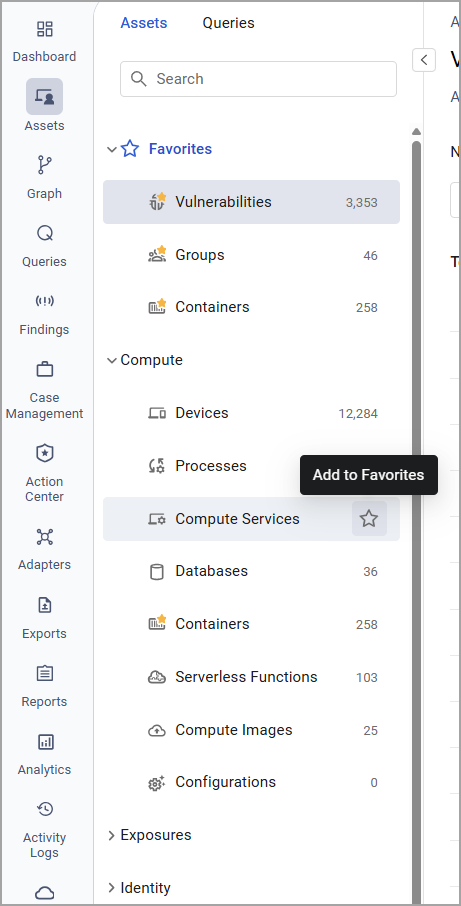
Asset Type Navigation Panel Enhancements
The asset type navigation was improved to make it easier and faster to access the most relevant assets.
- When navigating to the Assets page, all asset type categories are now collapsed by default except for the category containing the selected asset type.
- Users can mark any asset type as a Favorite (per user), or un-favorite any asset type at any time. Favorite asset types appear at the top of the asset type list as well as under their original (native) category.
- If a user has defined favorite asset types, the first favorite asset type opens automatically when entering the Assets screen.
- If no favorites are defined, the default behavior remains unchanged.
- These new functionalities also apply when working in a specific Workspace.
Workflows
Import/Export of Workflows
Workflows can now be imported and exported to share them across environments. The workflow is exported in JSON format, including the complete definition of all nodes. One workflow can be imported or exported at a time. Sensitive information and credentials are not included in the export and will need to be re-entered after import.
Adapter Pages and Adapter Interface
The following updates were made to the common functionality across all adapters:
Adapter Interface
New Active for Enrichment Status
The new 'Active for Enrichment' status for adapters used for enrichment signifies when a CSV or SQL adapter is being used for Custom Enrichment even if the adapter is not active.
System Settings
The following updates were made to various System settings:
New UI for Configuring Role Permissions
The user interface for selecting Role permissions has been updated to a clear and intuitive format. Permission names have been standardized, and a powerful search makes it easy to find the correct permissions. Permissions are now separated into two main categories: Platform Capabilities and Assets, making it easier to navigate to the required permission.
Use an HTTP Proxy to Connect a Compute Node
When connecting a new compute node, an HTTP proxy server can now be used.
Adapter and Enforcement Action Updates
New Adapters
The following new adapters were added:
- Detectify
- Detectify is an external attack surface management platform that provides continuous asset discovery and dynamic automated security testing to identify vulnerabilities across web applications and domains. (Fetches: Devices, Vulnerabilities, SaaS Applications, Domains & URLs.)
- Logitech Sync
- Logitech Sync is a device management platform that provides remote monitoring, configuration, and firmware updates for conferencing and workspace devices via a unified web interface. (Fetches: Devices.)
Adapter Updates
The following adapters were updated:
- Akamai Kona WAF - Added the option to parse Devices, allowing assets to be parsed as either Devices or Domains & URLs based on organizational requirements.
- AlgoSec Firewall Analyzer - Added the option to parse Rules as Network/Firewall Rules assets.
- Amazon Web Services (AWS) - Added the option to enrich SQS Queues with their tags.
- Axonius Users - Added the option to upload client certificate and private key files to support adapter connections when client certificate validation is enforced.
- BMC Atrium CMDB - Added the option to select the forms from which devices will be fetched.
- Censys ASM - Added the option to parse the hostname from the
reverseDNsinstead of from theforwardDNS. - Claroty xDome - Added the option to fetch vulnerabilities.
- Cloudflare DNS - By default, Axonius parses A and AAA records as Devices. Added the option to parse them only as Domains and URLs.
- CrowdStrike Falcon
- Added the option to parse file paths in vulnerability data.
- Added the option to not ingest vulnerabilities that are newer than the device.
- CSV - Expenses - Added the option to match the fetched application names with the names in the Axonius SaaS applications repository.
- Custom Files - This adapter now supports import of XML files.
- Efecte - This adapter now fetches network devices.
- Element Security - Added the option to utilize new API endpoints and pagination parameters to improve the retrieval of asset data.
- ForeScout CounterACT - Added the option to select Switch Hostname in the advanced configuration to prioritize specific hostname parsing for IP Switch assets.
- Google Workspace (G Suite) - Added the option to enrich browser extensions.
- Keyfactor - Added authentication using OAuth.
- Kubernetes - Added the option to enrich containers with ingress rules.
- Lansweeper Cloud - Added the option to configure the export status timeout, increasing the default duration to accommodate larger data fetches.
- Microsoft Azure - Added the option to Fetch Heartbeat Data from LogAnalytics.
- Miro - Added the option to fetch entity settings.
- MuleSoft Anypoint Platform - Added an option to fetch vendor settings.
- Okta - Added the option to enrich Groups with group owners.
- Omnissa Workspace ONE (AirWatch) - Added the option to parse the Friendly Name as the device hostname to improve asset correlation and identification.
- OneTrust - Added the option to fetch Users and Groups as new asset types through the integration of expanded API endpoints.
- Rapid7 Insight AppSec - Added an option to fetch and parse apps as URLs.
- SentinelOne - Added the option to enrich devices with Deep Visibility events: Last User Sessions - Last 24h.
- ServiceNow
- A new configuration menu was added to the adapter’s Advanced Settings section to consolidate and organize the hostname parsing options. The new options include removing the domain suffix from the hostname field, setting fallback hostname values, and additional parsing settings.
- Added an option to select the API version to use in the fetch.
- ServiceNow Tickets Fetch - Added the option to create a Custom (Tickets) Schema under the adapter’s Advanced Settings. It has the exact same functionality as the Custom JSON Schema in the Service Now adapter.
- Shodan - Added the option to fetch vulnerabilities, enabling the enrichment of assets with known security flaws and associated risk data.
- Tenable Vulnerability Management
- Added multiple new plugins to fetch data from.
- Trend Micro Vision One - Added the option to enrich assets with last login timestamps and MITRE ATT&CK adversary behaviors.
- Wiz- The following parsing change was made to the adapter: CONTAINER_IMAGE is no longer parsed as a Container type, but as a Compute Image type.
New Enforcement Actions
The following Enforcement Actions were added:
- Action1 - Deploy Package - Deploys packages to Action1.
- Bindplane - Disconnect Agent - Disconnects agents in Bindplane.
- Zscaler - Add or Remove Custom URLs to/from Category - Adds a custom URL to or removes a custom URL from a custom category in Zscaler, based on the category ID.
Updated Enforcement Actions
The following Enforcement Actions were updated:
- SentinelOne - Add or Remove Tag to/from Assets - Added the option to specify tag scope parameters to fetch and manage site-scoped tags.
- CrowdStrike Falcon - RTR Run Command - Added the option Queue command for offline devices, that adds the "queue_offline" parameter as 'True' when sending the requests.