
Axonius Release Notes 9.0.2
Release Date: July 12th 2026
These Release Notes contain new features and enhancements added in version 9.0.2
Exposures New Features and Enhancements
The following new features and enhancements were added to Exposures:
New Enrichment Source
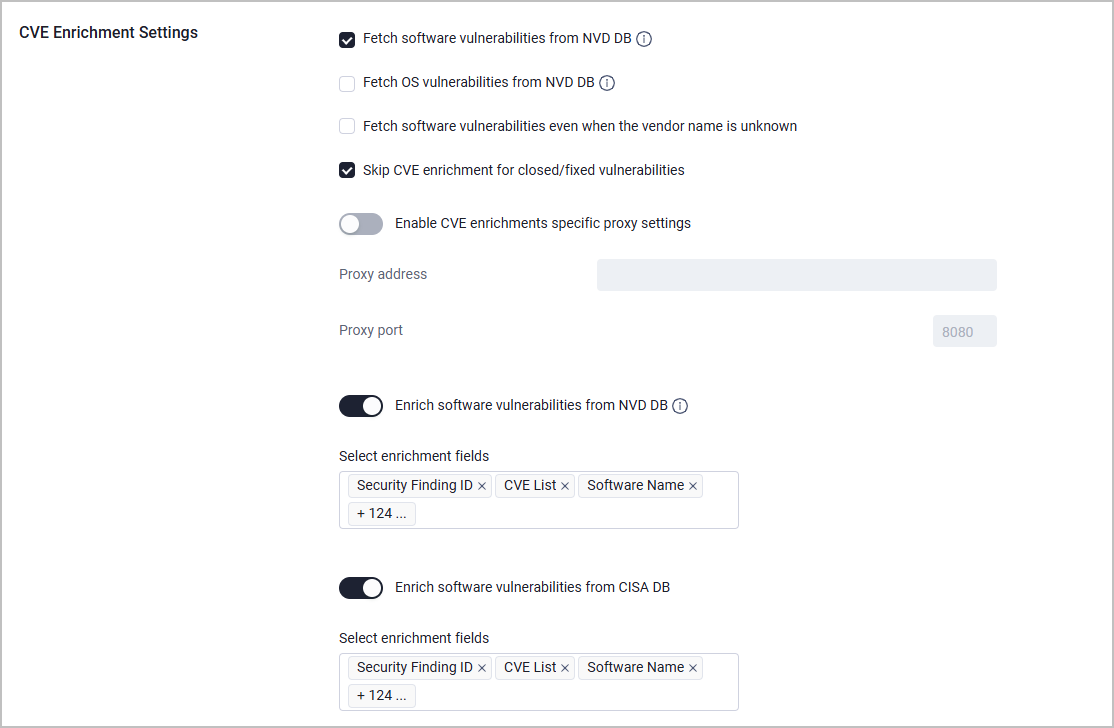
Added CISA Vulnrichment as a new, out-of-the-box vulnerability enrichment source, providing CWE mappings, affected product data, and SSVC metrics for vulnerabilities. To enable this enrichment, go to Settings > Enrichment > CVE Enrichment Settings and toggle on Enrich software vulnerabilities from CISA Vulnrichment.
Consolidation of CVE Enrichment Settings
A new, dedicated section for CVE Enrichment Settings was added under System Settings > Enrichment. This section consolidates all CVE vulnerability enrichment configuration into a single location, replacing scattered settings previously not available to be configured by customers. The new section provides a centralized control over 24 different vulnerability enrichment sources with granular field selection capabilities.
Axonius Platform New Features and Enhancements
Front End Performance
Axonius rebuilt data tables from the ground up for faster navigation and exploration of large datasets. Calculations were also rebuilt, so answers to complex queries return faster.
This release includes the following changes to data tables:
- Removed the limit on the number of columns added to a view.
- Added the option to pin columns instead of freezing them, in the Edit Columns menu.
- Changed the sort icon to a two-way arrow.
- Replaced the hover-based row actions for most tables with a three-dot menu column.
Latest Snapshot View
Axonius introduces the Latest Snapshot View, a point-in-time read–only view of your asset data, independent of live discovery cycles. Because Latest Snapshot view isolates read operations from write operations, queries return faster, and results stay stable even while a discovery cycle is running. Live View remains available and continues to support write operations such as tagging, updating fields, and triggering enforcement actions. Users can set a default view to override the system default of Live View. Note that write actions, such as adding tags and deleting assets, are only available in Live View.
Enhanced AI Integration in Documentation
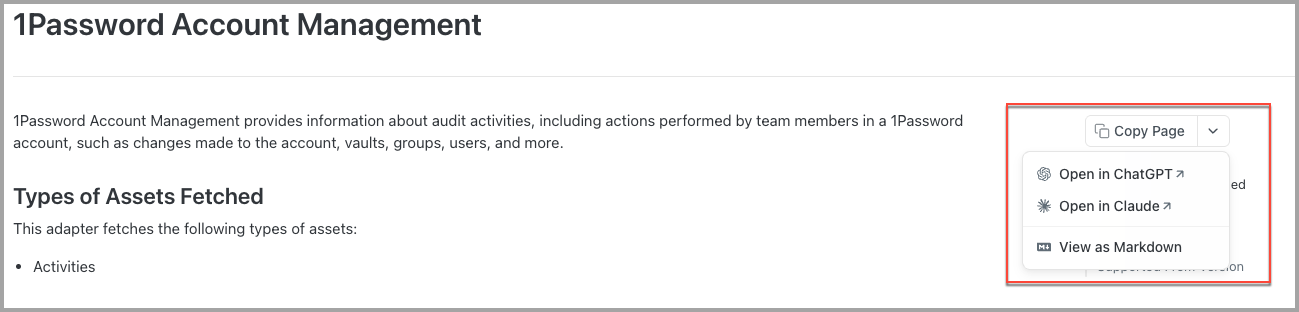
Axonius documentation now offer access for AI (via llm.txt, view and copy as markdown, and prompt straight to your LLM provider), enabling AI access while reducing inference costs. This allows users to:
-
Copy Page: Click the main button to copy the full page content as Markdown.
-
Open in ChatGPT/Open in Claude – Send full page content to ChatGPT or Claude, opening a pre-loaded new tab for seamless follow-up questions or code generation.
-
View as Markdown: Quickly view page content in Markdown format in a new tab.
Dashboard
The following new features and enhancements were added to the Dashboards:
Dashboard Navigation Enhancements
Retaining View Context on Chart Click-Through
Axonius updated dashboard Chart Click-Through so that clicking a chart segment opens the Asset Table using the view associated with that segment, instead of a generic default view.
- For the Pivot chart, all configured dimension fields are added, and measure fields are added only when the user clicks a chart element associated with that measure.
- For Query Comparison and Query Timeline charts, each segment resolves independently to its originating query view.
- For Query Intersection and Matrix Data (Stacked) charts, the base query view combines with the view for the specific intersecting query in the clicked segment.
- For the Adapter Segmentation chart, click-through uses the resolved base view.
- Fields configured on inline (unsaved) queries are appended to the view for the click-through session; duplicate fields are not added again.
- When a chart uses a saved query, the query's saved view is maintained, if one is defined.
This removes the need to manually rebuild Asset Table columns after clicking into a dashboard widget.
Chart Enhancements
Adding Markdown Support to Text Widgets
Axonius added Markdown support to Text Widgets. Users can type Markdown syntax directly into the Text Widget editor, and the widget renders the corresponding formatting automatically. For example, # Title becomes a heading, and **Bold Text** becomes bold text.
Findings Center
Rename Findings to Monitoring
Axonius renamed Findings to Monitoring across the platform. The main navigation, page headers, table columns, filters, and the create-rule drawer now use Monitoring terminology instead of Findings terminology. For example, Create Finding is now Create Rule, Finding Name is now Monitoring rule, and All Findings is now Monitoring Rules.
Adapter Pages and Adapter Interface
The following updates were made to the common functionality across all adapters:
New Setting to Filter Out Old Security Findings
A new Ignore Security Findings fixed more than X days ago setting was added to each Advanced Setting > Adapter Configuration page, to prevent stale or resolved Security Findings from being reintroduced. This applies to all adapters that collect CVE and Security Findings data.
By default, security findings that were fixed more than 14 days ago will not be parsed by the adapter. Users can adjust this threshold or disable the filtering entirely by setting the value to 0.
Adding Alerts for Unsuccessful Fetches
Axonius added two notification triggers to Adapter Connections notification settings, giving users more control over alerts for fetch inactivity.
-
Notify only if fetch did not happen in the last X days: Triggers when no fetch cycle has started for a connection within the configured number of days.
-
Notify only if no successful fetch happened in the last X days: Triggers when no fetch completed successfully within the configured number of days, including cases where the most recent fetch is still in progress.
Ingestion Rules
Ingestion Rules now support a new set_value post-action that allows you to dynamically set or update field values during data ingestion from adapters. This powerful new capability enables you to set field values to static literals (strings, booleans, or numbers), copy values from other fields within the same entity, and apply transformations to field values using built-in functions (trim_prefix, trim_suffix, trim_regex, regex_extract).
System Settings
The following updates were made to various System settings:
Enabling Custom Parallel Processing for Network Routes Enrichment
A new setting that controls the number of tasks running in parallel during Network Routes enrichment was added under System Settings > Network > Network Routes Enrichment Configurations. Enable this to manually configure parallelism instead of using automatic CPU-based calculation, and set the maximum number of tasks to run in parallel during Network Routes enrichment. This setting is useful in the following use cases:
- You have a large number of devices and want to speed up Network Routes enrichment by increasing parallelism beyond the automatic calculation.
- You need to limit parallel tasks to reduce resource usage on the Axonius instance.
- You want to fine-tune enrichment performance based on your specific environment's characteristics.
Assign Visiting Data Scopes via SAML Rules
SAML user assignment rules now support configuring which data scopes users can visit automatically upon login without needing to provision that access manually. The new Visiting Data Scopes field displays a list of available data scopes for users who match the assignment rule. The Visiting Data Scopes field appears when the Global Data Scope is selected as the main data scope and can be left empty for all scopes or set to specific scopes.
Adapter and Enforcement Action Updates
New Adapters
The following new adapters were added:
- Broadcom Layer7 API Gateway - Layer7 API Gateway is an API management platform that provides service routing, policy enforcement, traffic management, and security controls for enterprise APIs. (Fetches: Users, Application Resources)
- Figma - Figma is a design platform that provides collaborative interface design, prototyping, design system management, and developer handoff capabilities for product teams. (Fetches: Users, Groups, Audit Activities)
- Palo Alto Networks Cortex Cloud - Palo Alto Networks Cortex Cloud is a cloud security platform that provides application security, cloud posture management, runtime protection, and threat detection across code, cloud, and SOC environments. (Fetches: Devices, Containers, Cloud Security Exposures, Compliance Findings)
- UKG Pro HCM Reports-as-a-Service - UKG Pro HCM Reports-as-a-Service is a SOAP-based web service that provides programmatic access to IBM Cognos reports for retrieving HRIS data such as employee, payroll, and benefits information. (Fetches: Users)
Updated Adapters
-
A10 - Added the option to fetch load balancer configuration data, including service groups, partitions, listeners, and ingress/egress endpoint details.
-
BeyondTrust Privilege Management Cloud - Added the option to fetch blocked application event data from the v2 Events API with configurable time range, page size, and event action filters.
-
BIND - Added support for TSIG key authentication for DNS zone transfers, with new optional connection settings for TSIG Key Name, TSIG Key Secret, and TSIG Algorithm (default: hmac-sha256).
-
Bitbucket- Updated to support new workspace endpoint required by Bitbucket Cloud API V2 due to deprecation of /user/workspaces endpoint.
- New Connection Setting: Workspace Slugs (required for Bitbucket Cloud V2).
- Migration Note: Existing Bitbucket Cloud V2 connections require workspace slugs to be added.
-
BitSight Security Ratings- Added the option to fetch observations data, including vulnerabilities and company findings.
-
BMC Atrium CMDB - Added the option to fetch installed software data from CMDB and enrich devices with software data..
-
Cisco - This adapter now supports Custom Parsing
-
Cisco Catalyst Center (formerly Cisco DNA Center) - When a device has multiple serial numbers (indicating a stack configuration), the adapter now properly identifies it as a stack switch, preserves the active-switch MAC address for debugging purposes, and nulls the MAC address field to prevent conflicts in Axonius.
-
Cisco Firepower Management Center:
- Added the option to fetch ARP table data from managed firewall devices, including MAC address, IP address, interface, and port information.
- Added the Firewall Name field to Firewall Rule assets for improved device identification.
-
Cloudflare DNS - Added support for account-owned API tokens (with a cfat_ prefix), configurable by a new, optional Account ID connection setting.
-
Code42 Incyder - Added the option to enrich devices with additional details from the Code42 device details endpoint, including serial number information.
-
Com Laude - Changed domain records from the Devices asset type to Domains & URLs, aligning Com Laude data with other domain registrar adapters. Existing queries that filter Devices by domain-related fields may need to be updated to query URLs instead
as the Devices asset type will now only contain resource record data (DNS records). -
- Added new advanced setting "Fetch Cases" for accessing the Cases API (replaces deprecated Incidents API).
-
Custom Files- This adapter now fetches Compute Services.
-
FortiSASE - This adapter now fetches Devices and their Installed Software information. A new advanced setting enables or disables fetching installed software.
-
- Added the option to limit the adapter fetch to NQE queries only, thus skipping the regular device API fetch.
-
Google Cloud Platform (GCP) - Added the option to fetch Google App Engine instances as Compute Services assets
-
-
A Records (
record:a)and Shared A Records(sharedrecord:a)are now parsed as Domains & URLs instead of Devices, aligning with the DNS-layer nature of these records.- Attention: Any saved queries, Enforcement Actions, dashboards, reports, or workflows targeting A Records or Shared A Records as Devices will need to be updated to use Domains & URLs instead.
-
IPAM statistics are now enriched directly onto Network assets as a new field instead of being created as separate device assets.
Details - New Fetch Logic for IPAM Statistics
When both Fetch IPAM statistics and Fetch networks as assets advanced settings are enabled, the following IPAM Statistics fields are populated in Network assets:
- Network - The network address and CIDR notation
- Conflict Count - Number of IP address conflicts detected in the network
- Unmanaged Count - Number of unmanaged IP addresses in the network
- Utilization Percentage - Network utilization as a percentage
- Utilization Update Time - Timestamp of when the utilization was last calculated
The change from previous behavior is that now the adapter enriches Network assets with IPAM data, instead of creating separate IPAM Device assets.
If only Fetch IPAM statistics is enabled without Fetch networks as assets, no IPAM data will be collected. Therefore, if you currently have Fetch IPAM statistics enabled, note the following:
-
Ensure Fetch networks as assets is also enabled in your adapter advanced settings.
-
If you have saved queries or reports that reference IPAM statistics as Devices, you need to update them to query the IPAM Statistics field on Networks instead.
-
Any dashboards or custom views that display IPAM statistics data need to be updated to reference the new field location.
- Network - The network address and CIDR notation
-
-
- This adapter now supports password-protected private key files for certificate-based authentication.
- This adapter now distinguishes between IPv4 and IPv6 subnets based on their address prefixes and creates separate network assets for each IP version.
-
Milestone XProtect - This adapter now supports authenticating with Windows Credentials in addition to the default password-based authentication.
-
Netskope - Added the option to fetch all SaaS applications directly from the API endpoint.
-
- This adapter now supports fetching SaaS Applications as a new asset type. This enhancement allows users to discover and manage SaaS applications tracked within OneTrust's inventory alongside existing devices, users, and groups.
- Custom Parsing is supported for SaaS Applications
-
- This adapter now fetches identity user accounts and their associated SSH key pairs.
- Added the option to fetch compute image data from OpenStack Glance.
- Added the option to fetch cloud networking infrastructure data, including virtual networks, subnets, floating IPs, routers, security groups, and load balancers.
-
- This adapter now fetches Network Security Groups (NSGs) and VCN Security Lists as Firewalls.
- Added the option to fetch Object Storage Buckets.
- Added the option to fetch DRG Route Tables as Network Routes assets.
- Added the option to fetch Container Images as Compute Images assets.
-
Palo Alto Networks Cortex XSOAR - Added the option to filter incidents using XSOAR's native query syntax, allowing retrieval of only specific incidents based on custom fields, states, or other incident properties.
-
Palo Alto Networks Panorama - Removed the adapter-level internal CIDRs setting: “CIDRs to be considered as internal/private “. This is because internal CIDR ranges are now configured globally, with automatic migration of existing values.
- To configure internal CIDRs, navigate to Settings > Data > Network > Internal CIDRs.
- Existing, adapter-specific CIDR settings will be automatically migrated to the global Internal CIDRs setting.
-
Qualys Cloud Platform - Added an option to enrich Security Findings with results from Qualys detection scans, under a dedicated Qualys Vulnerabilities field.
-
Qualys VMDR - Added the option to populate the Qualys Results field in the Security Findings table, providing detailed detection results from vulnerability scans.
-
- Added the option to include in the fetch vulnerabilities remediated between the comparison date and the current time that are discovered after the comparison time.
- The adapter now adds a Status field to Security Findings, indicating whether a vulnerability is open or closed based on its remediation state.
-
- Updated the Fields to include exclusively from the fetch advanced setting with a warning that the id field is required for user ingestion.
- Added validation to alert administrators when id is missing from included fields configuration.
- Improved userType field parsing to use the correct location in raw data.
-
Salesforce - Updated the adapter to exclude deactivated users from the Associated Users count in the Licenses view.
-
ServiceNow - Added the option to fetch load balancer data from the cmdb_ci_lb table as Load Balancer assets.
-
SharePoint - Added the option to fetch site usage statistics from Microsoft Graph API, including file counts, page views, storage metrics, and activity dates.
-
Tanium Comply - Added the option to fetch custom tags from Tanium Comply devices.
-
- This adapter was significantly enhanced with 15 new data source endpoints that expand coverage across multiple cloud resource types. These endpoints enable comprehensive visibility into cloud infrastructure, identity and access management (IAM), networking, security, and serverless resources across AWS, Azure, and GCP environments. All new endpoints are configurable via advanced settings and enabled by default. For more information, refer to the [Tenable Cloud Security] documentation.~
-
- Added the option to fetch installed Mac OS X applications (such as Safari or Chrome) from Tenable Plugin 83991 output.
- Added the option to fetch Unix/Linux running processes from Tenable Plugin ID 110483, including process name, user, and command line information.
-
Tufin SecureTrack - Added the option to control whether host-type network objects should be fetched as Devices.
-
UpGuard CyberRisk - Added the option to automatically resolve DNS records for Domain and URL assets during asset collection.
New Enforcement Actions
-
Axonius - Remove Axonius Risk Score - Removes existing Axonius Risk Score values from selected assets, supporting both Per Vulnerability per Asset and Per Asset risk score types.
-
Microsoft Intune - Add Primary User to Device - Assigns a specific Azure AD user as the primary user for a managed device in Microsoft Intune.
-
Nexthink Infinity NQL - Trigger Remote Action - Triggers a Nexthink remote action on selected devices, with options to specify the Remote Action ID, expiration time, trigger reason, and an optional external reference.
-
Omnissa Workspace ONE (Airwatch) - Run Admin Command - Performs administrative commands on enrolled Omnissa Workspace ONE devices, including enterprise wipe to unenroll devices and remove all managed enterprise resources.
Updated Enforcement Actions
-
Cisco - Cycle Interface (Port) - Added SSH connection support in addition to SNMP, with a new Interface Name parameter for specifying the target interface when using SSH.
-
Cisco - Manage Interface Status - Added SSH connection support in addition to SNMP, with a new Interface Name parameter for specifying the target interface when using SSH.
-
- Enhanced "Halo - Update Device" EC action with custom field mapping support.
- New EC Action Parameter: Map Axonius fields to Halo asset custom fields (by numeric ID or field name).
- Modified EC Action Parameter: Site ID is now optional when Site Name is provided.
-
Jira Service Management - Create Ticket - Added rich text formatting support for the Request description field, including bold, italic, headings, lists, links, and code blocks, with automatic conversion to Jira Wiki Markup for standard Jira integrations or plain text for Automation for Jira integrations.