
Axonius Release Notes 8.0.24
Release Date: May 17th 2026
These Release Notes contain new features and enhancements added in version 8.0.24
Cyber Assets New Features and Enhancements
The following new features and enhancements were added to Axonius Cyber Assets:
Agent Coverage
New Workspace Design
The Agent Coverage homepage was redesigned to deliver a streamlined, role-based experience tailored to the needs of different user personas within security and IT teams. It now stands as a workspace of its own, accessible from Workspaces > Agent Coverage.
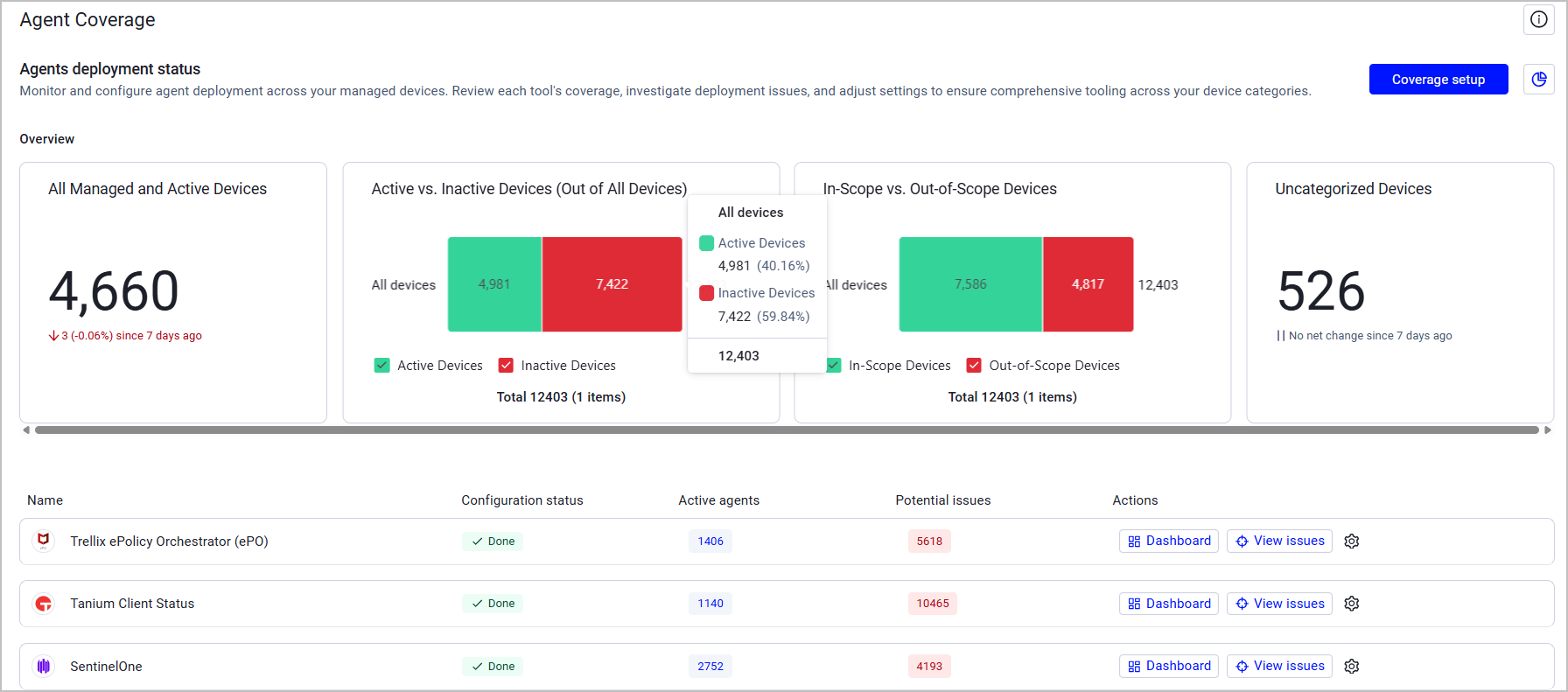
The new homepage addresses the distinct requirements of three key user types:
- Executives - Security leaders now have immediate access to high-level strategic KPIs, including overall compliance scores and trend data, so they can quickly assess the organization's coverage posture and progress over time. This change is also reflected in new, improved tool-specific dashboards.
- Policy Configurators - Managers and analysts responsible for policy setup now benefit from an improved, intuitive flow that clarifies the relationship between global scope and tool-specific configurations.
- Doers - Security analysts and IT operators now receive a prioritized, actionable list of issues with clear context and remediation paths, no longer needing to manually filter through unordered lists to identify critical problems.
This redesign makes Agent Coverage a more powerful, efficient tool that accelerates time-to- value and improves cross-team communication.
Customized Device Categories
In addition to Axonius-predefined device categories, the Agent Coverage workspace now includes the option to create custom device categories, providing granular control over tool monitoring across the entire workspace. Users can select any shared Devices query to define the new category. Each category is global and is available for all tools once created.

Exposures New Features and Enhancements
The following new features and enhancements were added to Exposures:
Security Findings “Status” Fields
The following changes were applied to the Status-related fields on the Security Findings page (and the Security Findings table on the Devices page) to match different scenarios:
| Old Field Name | New Field Name | Possible Values and Logic |
|---|---|---|
| Status | Adapter Status | All the raw statuses retrieved from adapters |
| Status (Open\Closed) | Adapter Status (Open/Closed) | Open\Closed status per specific adapters (parsed from raw data) |
| Axonius Status | - | Open - The vulnerability is currently detected on the asset Closed - The vulnerability is no longer detected on the asset Reopen - The vulnerability was re-detected on the asset after being closed for more than 7 days Open - Risk Accepted - The user marked the vulnerability as Excepted by an Exception Management rule. |
Additional updates:
- A Status Resolver mechanism was developed to deal with adapters that report a vulnerability or a Security Finding when it's open and stop actively reporting when it is closed. This mechanism allows users to control the conditions of how the status of such vulnerabilities is reported by selected adapters. Status Resolver settings are available under Data Settings > Security Findings Data.
- In case of conflicting data between adapters, conflict resolution rules were developed to determine the final vulnerability status.
Software Assets New Features and Enhancements
The following new features and enhancements were added to Software Assets:
Software Registry Approval Status
The Software Registry's functionality was updated to ensure the approval status of a Software and its associated versions are consistent.
- When Software is not approved, then all versions of that software are also not approved. (it is not possible for a version of a software to be approved, if the software itself is not approved)
- The Approval Status field must always have a value
- These changes to Approval Status are validated for any sort of Software Registry file that is imported from external sources.
Adapter and Enforcement Action Updates
New Adapters
-
- Akamai API Security is an API security platform that provides API discovery, posture management, runtime threat detection, and compliance monitoring across enterprise API environments. Fetches: Aggregated Security Findings, Domains & URLs, SaaS Applications
-
Google Security Operations SIEM REST
- Google Security Operations (formerly Chronicle) is a cloud-based SIEM platform built on Google infrastructure that enables security teams to store and analyze security data in one place and to detect, investigate, and respond to threats. Fetches: Devices
-
- HackerOne is a vulnerability coordination platform that provides bug bounty programs, penetration testing, and coordinated disclosure for ethical security research. Fetches: Devices, Aggregated Security Findings,SaaS Applications, Domains & URLs
-
- Ivanti Neurons for ITSM is a service management platform with CMDB capabilities for asset lifecycle and configuration management. Fetches: Devices, Users
Updated Adapters
-
Amazon Web Services (AWS) - Granular opt-out toggles for "Enrich EC2 with Auto Scaling Data" and "Fetch ACM Certificates" (default false for new users, true for migrations).
-
Azure DevOps (On-Premise) - Added options to fetch Git Commits (as Audit Activities) and Git Repositories (as Application Resources).
-
Citrix ADC - The adapter now fetches NetScaler appliances (connections) as devices.
-
Cisco Intersight - This adapter now includes a new advanced setting that allows you to control which device entity types are fetched during data collection. This optional setting helps optimize performance by allowing you to select only the specific entity types relevant to your environment, reducing the amount of data retrieved from the Cisco Intersight API.
-
Cisco Identity Services Engine (ISE) - Added an option to parse FismaID values from device authorization profiles. When enabled, this feature extracts and formats FismaID information from the first selected authorization profile assigned to devices, making it available as a queryable field in Axonius.
-
-
Removed the following advanced settings: “Fetch incidents” and “Fetch MITRE ATT&CK data”.
-
The "Fetch Ransomware Behaviour Flags" setting now references only the Alerts API (without the Incidents API).
-
-
CrowdStrike Falcon Discover - Added the option to fetch vulnerabilities for unmanaged devices via the CrowdStrike Spotlight API.
-
-
This adapter now supports fetching Licenses.
-
Added custom CSV headers support for headerless files.
-
Added path-to-entity support for JSON files.
-
When selecting Microsoft SharePoint as a file source, an option to fetch all files from the specified SharePoint folder was added.
-
-
Databricks - This adapter now supports OAuth M2M authentication with service principal client credentials.
-
Delinea Privileged Remote Access
-
This adapter now fetches Users
-
Added an option to enrich user data with additional details including Tenant ID and Directory Service Name.
-
-
FlexNet Manager Suite Cloud - The adapter now supports enriching software entities with lifecycle data from FlexNet Manager Suite Cloud. When enabled, the adapter queries the FlexNet GraphQL API to retrieve comprehensive lifecycle information for software products.
-
GitLab - Added an option to exclude internal groups and all resources within them from being fetched.
-
Guidewire InsuranceSuite - Added the option to fetch application settings.
-
HPE Aruba Networking ClearPass Policy Manager - Added a setting to fetch all extended endpoint info for devices updated within a defined number of days.
-
ManageEngine ServiceDesk Plus - The legacy Advanced Fields to Show in Basic Fields setting was superseded by the new Custom Parsing configuration. All existing configuration is retained.
-
MarkMonitor - The MarkMonitor adapter now supports optional enrichment of domain data with DNS zone information and SSL certificate details. Two new connection configuration settings settings allow users to enable fetching of DNS zones and SSL certificates from the MarkMonitor API, which enriches domain assets with additional security and configuration data.
-
Microsoft Azure - The following Azure services are now fetched as Application Services in Axonius: AI Foundry Accounts and AI Foundry Projects.
-
- This adapter now fetches Certificates.
- Removed the “loopback IP parsing” advanced setting while introducing a new Software Loopback IPs field.
-
Microsoft Entra ID (formerly Azure Active Directory) and Microsoft Intune - A dropdown in Advanced Settings (Advanced Configuration section) was added that allows the user to select one or more asset types. After the asset types are selected, the relevant advanced configurations are displayed. Advanced Configuration is divided into subcategories to make finding relevant settings easier. In addition, advanced configurations now have a description in a tooltip that provides information such as asset types, permissions, description, and more.
-
Mimecast V2 - Added a new campaigns endpoint for enriching users with campaign membership and engagement metrics.
-
- Added the option to fetch vulnerability data for devices and containers via the New Relic Security RX module.
- This adapter now fetches Aggregated Security Findings
-
Okta - This adapter now supports Custom Parsing to parse additional fields (profile.owner, pluralsight_slack, etc.) from group JSON responses.
-
Oracle Fusion HCM Cloud - The Oracle Fusion HCM Cloud adapter now includes an optional Token URL connection setting for OAuth authentication. This setting allows you to specify a custom OAuth token endpoint URL when the token retrieval endpoint differs from the main domain. This is particularly useful for environments with custom OAuth configurations or when the standard token endpoint URL needs to be overridden.
-
Oomnitza Enterprise Technology Management -
-
Added an option to fetch archived (deleted) assets from Oomnitza in addition to active assets.
-
By default the adapter fetches user data from Oomnitza, it is now possible to clear an option to not fetch users.
-
-
Orca Cloud Visibility Platform - The Orca adapter now includes a new optional advanced setting that allows vulnerability data (CVEs and vulnerable packages) to be fetched in a separate background cycle instead of during the main asset fetch. This optimization can significantly reduce the time required for device fetches when vulnerability enrichment is enabled.
-
Palo Alto Networks Cortex Xpanse
- Added an option to fetch Alerts.
- Added an option to fetch and parse non-CVE security findings.
-
Palo Alto Networks Panorama - This adapter now includes Shadow SaaS Discovery capabilities, enabling organizations to identify unauthorized or unapproved SaaS applications being used within their network. This feature analyzes Panorama traffic logs to detect SaaS applications based on file upload activity, high-volume data transfers, or high-risk App-IDs, providing visibility into potential shadow IT usage with detailed session information including users, source IPs, data volumes, and risk scores.
-
Qualys Cloud Platform - Added the option to parse and display the Results field from Qualys VM detections.
-
Qualys Container Security - Added advanced configuration to filter out deleted or terminated containers from ingestion.
-
Rapid7 InsightVM - Added an option to exclude remediated vulnerabilities from the Security Findings fetch.
-
RecordedFuture - Added an option to exclude non-standard CVE IDs and normalize valid CVE IDs to the standard format during vulnerability enrichment.
-
RingCentral - The RingCentral adapter now includes a new advanced setting, Device extension types, that allows filtering which device extension types are fetched. This setting helps optimize device fetching and prevents timeouts when fetching devices from RingCentral by allowing only the extension types relevant to the environment to be specified. By default, the adapter fetches devices for all extension types, maintaining existing behavior.
-
Rippling - The Rippling adapter has been migrated to Rippling's updated REST API. This update includes a new advanced configuration setting that allows users to control which worker fields are expanded during data retrieval, providing more flexibility in data collection. Connections with the existing API will continue to work.
-
Rubrik Security Cloud - Added Nutanix AHV VM support via the GraphQL API.
-
SecureOT (formerly Verve Security Center) - Verve Security Center was renamed SecureOT (formerly Verve Security Center) to reflect Rockwell Automation's acquisition.
-
Seismic - Added the option to fetch application settings.
-
Snowflake Data Warehouse - Added a new connection setting to configure the JWT token timeout.
-
- Added Application Resources as an asset type.
- Added custom fields parsing support for Application Resources.
-
SolarWinds Network Performance Monitor - Parse Hostname from Node Description advanced setting was updated to now correctly apply only to Check Point devices.
-
Tenable.asm - Added the option to parse assets as URLs instead of devices for better correlation.
-
Tenable.sc (SecurityCenter) - Added advanced configuration to fetch Local Linux Users from Plugin 95928.
-
Tenable Vulnerability Management - Removed the option to fetch URL assets. Now, web applications discovered by Tenable Vulnerability Management are exclusively fetched as Devices. New advanced setting to parse web applications as URLs instead of Devices.
-
Trend Micro Vision One - Added the option to filter device fetching to only managed endpoints.
-
TruffleHog - The TruffleHog adapter now supports filtering secrets by creation date.
-
Veritas NetBackup - The Veritas NetBackup adapter has been updated with enhanced authentication options to support multiple domain types. This update adds a new Authentication Domain connection setting and provides a dropdown menu for selecting the appropriate domain type (Veritas, Windows NT, Unix Password, or LDAP) based on your NetBackup environment.
-
Verkada - Added advanced configuration for selectively enabling or disabling asset type fetching (cameras, sensors, doors, users).
-
Wiz - The adapter now accepts either the ‘'read:resources' or 'read:network_exposure' permissions for fetching network exposures
-
Workday - The Workday adapter now supports custom ID fields for users and devices when fetching data from custom reports. This enhancement allows users to specify which field in their custom report should be used as the primary identifier for users and devices, providing greater flexibility when working with custom report data.
-
Zscaler Web Security - This adapter now fetches application settings. Enable an advanced setting to fetch them.
-
ZScaler Web Security - This adapter adapter now includes a new advanced setting that allows users to control device fetching behavior.
New Enforcement Actions
-
Axonius BACnet Scanner - Scan Device - Scan BACnet devices based on device IPs and correlate metadata.
-
Axonius Modbus Scanner - Scan Device - Scan Modbus TCP devices based on device IPs and correlate metadata.
-
Halcyon - Set Deployment Group - Assigns devices to a specific Halcyon deployment group.
-
Ivanti Neurons for ITSM - Create Computer - Create ConfigurationItems in Ivanti ITSM through Action Center for computer inventory management.
-
Ivanti Neurons for ITSM - Update Computer - Update existing ConfigurationItems in Ivanti ITSM, enabling bidirectional asset synchronization.
-
Red Hat Ansible Tower - Launch Job Template - Launch existing job templates, workflow job templates, or system job templates with field mapping support.
Updated Enforcement Actions
- WMI - WinRM Scan- This Enforcement Center action now supports checking Windows registry keys. Users can now specify registry keys to verify their existence or retrieve their key-value pairs during remote scans.