
Axonius Release Notes 8.0.12
Release Date: January 25th 2026
These Release Notes contain new features and enhancements added in version 8.0.12.
Exposures New Features and Enhancements
The following new features and enhancements were added to Exposures:
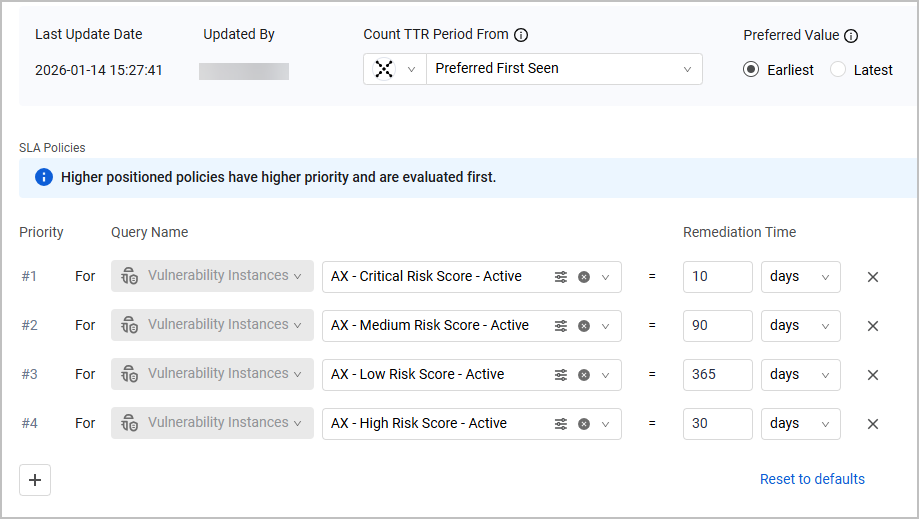
New SLA Management Page
Axonius Exposures is now enhanced with a dedicated SLA Management page where users can define SLA policies, crucial for tracking and managing an organization's remediation efforts.
Axonius' SLA mechanism is unique in a way that it assigns remediation timelines based on asset attributes and query logic instead of on static severities. This allows dynamic remediation deadlines to be set using prioritized logic, which users can customize at any time to fit their security needs.
SLA policies are applied to Vulnerability Instances tables and dashboards, ensuring full transparency of the SLA status of each Vulnerability Instance: its SLA due date, and whether it approaches the due date or is overdue.
Axonius Platform New Features and Enhancements
Activity Log
The Discovery Cycle data is now included in Export to CSV from Activity Logs.
System Settings
The following updates were made to various System Settings:
Creating Tags Without an Asset
Previously, tags bound to assets that no longer exist were automatically deleted from the system. Now such tags remain in the system and can only be actively deleted from the Tag Management page. In addition, an option to create tags directly from the Tag Management page without binding them to specific assets was added.
Changes to Central Core Architecture Settings
The following changes were made to the Central Core Architecture settings:
- Added the Gateway field to select the gateway to use.
- When the Filename format field is used, you must add these keywords (or any part of the filename format that is unique enough to identify the backup file) to the Comma-separated list of strings that must exist in backup filenames field in the main Central Core configuration.
- Removed the Enable backup to Amazon S3 field.
Adapter and Enforcement Action Updates
New Adapters
The following new adapters were added:
-
Constant Contact
- Constant Contact is a digital marketing platform that offers email marketing, social media, SMS and automation tools for managing campaigns and contact lists. (Fetches: Users)
-
- CSV - Network Services File adapter imports information about network services from a CSV file. (Fetches: Network Services)
-
Forescout eyeSight
- Forescout eyeSight is a network visibility tool that offers real-time device intelligence and monitoring. (Fetches: Networks, Network Services)
-
FortiManager
- FortiManager is a centralized management platform that provides configuration management, policy provisioning, device monitoring, and firmware management for Fortinet network and security devices, available as both an on-premises deployment and a cloud-hosted service. (Fetches: Devices, Users, Network/Firewall Rules, Alerts/Incidents)
-
MicroStrategy
- MicroStrategy is an analytics platform that provides data discovery, reporting, and visualization capabilities for enterprise data assets. (Fetches: Users)
-
OP Innovate WASP
- Op Innovate Wasp is a solution that offers attack surface management capabilities for identifying vulnerabilities. (Fetches: Devices, Vulnerabilities, SaaS Applications)
-
Solink
- Solink is a physical security platform that aggregates, indexes, and manages video data streams from connected surveillance cameras and IoT devices. (Fetches: Devices)
-
Stellar Cyber
- Stellar Cyber is a security platform that provides visibility and protection against cyber threats. (Fetches: Devices, Users, Alerts/Incidents)
-
Varonis (SQL)
- Varonis is a data security platform that provides automated discovery, classification, threat detection, and remediation to protect sensitive data wherever it resides. (Fetches: Users, Groups, Permissions, Secrets, File Systems)
-
Veeam One
- Veeam One is a monitoring and analytics platform that provides visibility, alerting, and capacity planning for backup, virtual infrastructure, and data protection environments. (Fetches: Devices)
Adapter Updates
The following adapters were updated:
-
Atlassian (formerly Atlassian Jira Software) - A dropdown in Advanced Settings (Advanced Configuration section) was added that allows the user to select one or more asset types. After the asset types are selected, the relevant advanced configurations are displayed. Advanced Configuration is divided into subcategories to make finding relevant settings easier. In addition, advanced configurations now have a description in a tooltip that provides information such as asset types, permissions, description, and more.
-
Aqua Security (SaaS) - It is now possible to use APIV2. This is only to fetch users.
-
Avanan was renamed Check Point Harmony Email & Collaboration.
-
Axonius - Send Email - it is now possible to add a bcc field.
-
BigFix - Device Custom Parsing was added to this adapter.
-
ControlUp - Added the capability to enrich devices with App Usage.
-
CSV, Custom Files and JSON- these adapters now support uploading files from SAP Fieldglass.
-
Cisco Secure Access - Added an option to not fetch deleted users.
-
Custom Files - This adapter now accepts TXT as file type. The TXT file format consists of key-value pairs representing assets.
-
Cyberint Argos Edge
- This adapter now fetches Alerts/Incidents.
- An option was added to parse alerts as Incidents instead of devices.
- An option was added to disable fetch from the Alerts API.
-
Elisity - Now supports API v2.
-
GitLab- Added the option to fetch Archived Projects.
-
HPE OneView - Added a capability to specify the API version.
-
Infoblox NetMRI - Added the option to fetch infrastructure devices.
-
ManageEngine Mobile Device Management - Added an
MDM Instance IDfield to the adapter’s connection parameters. -
Microsoft Defender for Endpoint (Microsoft Defender ATP) - Added the option to fetch scheduled tasks.
-
Microsoft Teams - This adapter now supports Certificate-Based Authentication.
-
Netdisco - Added the ability to control whether the vendor field is included when parsing the operating system information for devices.
-
NetaNetapp Active IQ Unified Manager
- This adapter now fetches Users and File Systems.
- Added the advanced options to fetch SVMs, file systems and users.
-
SailPoint IdentityNow - User Custom Parsing was added to this adapter.
-
Splunk - The version of the splunklib can now be selected.
-
Tenable.sc (SecurityCenter) - Added the option to group PLC components as modules in the main PLC controller.
-
Tenable Vulnerability Management- Added the option to parse file paths from plugin vulnerabilities output.
-
Zabbix - It is now possible to use an API Token to authenticate this adapter.
New Enforcement Actions
The following Enforcement Actions were added:
-
Airlock Digital - Move Agent to Group - Moves agents from one group to another in Airlock Digital.
-
Island - Add URLs to URL Object - Adds URLs from a saved query to a specified URL Object in Island Browser.
-
Qualys WAS - Add or Remove Tags to Assets - Adds tags to or remove tags from Qualys WAS assets.
Updated Enforcement Actions
The following Enforcement Actions were updated:
- Axonius - Send Email - Added the Recipients BCC field.
- Elastic Fleet - Update Tags - It is now possible to enter a list of tag values.
- Freshservice - Create Assets and Freshservice - Update Assets - Added the Do not map default Axonius fields option.
- Jira Service Management - Create Ticket per Asset - Added the capability to create dynamic request descriptions that include field values from the asset.
- Jira Service Management (Service Desk) Update Ticket - It is now possible to update tickets using the CSV attachment.
- ServiceNow - Create Assets - A new asset creation method was added under Related Assets Configuration: Main Asset Lookup List. When selected, the related asset will be added to the main asset's
lookupfield rather than as a separate asset in items. - Tenable Vulnerability Management - Add IP Addresses to Scan - Added the Auto route scan targets to scanner groups based on their configured scan routes option to add
target_network_uuidandscanner_id fieldsto the request. - HTTP Server - Send to Webhook - Added a configuration to run the enforcement action query even if no records are returned in the entity.