
Data Hygiene
Data Hygiene is an Axonius-powered engine that audits every device against a "gold standard" of quality and assigns a Verified/Unverified status to every record.
The Challenge
The Devices inventory often contains significant "noise" - such as stale, single-source, or "ghost" records. The might lead to the following issues:
- Operational Inefficiency: Users are forced to build complex queries with multiple conditions and custom dashboards to get a "clean" view of their inventory.
- Lack of Standardization: Without a productized "triage" workflow, there is no consistent way to identify and fix correlation or identity gaps, and many processes have to involve manual workflows. This leads to fragmented data management across different environments.
- Trust Gap: "Noisy" inventory is confusing and difficult to work with - from performing simple, daily tasks to satisfying cross-organizational audit requirements.
Our Solution
The Data Hygiene hub allows you to track the health of your device data over time, identify which devices aren't verified, understand why, and pinpoint the adapters that are driving the most issues. It shows clear trends and statistics regarding the verification status of your device inventory, offers an out-of-the-box mechanism to verify devices be predefined conditions, and also allows you to create your own, custom conditions.
Accessing Data Hygiene in Axonius
In Axonius New Navigation Experience, navigate to Inventory > Inventory Tools > Data Hygiene.
The Overview Dashboard opens by default.
Note
Data hygiene information is refresed every discovery cycle.
Access Management
- Admins can access the Data Hygiene hub and perform actions in it by default: create new charts, disable/enable gates, create customized Verification Gates, and more.
- Admins can grant non-admin users the following permissions:
- View - User can see the dashboards and the configuration page, but cannot modify any data.
- Manage Data Hygiene - Same permissions as admin.
Viewing Verification Data on the Devices Page
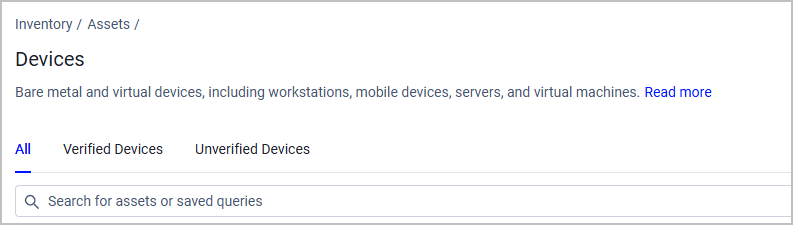
Select the relevant tab from the Devices page to see only Verified/Unverified Devices, or All Devices:
To see data hygiene data, click Edit Columns and add the following fields to the Devices table:
- Axonius Verified - Yes or No.
- Axonius Verification Reasons - A multi-value field indicating which gate(s) caused a device to receive a Verified or Unverified tag. The possible values are:
-
Failure reasons - Recency Failure, Identity Failure, Instability Failure, Low Confidence Source Failure, or Manually Unverified
-
Success reasons - Manually Verified, Forced Verification, or Manually Created Asset (Such assets are automatically verified)
Notes
- When a device ws verified due to success in all gates (without manual intervention), the Axonius Verification Reasons field is empty.
- Devices classified as IoT and devices you created manually in Axonius are always verified.
-
Getting Started with Data Hygiene
Overview Dashboard - Explore the overall health of your device inventory.
Verification Gates - Set the requirements for a device to be categorized as Verified.
Custom Exceptions - Define queries that manually override the predefined Verification Gates.
Working with Unverified Devices - Learn how to make actionable insights from unverified devices by separating records worth removing from devices worth recovering.
Updated 13 days ago