---
updatedAt: 2026-10-13T14:48:34.000Z
agentTools:
projectIndex: https://docs.axonius.com/llms.txt
---
# RHSM Management Portal
Red Hat Subscription Management (RHSM) provides tools that help administrators track information about support contracts and software subscriptions.
## Types of Assets Fetched
This adapter fetches the following types of assets:
* Devices
## Parameters
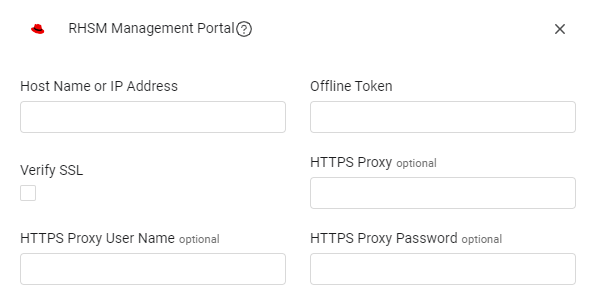
1. **Host Name or IP Address** *(required)* - The hostname or IP address of the Red Hat Subscription Management server.
2. **Offline Token** *(required)* - A token associated with a user account that has permissions to fetch assets. Refer to [Red Hat documentation](https://sso.redhat.com/auth/realms/redhat-external/login-actions/registration?client_id=rhsm-web\&tab_id=TZidFn9Wdjo) for information about how to generate the offline token.
3. **Verify SSL** - Select whether to verify the SSL certificate of the server against the CA database inside of Axonius. For more details, see [SSL Trust & CA Settings](https://docs.axonius.com/axonius-help-docs/docs/certificate-settings#ssl-trust-ca-settings).
4. **HTTPS Proxy** *(optional)* - Connect the adapter to a proxy instead of directly connecting it to the domain.
5. **HTTPS Proxy User Name** *(optional)* - The user name to use when connecting to the value supplied in **Host Name or IP Address** via the value supplied in **HTTPS Proxy**.
6. **HTTPS Proxy Password** *(optional)* - The password to use when connecting to the server using the **HTTPS Proxy**.
To learn more about common adapter connection parameters and buttons, see [Adding a New Adapter Connection](https://docs.axonius.com/axonius-help-docs/docs/adding-a-new-adapter-connection).
## Advanced Settings
Note
Advanced settings can either apply for all connections for this adapter, or you can set different advanced settings and/or different scheduling for a specific connection, refer to [Advanced Configuration for Adapters](https://docs.axonius.com/axonius-help-docs/docs/advanced-configuration-for-adapters).
1. **Get extended devices** - Select this option to fetch full device data.
2. **Fetch packages** - Select this option to fetch the packages on the devices.
Note
To learn more about **Adapter Configuration** tab advanced settings, see [Adapter Advanced Settings](https://docs.axonius.com/axonius-help-docs/docs/advanced-settings).
## APIs
Axonius uses the [Red Hat RHSM API.](https://access.redhat.com/management/api/rhsm)
## Supported From Version
Supported from Axonius version 5.0