---
updatedAt: 2026-04-28T09:44:23.000Z
agentTools:
projectIndex: https://docs.axonius.com/llms.txt
---
# Hyland Onbase
Hyland OnBase is an enterprise content management platform that provides document management, workflow automation, and case management functions.
### Use Cases the Adapter Solves
* **Centralized User Access Governance:** Consolidate visibility of OnBase users alongside users from other enterprise systems (Active Directory, Okta, etc.), enabling comprehensive identity and access management across your content management infrastructure.
* **User Lifecycle Management:** Monitor user account status (locked, deactivated) and group memberships to support onboarding, offboarding, and access review processes, reducing security risks from orphaned or inactive accounts.
### Asset Types Fetched
* Users
## Data Retrieved through the Adapter
The following data can be fetched by the adapter:
**Users** - Fields such as Username, Display Name, Email Address, Is Locked, Permissions
## Before You Begin
### Required Ports
* TCP port 443 (HTTPS)
### Authentication Methods
Bearer Token Authentication
### APIs
Axonius uses the Hyland OnBase Administration API. The following endpoints are called:
* `GET /api/users` - Retrieves list of users
* `GET /api/users/{userId}` - Retrieves detailed user information
* `GET /api/users/user-groups` - Retrieves user-to-group membership mappings
* `GET /api/user-groups` - Retrieves all user groups
* `GET /api/user-groups/{userGroupId}/permissions/privileges` - Retrieves group permissions
### Required Permissions
The API token must have sufficient privileges to:
* Read user and user group information via the Administration API
* Access user details, group memberships, and permission information
**Note:** The OnBase API documentation doesn't explicitly list required roles/permissions. The authenticated user must have administrative access to read user and group data. For the most current and accurate permission requirements, please consult your Hyland OnBase administrator or Hyland support.
### Supported From Version
Supported from Axonius version 8.0.16.0
## Connecting the Adapter in Axonius
Navigate to the Adapters page, search for Hyland OnBase, and click on the adapter tile.
Click **Add Connection**.
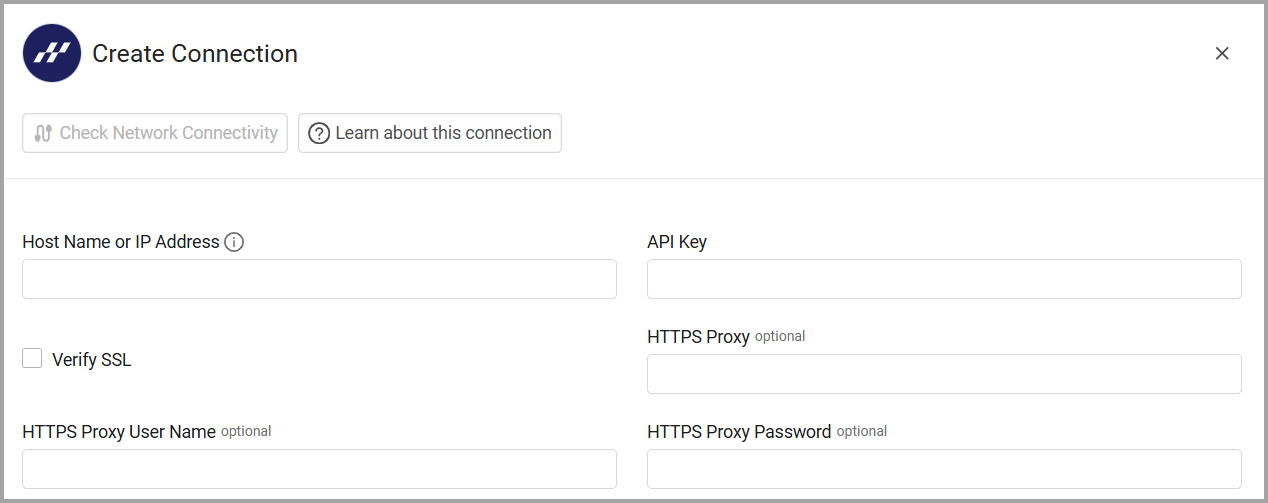
To connect the adapter in Axonius, provide the following parameters:
### Required Parameters
1. **OnBase API URL** - The base URL for the Hyland OnBase API. Example: `https://your-onbase-instance.com`
2. **API Key (Bearer Token)** - The Bearer Token generated from the OnBase Administration Console with permissions to read user and group information.
### Optional Parameters
1. **Verify SSL** - Select whether to verify the SSL certificate of the server against the CA database inside of Axonius. For more details, see [SSL Trust & CA Settings](https://docs.axonius.com/axonius-help-docs/docs/certificate-settings#ssl-trust-ca-settings).
2. **HTTPS Proxy** - Connect the adapter to a proxy instead of directly connecting it to the domain.
3. **HTTPS Proxy User Name** - The user name to use when connecting to the value supplied in **OnBase API URL** via the value supplied in **HTTPS Proxy**.
4. **HTTPS Proxy Password** - The password to use when connecting to the server using the **HTTPS Proxy**.
## Related Enforcement Actions
* [Hyland OnBase - Assign Group to User](https://docs.axonius.com/axonius-help-docs/docs/hyland-onbase-assign-group-to-user)