---
updatedAt: 2026-10-13T14:48:34.000Z
agentTools:
projectIndex: https://docs.axonius.com/llms.txt
---
# PingIDM (formerly ForgeRock)
PingIDM (formerly ForgeRock) is a high-performance identity store that provides the necessary encryption to protect enterprise data at rest and encryption.
Note
This page describes how to connect **PingIDM (formerly ForgeRock)** (on-prem platform) deployments. To connect **PingOne Advanced Identity Cloud**, see [PingOne Advanced Identity Cloud](https://docs.axonius.com/axonius-help-docs/docs/pingone-openidm).
## Types of Assets Fetched
This adapter fetches the following types of assets:
* Users
* Devices
## Parameters
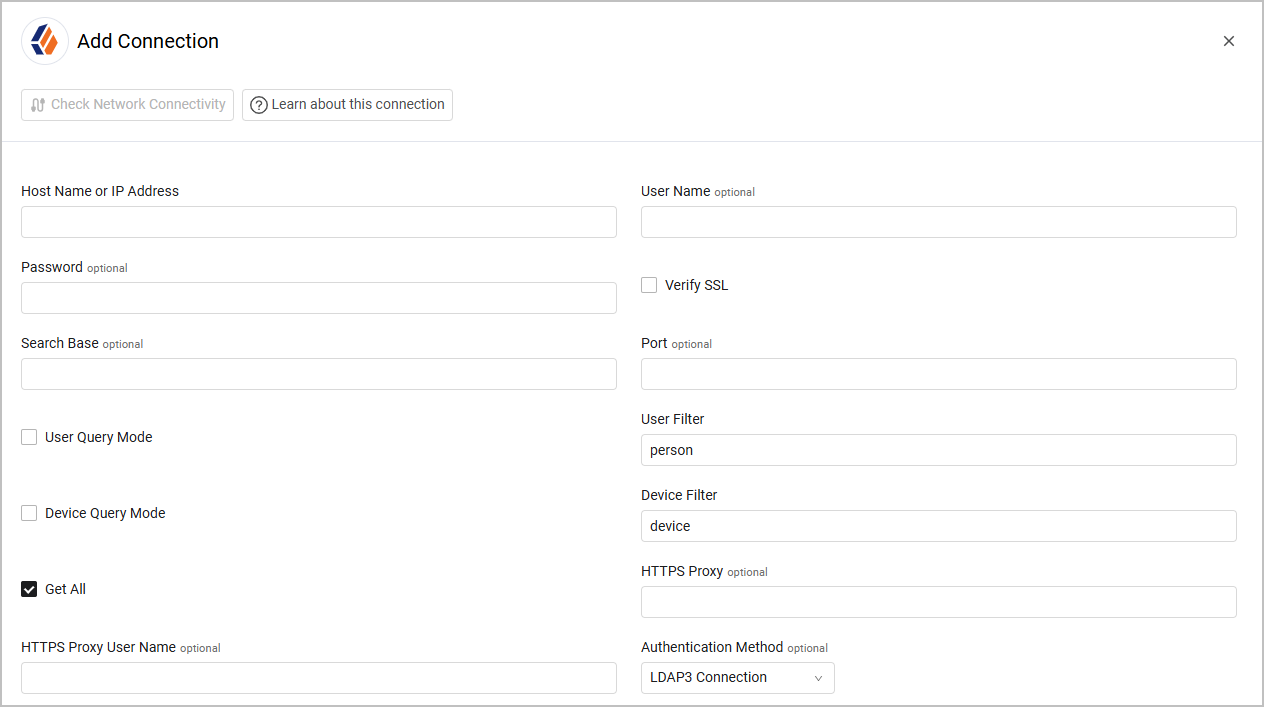
1. **Host Name or IP Address** *(required)* - The hostname or IP address of the PingIDM server that Axonius can communicate.
2. **User Name** and **Password** *(optional)* - The credentials for a user account that has the permissions to fetch assets.
3. **Verify SSL** - Select whether to verify the SSL certificate of the server against the CA database inside of Axonius. For more details, see [SSL Trust & CA Settings](https://docs.axonius.com/axonius-help-docs/docs/certificate-settings#ssl-trust-ca-settings).
4. **Search Base** *(optional)* - Specify the desired search base location to search for a particular directory object. When this parameter is left empty, the adapter uses the default search base location.
5. **Port** *(optional)* - The port used for the connection.
6. **User Query Mode** *(optional, default: false)* - Select whether to change the query mode from **AND** (&(objectClass=user)) to **OR** (|objectClass=user)). Default is **AND** mode.
7. **User Filter** *(required, default: person)* - Specify the queried object from the server. You can add multiple values in this parameter by separating them with a comma and without a space. For example: first,second
8. **Device Query Mode** *(optional, default: false)* - Select whether to use the Device Query mode.
9. **Device Filter** *(required, default: device)* - Specify the queried object from the server. You can add multiple values in this parameter by separating them with a comma and without a space. For example: first,second
10. **Get All** *(optional, default: true)* - Select whether to get all available subtree objects from the user and device.
11. **HTTPS Proxy** *(optional, default: empty)* - Connect the adapter to a proxy instead of directly connecting it to the domain.
12. **HTTPS Proxy User Name** *(optional, default: empty)* - The user name to use when connecting to the value supplied in **Host Name or IP Address** via the value supplied in **HTTPS Proxy**.
13. **Authentication Method** - Select between LDAP3 Connection (default) and Rest connection.
* When using Rest connection, the adapter fetches additional user information: internal and external users, roles, and managed users.
* Learn more about [internal users information](https://docs.pingidentity.com/pingidm/7.5/rest-api-reference/endpoints/rest-internal.html).
* Learn more about [managed users information](https://docs.pingidentity.com/pingidm/7.5/rest-api-reference/endpoints/rest-managed-users.html) and what the [retrieved data](https://docs.pingidentity.com/pingidm/7.5/objects-guide/users.html#retrieve_a_managed_user_by_their_id) looks like.
To learn more about common adapter connection parameters and buttons, see [Adding a New Adapter Connection](https://docs.axonius.com/axonius-help-docs/docs/adding-a-new-adapter-connection).
## Advanced Settings
Note
Advanced settings can either apply for all connections for this adapter, or you can set different advanced settings and/or different scheduling for a specific connection, refer to [Advanced Configuration for Adapters](https://docs.axonius.com/axonius-help-docs/docs/advanced-configuration-for-adapters).
* **Assets per page** *(default 500, Min 10, Max 1000)* - Set the number of assets to fetch at a time. Adjust this value to improve performance depending on the size of the records fetched. Larger for fewer requests/responses: appropriate for smaller record sizes. Smaller for managing response size: appropriate for larger record sizes.
Note
To learn more about **Adapter Configuration** tab advanced settings, see [Adapter Advanced Settings](https://docs.axonius.com/axonius-help-docs/docs/advanced-settings).
## APIs
Axonius uses the [ForgeRock REST and LDAP API](https://www.forgerock.com/platform/directory-services/rest-ldap).
## Required Ports
Axonius must be able to communicate with the value supplied in [Host Name or IP Address](#parameters) via the following ports:
* **8080**
* **8443**
* **8444**
## Required Permissions
The value supplied in [User Name](#parameters) must have permissions to fetch assets, depending on the server configuration.
The value supplied in [API Key](#parameters) must be associated with credentials that have permissions to fetch assets.
## Version Matrix
This adapter was only tested with the versions marked as supported, but may work with other versions. Contact [Axonius Support](mailto:support@axonius.com) if you have a version that is not listed, which is not functioning as expected.
| Version | Supported | Notes |
| ------- | --------- | ----- |
| LDAP v3 | Yes | |
## Supported From Version
Supported from Axonius version 4.5