---
updatedAt: 2026-10-13T14:48:34.000Z
agentTools:
projectIndex: https://docs.axonius.com/llms.txt
---
# CyCognito Platform
The CyCognito platform delivers proactive attack surface protection and digital risk protection across your entire extended IT ecosystem to help you identify, categorize, prioritize and eliminate your attacker-exposed risk.
## Types of Assets Fetched
This adapter fetches the following types of assets:
* Devices
* Aggregated Security Findings
* SaaS Applications
* Domains & URLs
* Certificates
## Parameters
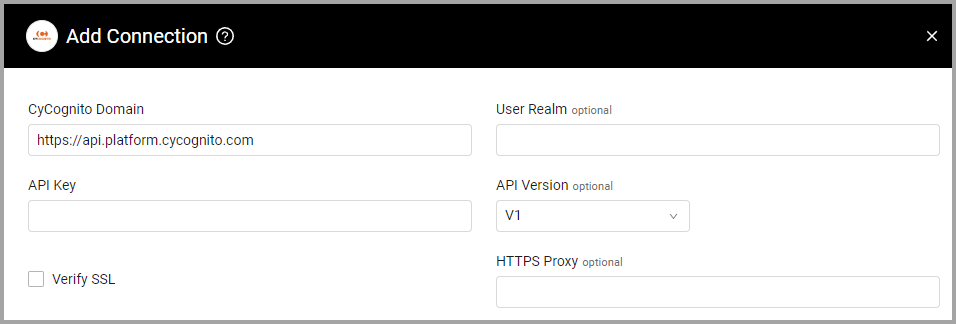
1. **CyCognito Domain** *(required, default: *`https://api.platform.cycognito.com`*)* - The hostname or IP address of the CyCognito server. For the US region, use `https://api-us.platform.cycognito.com'`
2. **User Realm** *(optional)* - Use your organization realm ID. Contact your CyCognito support representative to provide this value `contactus@cycognito.com`. If you are using API V0, you must enter a User Realm.
3. **API Key** - Use the API key you have generated. For details on generating a new API key, see [CyCognito Guides](https://api.us-platform.cycognito.com/v1/docs/index.html#).
4. **API Version** *(optional)* - Select the API Version, either V0 or V1.
5. **Verify SSL** - Select whether to verify the SSL certificate of the server against the CA database inside of Axonius. For more details, see [SSL Trust & CA Settings](https://docs.axonius.com/axonius-help-docs/docs/certificate-settings#ssl-trust-ca-settings).
6. **HTTPS Proxy** *(optional)* - Connect the adapter to a proxy instead of directly connecting it to the domain.
To learn more about common adapter connection parameters and buttons, see [Adding a New Adapter Connection](https://docs.axonius.com/axonius-help-docs/docs/adding-a-new-adapter-connection).
## Advanced Settings
Note
Advanced settings can either apply for all connections for this adapter, or you can set different advanced settings and/or different scheduling for a specific connection, refer to [Advanced Configuration for Adapters](https://docs.axonius.com/axonius-help-docs/docs/advanced-configuration-for-adapters).
1. **Fetch domains** - Select this option to fetch domains.
2. **Fetch Vulnerabilities** - Select this option to fetch vulnerabilities.
3. **Fetch Certificates** - Select this option to fetch certificates.
4. **Fetch Web Apps** - Select this option to fetch web apps.
5. **Fetch IP Ranges** - Select this option to fetch IP ranges.
6. **Filter semi-related and inactive assets** - Select this option to filter out inactive and/or semi-related assets.
Note
To learn more about **Adapter Configuration** tab advanced settings, see [Adapter Advanced Settings](https://docs.axonius.com/axonius-help-docs/docs/advanced-settings).
## APIs
Axonius uses the [CyCognito API V1](https://api.us-platform.cycognito.com/v1/docs/index.html#/Assets/post_v1_assets__asset_type_).